How do you look at one store only?
Filters sit behind the + control above the widgets, and Store is one of the attributes you can filter on, next to Country, Product, Currency and the rest. A filter applies to the whole section: the widgets, the chart and the table follow it. The table also carries its own Store column, so a mixed list stays readable without filtering at all. The two stores count different things:What do the widgets show?

The widget row over the selected period: what was requested, what was won back, the rate, what is still waiting and what ran out of time
Requested Refunds
- What the refund requests and chargeback disputes Refund Keeper answered in the period were worth.
Won Back Refunds
- The revenue kept, out of the amount above.
- On the App Store this follows Apple’s own refund notification. On Google Play it can also be inferred from the order showing no refund seven days after the answer, because Google does not report the verdict.
Won Back Rate
- The share of money the store did not refund, out of everything that is no longer waiting.
- Calculated by value, not by count:
Won Back / (Won Back + Refunded + Expired) × 100. - Events still inside the store’s response window are
Pendingand are excluded from both sides of the formula, so waiting never drags the rate down. Everything else counts,Expiredincluded. - The denominator reaches zero in two different situations. A period with no Refund Keeper events at all has no data to rate. A period that does have events, all of them still
Pending, has nothing decided yet — Pending Refunds tells you how much is waiting. In neither case does the period have a rate, so read whatever the widget shows there as “no result yet” rather than as a bad result.
Pending Refunds and Expired
- Pending Refunds is the money still inside the store’s response window — exactly what the rate above leaves out of both of its sides.
- Expired is the money that left the window with no outcome recorded yet. On Google Play this is not a final state; see the statuses below.
Refund activity timeline
A timeline of answered events and won-back results across the selected period, following any filter you apply.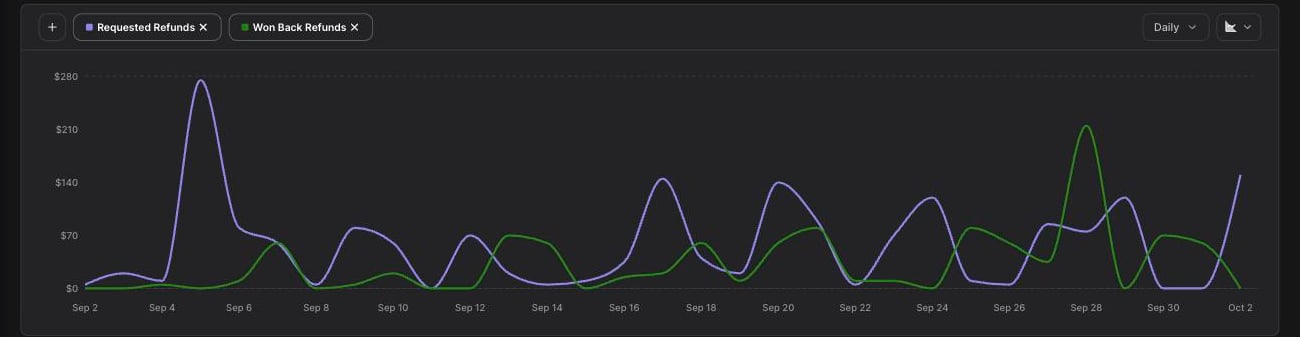
Requested refunds and won back refunds day by day across the selected period
What is in the refund table?
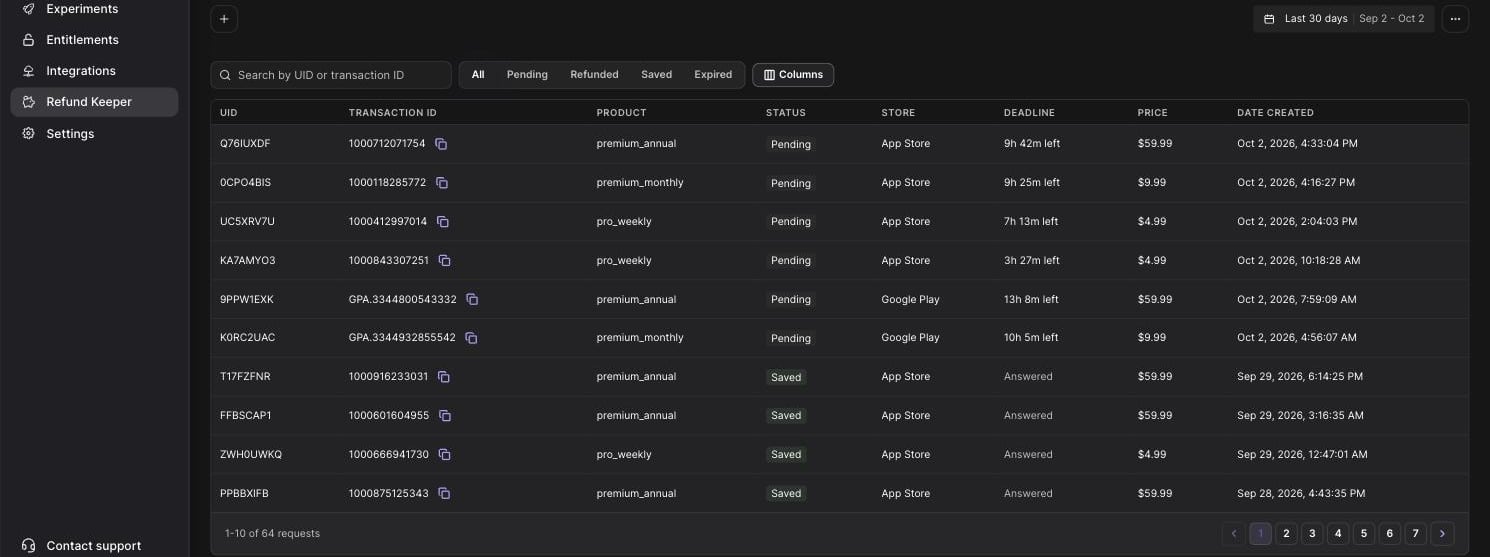
The refund table: one row per request or dispute, with its store, status and answer deadline
What do the statuses mean?
The table has a tab per status plus All, and you can search it by UID or transaction ID.
How long is the answer window?
Why is a Google Play outcome late?
Google does not return the verdict when Refund Keeper answers a dispute. Qonversion detects the result afterwards from Google’s follow-up notifications and the order state, so a Google Play row sits without an outcome after the answer was already sent, then moves toSaved or Refunded.
If seven days pass with no refund on the order, the dispute is recorded as won back, and the recorded outcome time is that seven-day mark. The row itself flips about two days later than that: refund rows can still materialise with a lag, so the check deliberately waits before concluding that no refund is coming. An App Store outcome needs no such inference — it arrives with Apple’s own refund notification.
What to keep in mind
- Refund Keeper analytics covers only the period when Refund Keeper was enabled for that store.
- It covers App Store refund requests and Google Play chargeback disputes. Regular Play Store refunds are out of scope.
- The App Store requires App Store Server Notifications V2; Google Play requires Real-time developer notifications pointed at Qonversion.
- A
Savedrow means the store kept the payment this time. It is not a guarantee for future events, because the store decides each case on its own.
Enable Refund Keeper Raw Data Export