To provide consistent data and flexible subscription infrastructure, we have built a comprehensive solution using a combination of Qonversion IDs, your backend IDs, and the merging concept for users.
Identifiers
Anonymous Unique User ID
Qonversion creates an anonymous user with a unique random ID upon an app install. The IDs for such users look as follows:Anonymous User ID Format
Provided Unique User ID
User ID is the unique identifier of a user within Qonversion project. User ID could not be changed. Each user has a single unique ID. Usually, User ID is created along with creating a user account, that allows a user to log in to his account. Qonversion SDK provides an asynchronous method to set User ID that can be used to match users in third-party integrations or manage cross-platform premium access.Log out
Call logout() method if you want to set User ID as null and create a new one Anonymous User on the Qonversion side:Зачем мне это делать, зачем создавать анонимный ID существующему юзеру? Тут бы тогда добавить конкретный пример.
Merging Users
Overview
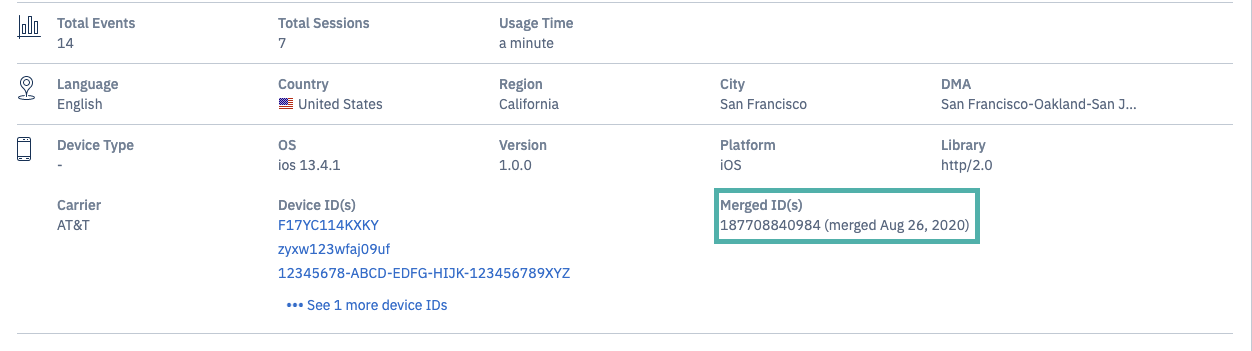
You can merge users, this will lead to the merge of user data. You’ll be able to see the merge history for a user in his details in the Customers dashboard.Delete
При объединении пользователей происходит слияние данных в Qonversion, при этом на странице пользователя в Qonversion вы сможете видить историю мерджей. /// Will replace the image
При мёрдже клиентов объединяются следующие сущности:
///
//// External data /// Internal data
- customer
- transaction
- trigger_action_job
- trigger_start_job
- client_job
- client_job_log
- client_receipt
- client_product
Merging Anonymous Users
Qonversion can merge anonymous users based on restored purchase data. If you want to avoid such behaviour, assignfalse value to storeSharingAccount.
не хотите избегать, или хотите избегать?Qonversion умеет мёрджить неавторизованных пользователей на основе приобретённых и восстановленных покупок.
Если вы не хотите избегать такого поведения, необходимо установить флаг
storeSharingAccount в false.
Other Merging Scenarios
In all other cases, the users are being merged based on User ID (or userID - выше использовали User ID), if you provide it. If when creating a User ID the user already exists in the database, then all the data will be associated with him. Во всех остальных случаях мёрдж пользователей происходит на основе userID, если таковый будет предоставлен вами. Если при установке userID такой пользователь в базе уже существует, то все переданные данные будут ассоциированы с ним.Example Scenarios
Let have a look at the following examples.Для наглядности понимания проблемы, давайте рассмотрим несколько возможных сценариев и разберём каждый по отдельности.
Case 1: User ID is assigned
A user first installs the app on his iPhone. Later he installs the app on his iPad. He makes a purchase and creates an account on the iPad. Later he uses the same credentials to log in on the iPhone. Пользователь установил приложение на iPhone. После этого он установил приложение на iPad, где взял подписку и произвёл вход. Пользователь вернулся на iPhone и произвёл вход там с теми же доступами.| Anonymous ID | User ID | Action |
|---|---|---|
| A | null | Install |
| B | null | Install |
| B | null | Start Subscription |
| B | 1 | Log in |
| A | 1 | Log in |
A and B. After the users are merged there will be only one user B. Both devices will be associated with this user. The data will not be duplicated.
В этом случае Qonversion произведёт слияние пользователя A и B. Останется лишь один пользователь B, с которым и будут ассоциированы оба девайса: iPhone и iPad. При этом Qonversion гарантирует отсутствие дублирования данных.
Case 2. Обратите внимания, что порядок покупки логина на любом из девайсов не имеет значения, доступы будут выданы верно.
| Anonymous ID | User ID | Action |
|---|---|---|
| B | null | Install |
| B | 1 | Log in |
| B | 1 | Start Subscription |
| A | null | Install |
| A | 1 | Log in |
A and B получат одинаковые пермишены. При этом пользователи A and B могли быть зарегистрированы с разных девайсов и платформ.
Each in-app purchase on the App Store or Google Play has a unique identifier, that allows to link it to a user. If the storeSharedAccount set to true in SDK (the default value), Qonversion will merge users A and B. There will be no duplicates in Qonversion database.
Каждая покупка в Apple или Google имеет уникальный идентификатор, который позволяет связывать его с конкретным пользователям. Если в SDKs включена опция storeSharedAccount (default is active), то Qonversion произведёт объединение пользователя A и B. При этом Qonversion гарантирует отстуствие дублей для аналитики.
Case 3. No User ID across different platforms
If there is no User Id, it’s impossible to match users across different platforms.You need to provide User Id to match data for the user and manage cross-platform access.
Delete User ID нет возможности идентифицировать пользователя между разными платформами. Фактически в этом случае пользователь и не является кроссплатформенным, если вы не реализовывается систему авторизации.