> ## Documentation Index
> Fetch the complete documentation index at: https://documentation.qonversion.io/llms.txt
> Use this file to discover all available pages before exploring further.
# Tenjin
> Send iOS and Android in-app subscription and purchase events to Tenjin with Qonversion.
Measure what drives your in-app subscription revenue on the ad campaign level by tracking events like trial-to-paying-user conversions, subscription renewals, refunds, upgrades, and other valuable events in Tenjin. Qonversion tracks revenue even if a user does not open your app. This allows for measuring the cohorts' revenue with 100% accuracy.
## 1. Provide Integration Details
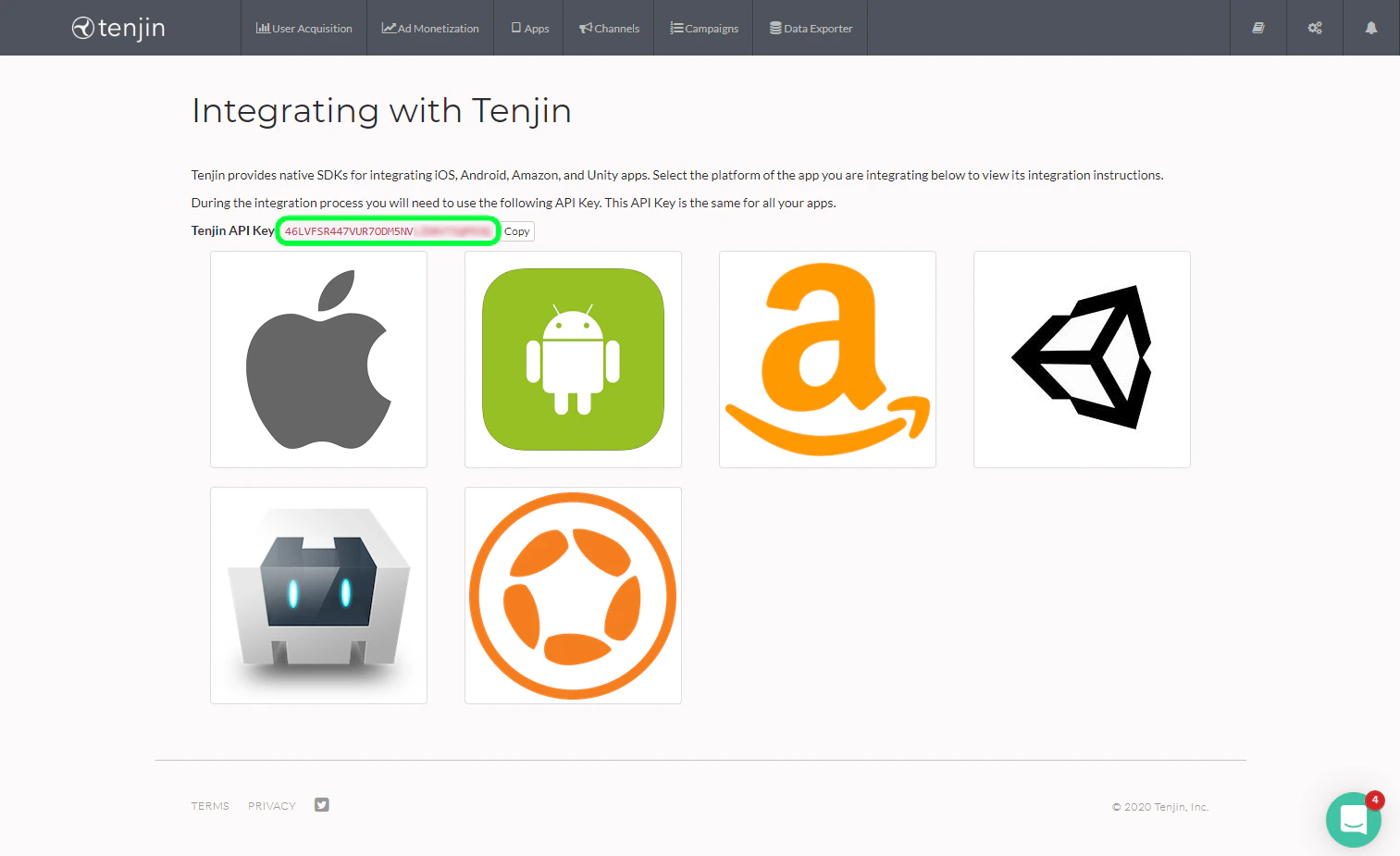
1. Before sending events to Tenjin, ensure you've added your apps to the Tenjin dashboard. Then get your **Tenjin API key** from the dashboard.
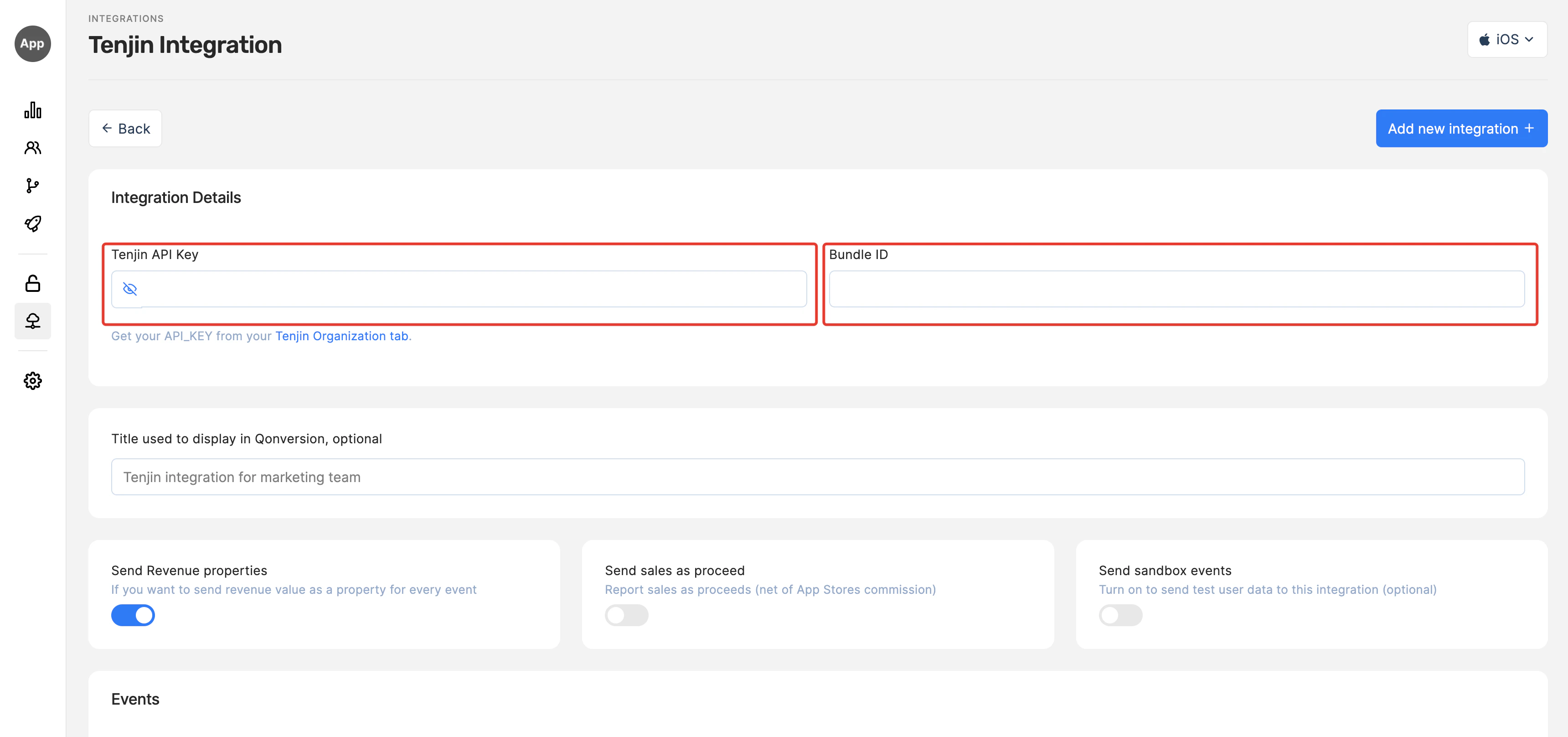
 2. Navigate to the Integrations section in your Qonversion project, select [Tenjin](https://dash.qonversion.io/app/integration/tenjin), and provide the **Tenjin API key** and Save.
3. For an iOS app, you should add Bundle ID. For Android App you need to provide the Tenjin API Key only.
2. Navigate to the Integrations section in your Qonversion project, select [Tenjin](https://dash.qonversion.io/app/integration/tenjin), and provide the **Tenjin API key** and Save.
3. For an iOS app, you should add Bundle ID. For Android App you need to provide the Tenjin API Key only.
 ## 2. Setup the SDKs
1. Make sure you have Tenjin SDK installed. Check the official Tenjin SDK documentation [here](https://github.com/tenjin)
2. Set Qonversion SDK following [Installing the SDKs](install-sdk) guides.
3. Send Tenjin `analytics_installation_id` to Qonversion via [User Properties](user-properties)
```swift Swift theme={null}
let tenjinId = TenjinSDK.getAnalyticsInstallationId()
Qonversion.shared().setUserProperty(.tenjinAnalyticsInstallationId, value: tenjinId)
```
```objectivec Objective-C theme={null}
[[Qonversion sharedInstance] setUserProperty:QONUserPropertyKeyTenjinAnalyticsInstallationId value:[TenjinSDK getAnalyticsInstallationId]];
```
```java Java theme={null}
TenjinSDK instance = TenjinSDK.getInstance(this, "");
String analyticsId = instance.getAnalyticsInstallationId();
Qonversion.getSharedInstance().setUserProperty(QUserPropertyKey.TenjinAnalyticsInstallationId, analyticsId);
```
```kotlin Kotlin theme={null}
val instance = TenjinSDK.getInstance(this, "")
val analyticsId = instance.analyticsInstallationId
Qonversion.shared.setUserProperty(QUserPropertyKey.TenjinAnalyticsInstallationId, analyticsId)
```
```dart Flutter theme={null}
String? analyticsId = await TenjinSDK.instance.getAnalyticsInstallationId();
if (analyticsId != null) {
Qonversion.getSharedInstance().setUserProperty(QUserPropertyKey.tenjinAnalyticsInstallationId, analyticsId);
}
```
```typescript React Native theme={null}
const analyticsId = await Tenjin.getAnalyticsInstallationId()
Qonversion.getSharedInstance().setUserProperty(UserPropertyKey.TENJIN_ANALYTICS_INSTALLATION_ID, analyticsId);
```
```csharp Unity theme={null}
BaseTenjin instance = Tenjin.getInstance("");
analyticsId = instance.GetAnalyticsInstallationId;
Qonversion.GetSharedInstance().SetUserProperty(UserPropertyKey.TenjinAnalyticsInstallationId, analyticsId);
```
```typescript Cordova theme={null}
Qonversion.getSharedInstance().setUserProperty(Qonversion.UserPropertyKey.TENJIN_ANALYTICS_INSTALLATION_ID, "tenjinAiid");
```
```typescript Capacitor theme={null}
const analyticsId = await Tenjin.getAnalyticsInstallationId();
Qonversion.getSharedInstance().setUserProperty(UserPropertyKey.TENJIN_ANALYTICS_INSTALLATION_ID, analyticsId);
```
### Switch off the toggle "Send sales as proceed"
Tenjin automatically subtracts App Stores commission, so you need to send gross sales data to Tenjin.
### Done
Now Qonversion will start sending in-app purchases and subscriptions data to your Tenjin account.
## Event names
You can configure some of the event names for this integration. Purchase events with revenue value (like Trial Converted or Subscription Started) do not have names in Tenjin, so they all have the same default **Purchase** name in Qonversion.
## Event Payload
In case you need details about data sent to Tenjin, follow the example below:
```json theme={null}
{
"advertising_id": "",
"analytics_installation_id": "",
"developer_device_id": "",
"bundle_id": "",
"platform": "",
"sdk_version": "",
"os_version": "",
"os_version_release": "",
"limit_ad_tracking": "",
"api_key": "",
"ip_address": "",
"country": "",
"app_version": "",
"product_id": "",
"price": "",
"quantity": "",
"currency": ""
}
```
***
[Slack](slack)
[Webhooks](webhooks)
## 2. Setup the SDKs
1. Make sure you have Tenjin SDK installed. Check the official Tenjin SDK documentation [here](https://github.com/tenjin)
2. Set Qonversion SDK following [Installing the SDKs](install-sdk) guides.
3. Send Tenjin `analytics_installation_id` to Qonversion via [User Properties](user-properties)
```swift Swift theme={null}
let tenjinId = TenjinSDK.getAnalyticsInstallationId()
Qonversion.shared().setUserProperty(.tenjinAnalyticsInstallationId, value: tenjinId)
```
```objectivec Objective-C theme={null}
[[Qonversion sharedInstance] setUserProperty:QONUserPropertyKeyTenjinAnalyticsInstallationId value:[TenjinSDK getAnalyticsInstallationId]];
```
```java Java theme={null}
TenjinSDK instance = TenjinSDK.getInstance(this, "");
String analyticsId = instance.getAnalyticsInstallationId();
Qonversion.getSharedInstance().setUserProperty(QUserPropertyKey.TenjinAnalyticsInstallationId, analyticsId);
```
```kotlin Kotlin theme={null}
val instance = TenjinSDK.getInstance(this, "")
val analyticsId = instance.analyticsInstallationId
Qonversion.shared.setUserProperty(QUserPropertyKey.TenjinAnalyticsInstallationId, analyticsId)
```
```dart Flutter theme={null}
String? analyticsId = await TenjinSDK.instance.getAnalyticsInstallationId();
if (analyticsId != null) {
Qonversion.getSharedInstance().setUserProperty(QUserPropertyKey.tenjinAnalyticsInstallationId, analyticsId);
}
```
```typescript React Native theme={null}
const analyticsId = await Tenjin.getAnalyticsInstallationId()
Qonversion.getSharedInstance().setUserProperty(UserPropertyKey.TENJIN_ANALYTICS_INSTALLATION_ID, analyticsId);
```
```csharp Unity theme={null}
BaseTenjin instance = Tenjin.getInstance("");
analyticsId = instance.GetAnalyticsInstallationId;
Qonversion.GetSharedInstance().SetUserProperty(UserPropertyKey.TenjinAnalyticsInstallationId, analyticsId);
```
```typescript Cordova theme={null}
Qonversion.getSharedInstance().setUserProperty(Qonversion.UserPropertyKey.TENJIN_ANALYTICS_INSTALLATION_ID, "tenjinAiid");
```
```typescript Capacitor theme={null}
const analyticsId = await Tenjin.getAnalyticsInstallationId();
Qonversion.getSharedInstance().setUserProperty(UserPropertyKey.TENJIN_ANALYTICS_INSTALLATION_ID, analyticsId);
```
### Switch off the toggle "Send sales as proceed"
Tenjin automatically subtracts App Stores commission, so you need to send gross sales data to Tenjin.
### Done
Now Qonversion will start sending in-app purchases and subscriptions data to your Tenjin account.
## Event names
You can configure some of the event names for this integration. Purchase events with revenue value (like Trial Converted or Subscription Started) do not have names in Tenjin, so they all have the same default **Purchase** name in Qonversion.
## Event Payload
In case you need details about data sent to Tenjin, follow the example below:
```json theme={null}
{
"advertising_id": "",
"analytics_installation_id": "",
"developer_device_id": "",
"bundle_id": "",
"platform": "",
"sdk_version": "",
"os_version": "",
"os_version_release": "",
"limit_ad_tracking": "",
"api_key": "",
"ip_address": "",
"country": "",
"app_version": "",
"product_id": "",
"price": "",
"quantity": "",
"currency": ""
}
```
***
[Slack](slack)
[Webhooks](webhooks)