> ## Documentation Index
> Fetch the complete documentation index at: https://documentation.qonversion.io/llms.txt
> Use this file to discover all available pages before exploring further.
# Pushwoosh
> Send in-app subscription events to Pushwoosh to win back your subscribers
Qonversion sends [subscription events](integrations-overview#tracked-events) to Pushwoosh to help you run customer-centric messaging to users who cancel their subscriptions. A personalized push notification with a special offer can significantly uplift your app revenue for this particular scenario.
## 1. Setup the SDKs
1. Make sure you have Pushwoosh SDK installed. More about the Pushwoosh SDKs you can find on the platform-specific pages: [IOS](https://docs.pushwoosh.com/platform-docs/pushwoosh-sdk/ios-push-notifications), [Android](https://docs.pushwoosh.com/platform-docs/pushwoosh-sdk/android-push-notifications) and [Cross-platform](https://docs.pushwoosh.com/platform-docs/pushwoosh-sdk/cross-platform-frameworks).
2. Set Qonversion SDK by following [installing the SDK guide](install-sdk).
3. To attribute sent from Qonversion events to a particular Pushwoosh user, set Pushwoosh Hardware ID (HWID):
```swift Swift theme={null}
Qonversion.shared().setUserProperty(.pushWooshHwId, value: Pushwoosh.sharedInstance().getHWID())
```
```objectivec Objective-C theme={null}
[[Qonversion sharedInstance] setUserProperty:QONUserPropertyKeyPushWooshHwId value:[[Pushwoosh sharedInstance] getHWID]];
```
```java Java theme={null}
Qonversion.getSharedInstance().setUserProperty(QUserPropertyKey.PushWooshHwId, Pushwoosh.getInstance().getHWID());
```
```kotlin Kotlin theme={null}
Qonversion.shared.setUserProperty(QUserPropertyKey.PushWooshHwId, Pushwoosh.getInstance().getHWID())
```
```dart Flutter theme={null}
String hwid = await Pushwoosh.getInstance.getHWID;
Qonversion.getSharedInstance().setUserProperty(QUserPropertyKey.pushWooshHwId, hwid);
```
```typescript React Native theme={null}
Pushwoosh.getHwid(
function(hwId) {
Qonversion.getSharedInstance().setUserProperty(UserPropertyKey.PUSH_WOOSH_HW_ID, hwId);
}
);
```
```csharp Unity theme={null}
Qonversion.GetSharedInstance().SetUserProperty(UserPropertyKey.PushWooshHwId, Pushwoosh.Instance.HWID);
```
```typescript Cordova theme={null}
pushwoosh.getPushwooshHWID(
function(hwId) {
Qonversion.getSharedInstance().setUserProperty(Qonversion.UserPropertyKey.PUSH_WOOSH_HW_ID, hwId);
}
);
```
```typescript Capacitor theme={null}
pushwoosh.getPushwooshHWID(
function(hwId) {
Qonversion.getSharedInstance().setUserProperty(UserPropertyKey.PUSH_WOOSH_HW_ID, hwId);
}
);
```
4. Set Pushwoosh userId (if already not), then set it to qonversion user's property `.pushwooshUserId`.
```swift Swift theme={null}
Pushwoosh.sharedInstance.setUserId("yourSideUserID")
Qonversion.shared().setUserProperty(.pushwooshUserId, value: "yourSideUserID")
```
```objectivec Objective-C theme={null}
[[Pushwoosh sharedInstance] setUserId:@"yourSideUserID"];
[[Qonversion sharedInstance] setUserProperty:QONUserPropertyKeyPushwooshUserId value:@"yourSideUserID"];
```
```java Java theme={null}
Pushwoosh.getInstance().setUserId("yourSideUserID");
Qonversion.getSharedInstance().setUserProperty(QUserPropertyKey.PushwooshUserId, "yourSideUserID");
```
```kotlin Kotlin theme={null}
Pushwoosh.getInstance().setUserId("yourSideUserID")
Qonversion.shared.setUserProperty(QUserPropertyKey.PushwooshUserId, "yourSideUserID")
```
```dart Flutter theme={null}
Pushwoosh.getInstance.setUserId('yourSideUserID');
Qonversion.getSharedInstance().setUserProperty(QUserPropertyKey.pushwooshUserId, 'yourSideUserID');
```
```typescript React Native theme={null}
Pushwoosh.setUserId('yourSideUserID');
Qonversion.getSharedInstance().setUserProperty(UserPropertyKey.PUSH_WOOSH_USER_ID, 'yourSideUserID');
```
```csharp Unity theme={null}
Pushwoosh.Instance.SetUserId("yourSideUserID");
Qonversion.GetSharedInstance().SetUserProperty(UserPropertyKey.PushwooshUserId, "yourSideUserID");
```
```typescript Cordova theme={null}
pushwoosh.setUserId('yourSideUserID');
Qonversion.getSharedInstance().setUserProperty(Qonversion.UserPropertyKey.PUSH_WOOSH_USER_ID, 'yourSideUserID');
```
```typescript Capacitor theme={null}
pushwoosh.setUserId('yourSideUserID');
Qonversion.getSharedInstance().setUserProperty(UserPropertyKey.PUSH_WOOSH_USER_ID, 'yourSideUserID');
```
## 2. Configure the Pushwoosh integration
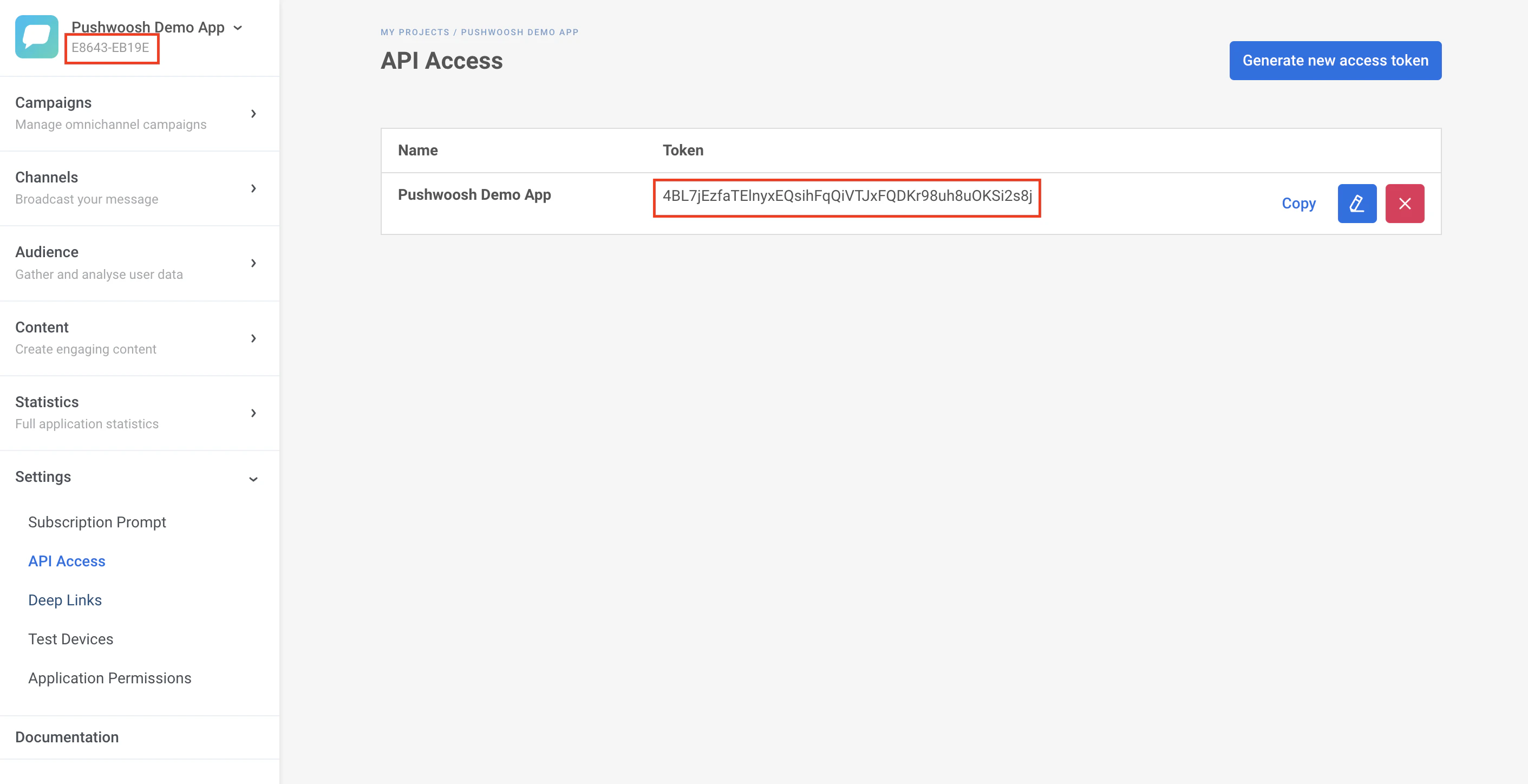
1. Navigate to your [Pushwoosh dashboard](https://app.pushwoosh.com/projects) and collect the following keys:
1. **Pushwoosh application code** (XXXXX-XXXXX). It can be found right below the name of your application.
2. **Device API Token**. It can be found in Settings -> API Access. You can learn more about the access token [in this guide](https://docs.pushwoosh.com/platform-docs/api-reference/api-access-token).
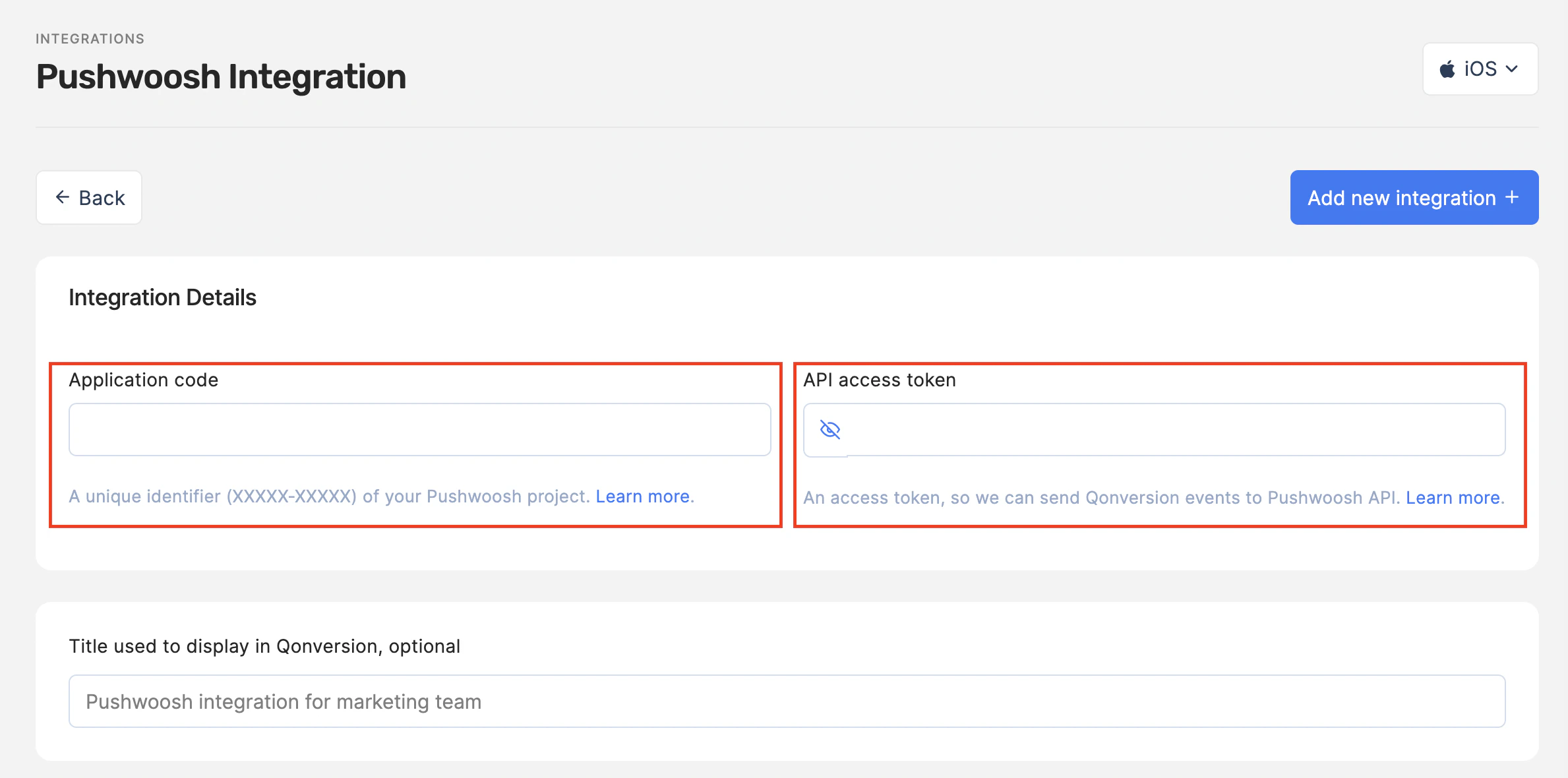
 2. Navigate to the [Integrations](https://dash.qonversion.io/app/integration/) section of your Qonversion project, select [Pushwoosh](https://dash.qonversion.io/app/integration/create?name=pushwoosh), provide the **Pushwoosh Application Key** and **Device API Token**, and click Save.
 3. You can use the default event names provided by Qonversion or change them as you need.
**→[Read more about tracked events here](integrations-overview#tracked-events)**
### Done
Now Qonversion starts sending in-app purchases and subscription data to your Pushwoosh account.
## Event Payload
In case you need details about data sent to Pushwoosh, follow the example below:
```json JSON theme={null}
{
"hwid": "8f65b16df378e7a6bece9614e1530",
"userId": "[email protected]",
"application": "XXXXX-CF22A",
"auth": "bsu5wJmYRcHFT...WVqW",
"event": "subscription_started",
"timestampUTC": 1706771191,
"attributes": {
"event_name": "subscription_started",
"user_id": "QON_9c0d54c7d56f4d46a37d86e1c1a",
"custom_user_id": "",
"identity_id": "",
"advertiser_id": "3c226994-3ded-4841-a031-c4637e78",
"time": null,
"created_at": 123,
"product_id": "product_id",
"revenue.value": 70,
"revenue.currency": "USD",
"revenue.value_usd": 70,
"revenue.proceeds_rate": 70,
"revenue.is_proceed": 1,
"price.value": 100,
"price.value_usd": 100,
"price.currency": "USD",
"transaction.transaction_id": null,
"transaction.original_transaction_id": null,
"transaction.expires": null,
"transaction.grace_period_expires": null,
"device_id": "",
"app_version": "",
"sdk_version": "",
"environment": "sandbox",
"platform": "iOS",
"ip": "",
"property.custom_user_property_1": "value_1",
"property.custom_user_property_2": "value_2"
}
}
```
### See also
Pushwoosh API reference
[https://docs.pushwoosh.com/developer/api-reference/user-centric-api#postevent](https://docs.pushwoosh.com/developer/api-reference/user-centric-api#postevent)
***
[OneSignal](onesignal)
[SplitMetrics Acquire](splitmetrics)
3. You can use the default event names provided by Qonversion or change them as you need.
**→[Read more about tracked events here](integrations-overview#tracked-events)**
### Done
Now Qonversion starts sending in-app purchases and subscription data to your Pushwoosh account.
## Event Payload
In case you need details about data sent to Pushwoosh, follow the example below:
```json JSON theme={null}
{
"hwid": "8f65b16df378e7a6bece9614e1530",
"userId": "[email protected]",
"application": "XXXXX-CF22A",
"auth": "bsu5wJmYRcHFT...WVqW",
"event": "subscription_started",
"timestampUTC": 1706771191,
"attributes": {
"event_name": "subscription_started",
"user_id": "QON_9c0d54c7d56f4d46a37d86e1c1a",
"custom_user_id": "",
"identity_id": "",
"advertiser_id": "3c226994-3ded-4841-a031-c4637e78",
"time": null,
"created_at": 123,
"product_id": "product_id",
"revenue.value": 70,
"revenue.currency": "USD",
"revenue.value_usd": 70,
"revenue.proceeds_rate": 70,
"revenue.is_proceed": 1,
"price.value": 100,
"price.value_usd": 100,
"price.currency": "USD",
"transaction.transaction_id": null,
"transaction.original_transaction_id": null,
"transaction.expires": null,
"transaction.grace_period_expires": null,
"device_id": "",
"app_version": "",
"sdk_version": "",
"environment": "sandbox",
"platform": "iOS",
"ip": "",
"property.custom_user_property_1": "value_1",
"property.custom_user_property_2": "value_2"
}
}
```
### See also
Pushwoosh API reference
[https://docs.pushwoosh.com/developer/api-reference/user-centric-api#postevent](https://docs.pushwoosh.com/developer/api-reference/user-centric-api#postevent)
***
[OneSignal](onesignal)
[SplitMetrics Acquire](splitmetrics)