> ## Documentation Index
> Fetch the complete documentation index at: https://documentation.qonversion.io/llms.txt
> Use this file to discover all available pages before exploring further.
# Migrate Offerings to Remote Configs
> Move your paywall product management from legacy Offerings to Remote Configs
Your existing Offerings keep working. The `offerings` SDK method and the data behind it will continue to be served, so paywalls in already-shipped app versions are not affected. This guide is for moving new development and day-to-day paywall management to Remote Configs. The Offerings dashboard section stays available in projects that already have offerings.
Offerings were designed to solve one problem: changing the set of products on a paywall without an app release. [Remote Configs](remote-config) solve the same problem as part of a more capable tool, and have replaced Offerings for all new integrations. On top of what Offerings could do, Remote Configs give you:
* **Any payload, not just products** — manage the whole paywall (products, texts, colors, layout flags) with one config.
* **Targeting** — serve different product sets by country, store, app version, subscription status, or purchase history. [See segmentation options](remote-config#5-segment-users).
* **A/B testing** — [launch an experiment directly from a config](launch-test-from-remote-config).
* **Drafts and safe rollout** — prepare changes without publishing them, [test on your own device before launch](remote-config#4-test-changes-before-launch).
## Concept mapping
| Offerings concept | Remote Configs equivalent |
| ----------------------------- | ------------------------------------------------------------------------------------------------------------------------------------------------------ |
| Offering ID (e.g. `discount`) | Context key (e.g. `discount_paywall`) |
| Product list and its order | An array of product IDs in the JSON payload |
| Main offering | The context key your app requests by default (e.g. `main_paywall`) |
| `offerings()` SDK method | [`remoteConfig(contextKey)`](remote-config#3-integrate-changes-into-your-app) + [`products()`](displaying-products#get-the-list-of-available-products) |
## 1. Create a Remote Config with your products
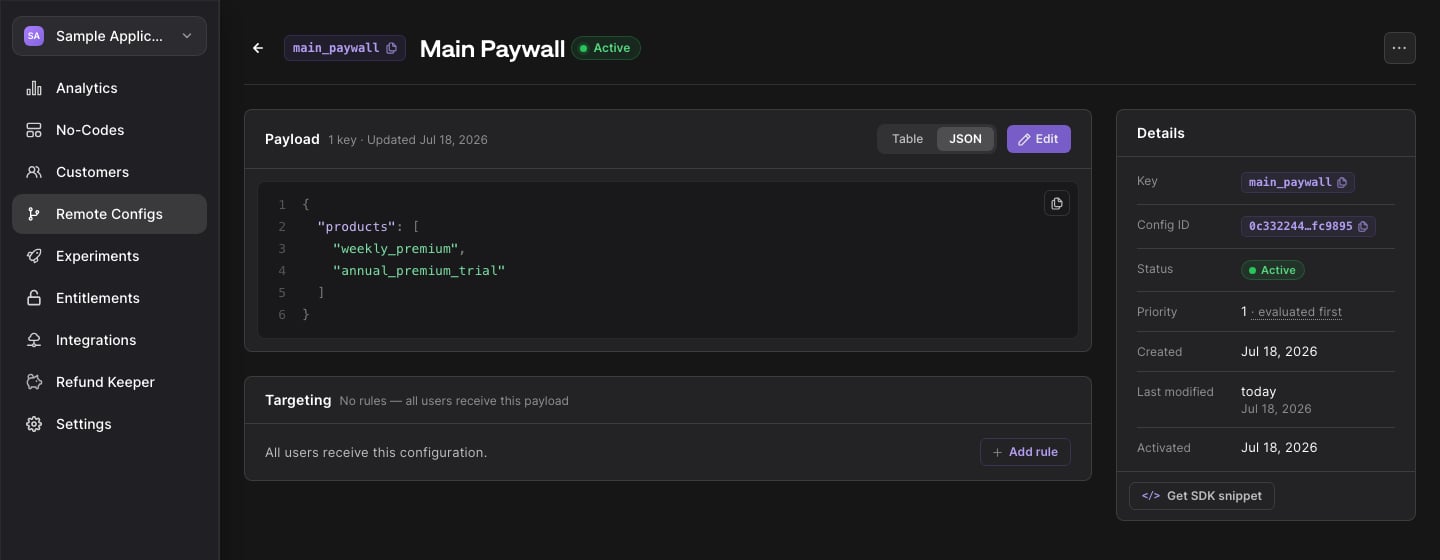
Open [Remote Configs](https://dash.qonversion.io/remote-configs) and create a configuration for each offering you actively manage. Use the offering ID as the context key (or pick a clearer name — the key is yours), and put the product IDs into the payload in the order you want to display them:
```json theme={null}
{
"products": ["weekly_premium", "annual_premium_trial"]
}
```
The payload is plain JSON, so you decide on the structure. `products` is just a convention that keeps this guide simple — you can add any other paywall settings next to it later.
## 2. Read the config in your app
Request the config by its context key, then resolve the product IDs to store products with the `products` method:
```swift Swift theme={null}
Qonversion.shared().remoteConfig(contextKey: "main_paywall") { remoteConfig, error in
guard let payload = remoteConfig?.payload,
let productIds = payload["products"] as? [String] else { return }
Qonversion.shared().products { allProducts, error in
let paywallProducts = productIds.compactMap { allProducts[$0] }
// Display paywallProducts in the configured order
}
}
```
```kotlin Kotlin theme={null}
Qonversion.shared.remoteConfig("main_paywall", object : QonversionRemoteConfigCallback {
override fun onSuccess(remoteConfig: QRemoteConfig) {
val productIds = (remoteConfig.payload["products"] as? List<*>)
?.filterIsInstance() ?: return
Qonversion.shared.products(object : QonversionProductsCallback {
override fun onSuccess(products: Map) {
val paywallProducts = productIds.mapNotNull { products[it] }
// Display paywallProducts in the configured order
}
override fun onError(error: QonversionError) { /* handle error */ }
})
}
override fun onError(error: QonversionError) { /* handle error */ }
})
```
```dart Flutter theme={null}
final remoteConfig = await Qonversion.getSharedInstance().remoteConfig(contextKey: 'main_paywall');
final productIds = List.from(remoteConfig.payload['products'] as List);
final products = await Qonversion.getSharedInstance().products();
final paywallProducts = productIds
.map((id) => products[id])
.whereType()
.toList();
// Display paywallProducts in the configured order
```
```typescript React Native theme={null}
const remoteConfig = await Qonversion.getSharedInstance().remoteConfig('main_paywall');
const productIds: string[] = remoteConfig.payload['products'] ?? [];
const products = await Qonversion.getSharedInstance().products();
const paywallProducts = productIds
.map((id) => products.get(id))
.filter((product) => product != null);
// Display paywallProducts in the configured order
```
```csharp Unity theme={null}
Qonversion.GetSharedInstance().RemoteConfig("main_paywall", (remoteConfig, error) =>
{
if (error != null) return;
var productIds = remoteConfig.Payload["products"] as List
If your app used `offerings().main`, request your default context key (e.g. `main_paywall`) in the same place. If it used `offering(forIdentifier:)`, request the corresponding context key instead.
## 3. Test before launch
Attach your test device to the new configuration with `attachUserToRemoteConfiguration` and verify the paywall renders the right products — see the [testing guide](remote-config#4-test-changes-before-launch).
## 4. Roll out
Ship the app update that reads Remote Configs. From that point, manage your paywall products in the Remote Configs section.
Keep your existing Offerings untouched while app versions that read them still have an audience — the data keeps being served to them. There is no forced cut-off date. Once traffic from those versions fades out, the offerings can simply be deleted.
***
What's Next
* [Create Remote Config](remote-config)
* [Launch A/B test from Remote Config](launch-test-from-remote-config)
 ## 2. Read the config in your app
Request the config by its context key, then resolve the product IDs to store products with the `products` method:
## 2. Read the config in your app
Request the config by its context key, then resolve the product IDs to store products with the `products` method: