> ## Documentation Index
> Fetch the complete documentation index at: https://documentation.qonversion.io/llms.txt
> Use this file to discover all available pages before exploring further.
# Integrations
> Send your in-app subscription data to destinations like AppsFlyer, Amplitude, and other major mobile platforms.
Qonversion sends subscription events, including purchases, subscriptions after free trials, renewals, refunds, and others to the integrated partners. This allows you to power your marketing and attribution platforms, as well as product analytics and retention tools, with accurate in-app subscription data.
Qonversion validates user receipts directly with app stores and tracks in-app revenue even if a user doesn't open your app. This allows you to have accurate subscription data of each subscription plan with 100% accuracy.
See the list of the events Qonversion tracks and sends to the integrated partners below.
## Tracked Events
The following section describes each event type Qonversion tracks and sends to third-party services.
| Event name | Description | Has Value by default |
| ---------------------------- | ------------------------------------------------------------------------------------------------------------------------------------------------------------------------ | ----------------------------------------------------------------------------------- |
| Trial Started | A user starts a trial. | |
| Trial Converted | A trial converts to a regular auto-renewable subscription. | Yes |
| Trial Canceled | A trial is canceled. Cancellation can occur when a subscriber turns off auto-renew. | |
| Trial Billing Retry | A trial went to a billing retry state. It happens if the App Store was not able to charge a user for any reason. | |
| Trial Still Active | A user did not cancel the trial two days after the trial started. Sent in real time and useful for marketing optimization. (Canonical event name: `trial_still_active`.) | |
| Subscription Started | A user started a subscription (only for subscriptions without a trial). | Yes |
| Subscription Renewed | A subscription was renewed. | Yes |
| Subscription Upgraded | A user purchases a subscription that offers a higher level of service than their current subscription. | Yes Refunded value, if the store processes the upgrade via refund and charge again. |
| Subscription Refunded | A user receives a refund for his previously made purchase. | Yes |
| Subscription Canceled | A user turns off auto-renew, or when the App Store can not charge a customer in a billing retry state. | |
| Subscription Billing Retry | A Subscription went to a billing retry state. | |
| In-App Purchase | An in-app purchase occurred. | Yes |
| Trial Expired | A trial period ended and a trial lapsed (auto-renew was previously disabled by a user). | |
| Subscription Expired | A subscription period ended and a subscription lapsed (auto-renew was previously disabled by a user). | |
| Subscription Product Changed | Active subscription product has changed due to upgrade, downgrade or crossgrade. | |
| In-App Refunded | A user receives a refund for his previously made an in-app purchase. | Yes |
Qonversion sends revenue value for some events. Refund values are negative. You can finely manage the sending of revenue for any event in the Integration settings (see below).
## Switching between subscriptions
Qonversion sends a 'Subscription Renewed' event in case of an upgrade, downgrade, or cross-grade of a subscription when a subscriber switches from his other subscription. Qonversion sends a 'Trial Converted' event if a user switches subscription and enters paid period at the same time.
Qonversion does not send downgrade event to integrations to avoid any possible data discrepancies. Both upgrade and downgrade events are shown in Qonversion in user's timeline available from the [Customers dashboard](https://dash.qonversion.io/customers).
You can check our detailed article on subscription service level and groups [here](https://qonversion.io/blog/ios-subscription-upgrades-downgrades-and-service-levels/).
## Configure Integrations
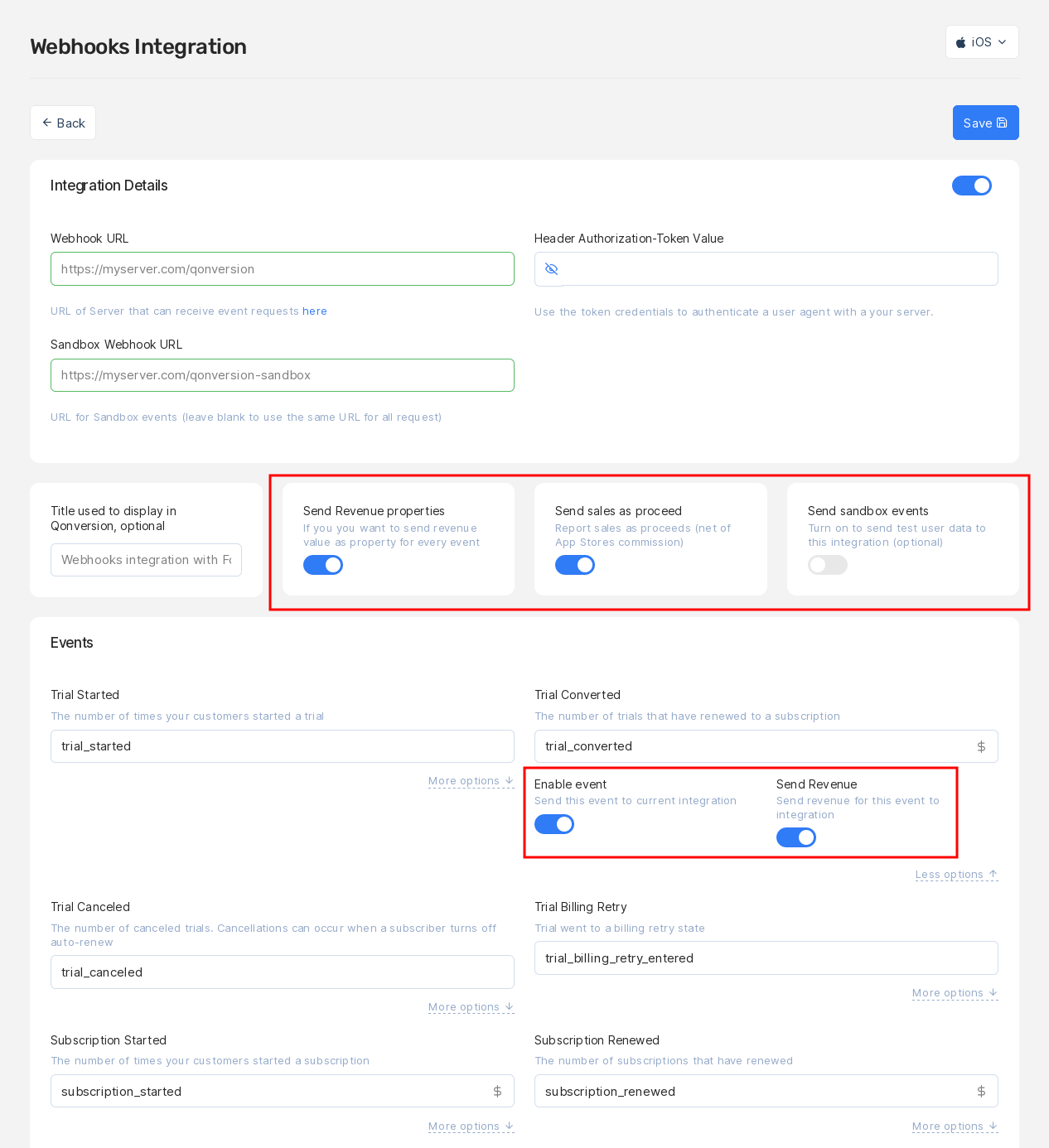 **Each integration has the following settings, that affect all events sent in this integration:\
**
* **Send revenue properties** If you turn this toggle off, you will not receive any revenue values for this integration. We recommend to send values, so do not turn it off unless you don't need Qonversion to send revenue values. You can enable or disable sending revenue for each event.
* **Send sales as proceed** Choose if you want to send revenue values net of App Stores commission (default) or gross (before deducting App Stores commission) by switching the "Send sales as proceed" toggle.
* **Send sandbox events** Turn on the "Send sandbox events" toggle if you want to receive sandbox events from Qonversion to this integration while testing it.
**Fine-tune each event:**
* **Enable event** Turn off sending the event if you don't need it in this integration.
* **Send Revenue** Enable or disable sending revenue value for the event.
## Storefront
Integration events for Apple purchases include a `storefront` field when an App Store Connect API Certificate is configured for the Apple application in the project. The field contains the Apple App Store country code in [ISO 3166-1 alpha-3](https://en.wikipedia.org/wiki/ISO_3166-1_alpha-3) format (e.g. "USA", "GBR", "CHN"). This represents the App Store storefront from which the transaction originated and is not the same as the user's geographic location or the `country` field, which is based on the user's IP address.
## Event time
Qonversion can set the exact time when an event occurs for most of the events. For example, when the App Store or Google play received a payment from a user. But some events do not have the exact time. The event time for such events is set equal to the time when Qonversion detected the event while checking a user receipt. Here is the list of such events:
* Trial Canceled
* Trial Billing Retry
* Subscription Canceled
* Subscription Billing Retry
* Trial Still Active
Events are sent to integrations if tracked no later than **5 days** from the moment they appeared on App Store or Google Play. If Qonversion detects an event later than five days after it originally appeared in Apple or Google, such an event will not be sent into integrations. **Trial Still Active** events are created in Qonversion and sent in real-time. **Subscription Refunded** events are sent into integrations if tracked not later than **30 days** compared to the date available in user receipt on Apple or Google.
## Event state
Event lifecycle includes several states in Qonversion. The available event states are:
* New
* In progress
* Disabled
* Stale
* Tracked
The **New** state is assigned to an event when Qonversion initially detects it. An event can be in this state for a few seconds before Qonversion processes it further.
When the system starts processing the event, the state changes to **In progress**. The event eventually is assigned one of the three final states after processing: Disabled, Staled, Tracked. The final state depends on the event's actual time (when the event happened on the app stores) and period of relevance for events.
**Disabled** state means that the time of relevance for this event has expired. For example, Qonversion detects trial\_started event that happened a few months ago before releasing the application with Qonversion SDK. This event gets Disabled state and is not sent to your project's active integrations.
***
## Available Integrations
Mobile measurement partner
Raw data export to S3
Product analytics
App analytics by Yandex
Attribution and analytics
Apple Search Ads optimization
Deep linking and attribution
Customer engagement
Retention and engagement
Ad attribution
Google analytics and events
Ad attribution
Raw data export to GCS
Attribution analytics
Email marketing
Product analytics
Push notifications
Product analytics
Push notifications
Apple Search Ads
Customer data platform
Marketing analytics
Team notifications
Ad revenue analytics
Custom HTTP endpoints
**Each integration has the following settings, that affect all events sent in this integration:\
**
* **Send revenue properties** If you turn this toggle off, you will not receive any revenue values for this integration. We recommend to send values, so do not turn it off unless you don't need Qonversion to send revenue values. You can enable or disable sending revenue for each event.
* **Send sales as proceed** Choose if you want to send revenue values net of App Stores commission (default) or gross (before deducting App Stores commission) by switching the "Send sales as proceed" toggle.
* **Send sandbox events** Turn on the "Send sandbox events" toggle if you want to receive sandbox events from Qonversion to this integration while testing it.
**Fine-tune each event:**
* **Enable event** Turn off sending the event if you don't need it in this integration.
* **Send Revenue** Enable or disable sending revenue value for the event.
## Storefront
Integration events for Apple purchases include a `storefront` field when an App Store Connect API Certificate is configured for the Apple application in the project. The field contains the Apple App Store country code in [ISO 3166-1 alpha-3](https://en.wikipedia.org/wiki/ISO_3166-1_alpha-3) format (e.g. "USA", "GBR", "CHN"). This represents the App Store storefront from which the transaction originated and is not the same as the user's geographic location or the `country` field, which is based on the user's IP address.
## Event time
Qonversion can set the exact time when an event occurs for most of the events. For example, when the App Store or Google play received a payment from a user. But some events do not have the exact time. The event time for such events is set equal to the time when Qonversion detected the event while checking a user receipt. Here is the list of such events:
* Trial Canceled
* Trial Billing Retry
* Subscription Canceled
* Subscription Billing Retry
* Trial Still Active
Events are sent to integrations if tracked no later than **5 days** from the moment they appeared on App Store or Google Play. If Qonversion detects an event later than five days after it originally appeared in Apple or Google, such an event will not be sent into integrations. **Trial Still Active** events are created in Qonversion and sent in real-time. **Subscription Refunded** events are sent into integrations if tracked not later than **30 days** compared to the date available in user receipt on Apple or Google.
## Event state
Event lifecycle includes several states in Qonversion. The available event states are:
* New
* In progress
* Disabled
* Stale
* Tracked
The **New** state is assigned to an event when Qonversion initially detects it. An event can be in this state for a few seconds before Qonversion processes it further.
When the system starts processing the event, the state changes to **In progress**. The event eventually is assigned one of the three final states after processing: Disabled, Staled, Tracked. The final state depends on the event's actual time (when the event happened on the app stores) and period of relevance for events.
**Disabled** state means that the time of relevance for this event has expired. For example, Qonversion detects trial\_started event that happened a few months ago before releasing the application with Qonversion SDK. This event gets Disabled state and is not sent to your project's active integrations.
***
## Available Integrations
Mobile measurement partner
Raw data export to S3
Product analytics
App analytics by Yandex
Attribution and analytics
Apple Search Ads optimization
Deep linking and attribution
Customer engagement
Retention and engagement
Ad attribution
Google analytics and events
Ad attribution
Raw data export to GCS
Attribution analytics
Email marketing
Product analytics
Push notifications
Product analytics
Push notifications
Apple Search Ads
Customer data platform
Marketing analytics
Team notifications
Ad revenue analytics
Custom HTTP endpoints