> ## Documentation Index
> Fetch the complete documentation index at: https://documentation.qonversion.io/llms.txt
> Use this file to discover all available pages before exploring further.
# Facebook Ads
> Send in-app subscription and purchases data to Facebook Analytics and Ads Manager
Measure what drives your revenue in Facebook Ads Manager and Facebook Analytics by tracking free-trial conversion to paid subscriptions, renewals, and even refunds. Qonversion sends data directly to your Facebook account to help you understand your marketing performance.
Use this integration to:
* See how your ads drive events like trial start, trial conversion, subscription renewals, and others.
* Measure the return on your advertising spend based on complete in-app revenue data.
* Create a custom Facebook audience (Lookalike Audience) based on your paying users to increase your advertising ROI (ROAS). Show ads to people similar to those who convert into paying users after a trial period.
### Qonversion tracks revenue even if users don't open the app. This allows you to measure the performance of each subscription plan with 100% accuracy.
## 1. Set up the SDKs
1. Make sure you have Facebook SDK installed. If you do not have Facebook integration yet, please use [this documentation](https://developers.facebook.com/docs/apis-and-sdks/).
2. Set Qonversion SDKs following [installing the SDKs](install-sdk) guides.
3. Additionally, to attribute events sent from Qonversion, you need to set the same user ID at `_q_custom_user_id` key using the `Qonversion.shared().setProperty` method. Follow the [documentation](user-properties) to learn more about this method.
4. Set the same user ID by using Facebook SDK:
```swift Swift theme={null}
AppEvents.shared.userID = "yourSideUserID"
```
```objectivec Objective-C theme={null}
[[FBSDKAppEvents shared] setUserID:@"yourSideUserID"];
```
```java Java theme={null}
AppEventsLogger.setUserID("yourSideUserID");
```
```kotlin Kotlin theme={null}
AppEventsLogger.setUserID("yourSideUserID")
```
5. Congratulations, you have completed the integration! From now on, Qonversion will share subscription events with Facebook with yourSideUserID attached.
### Do not track any purchase events on the client side
Qonversion tracks all revenue events so if you track revenue events with Facebook SDK, you may double count the revenue in your Facebook account.
## 2. Configure the Facebook Integration
## Provide Integration Details
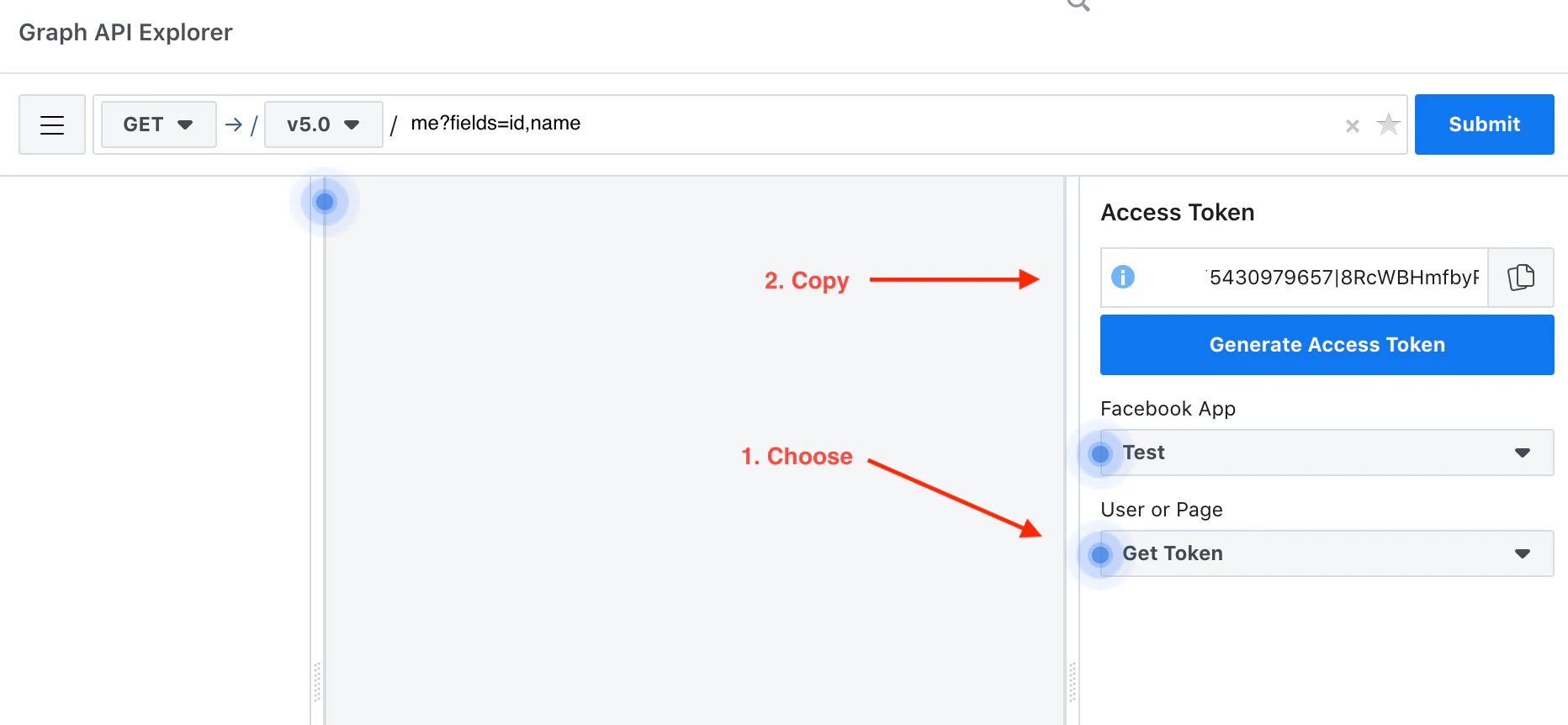
1. Get your Facebook **App Access Token**. You can use [this URL](https://developers.facebook.com/tools/explorer/) to access your token. Choose your Application in the top-right corner. Select the Get App Token and copy.
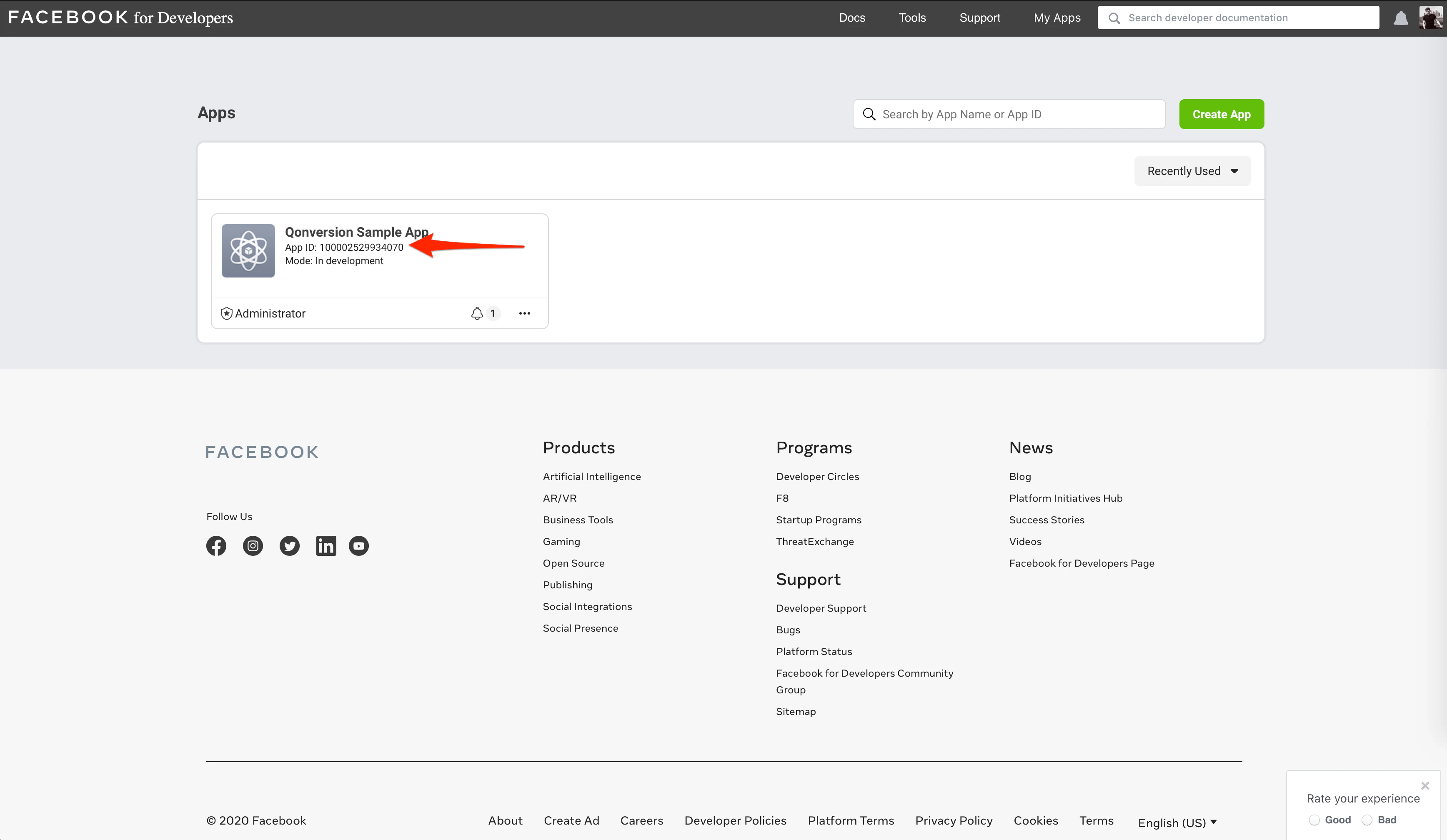
 2. Get **Facebook App ID** [here](https://developers.facebook.com/apps).
 3. Navigate to the Integrations section in your Qonversion project, select [Facebook](https://dash.qonversion.io/app/integration/facebook), and provide the **App Access Token** and **App ID**.
## Configure the event names
You can use the default event names provided by Qonversion and corresponding to Facebook standard event names. If the [standard Facebook event names](/docs/facebook-standard-event-names) are used, the events will show up in your Facebook Ads Account. If custom event names are used they will show up in Facebook Analytics, but they will not be delivered to Facebook Ads.
### If you will use custom event names in Qonversion, then you can continue tracking the events with Facebook SDK as well.
Please contact us, if you are not sure how to set up the tracking.
### Done
Now Qonversion will start sending subscription events to Facebook Ads Manager. You can view the detailed subscription-related events in your Facebook Ads account (Analytics, Ads Manager, Audience), get insights on your performance, and improve your marketing ROAS with Lookalike Audience.
### It may take up to 24 hours for recently delivered events to appear in Facebook Analytics and Facebook Ads Manager.
***
[CleverTap](clevertap)
[Firebase](firebase)
3. Navigate to the Integrations section in your Qonversion project, select [Facebook](https://dash.qonversion.io/app/integration/facebook), and provide the **App Access Token** and **App ID**.
## Configure the event names
You can use the default event names provided by Qonversion and corresponding to Facebook standard event names. If the [standard Facebook event names](/docs/facebook-standard-event-names) are used, the events will show up in your Facebook Ads Account. If custom event names are used they will show up in Facebook Analytics, but they will not be delivered to Facebook Ads.
### If you will use custom event names in Qonversion, then you can continue tracking the events with Facebook SDK as well.
Please contact us, if you are not sure how to set up the tracking.
### Done
Now Qonversion will start sending subscription events to Facebook Ads Manager. You can view the detailed subscription-related events in your Facebook Ads account (Analytics, Ads Manager, Audience), get insights on your performance, and improve your marketing ROAS with Lookalike Audience.
### It may take up to 24 hours for recently delivered events to appear in Facebook Analytics and Facebook Ads Manager.
***
[CleverTap](clevertap)
[Firebase](firebase)