> ## Documentation Index
> Fetch the complete documentation index at: https://documentation.qonversion.io/llms.txt
> Use this file to discover all available pages before exploring further.
# Enable Refund Keeper
> A short guide on how to Enable Refund Keeper in Qonversion and start saving revenue today.
Before enabling **Refund Keeper**, don't forget to make sure you're compliant with [requirements](refund-keeper#requirements-to-use-refund-keeper)
***
1. **Open [Refund Keeper](https://dash.qonversion.io/refund-keeper) Section in Qonversion**
2. **Enable App Store Server-to-Server Notifications V2.** 🎥 [Watch](https://youtu.be/jvZC3cdy5VM?feature=shared) our short tutorial
### Note: v1 Notifications are not supported, to Enable Refund Keeper, you need to set up S2S Notifications v2
3. **Fill out required App Store Data** 🎥 [Watch](https://youtu.be/jvZC3cdy5VM?feature=shared) our short tutorial
1. Go to Project Settings and fill out these fields:
1. App Store Connect Key Identifier
2. App Store Connect Private Key
3. App Store Connect Issuer Identifier
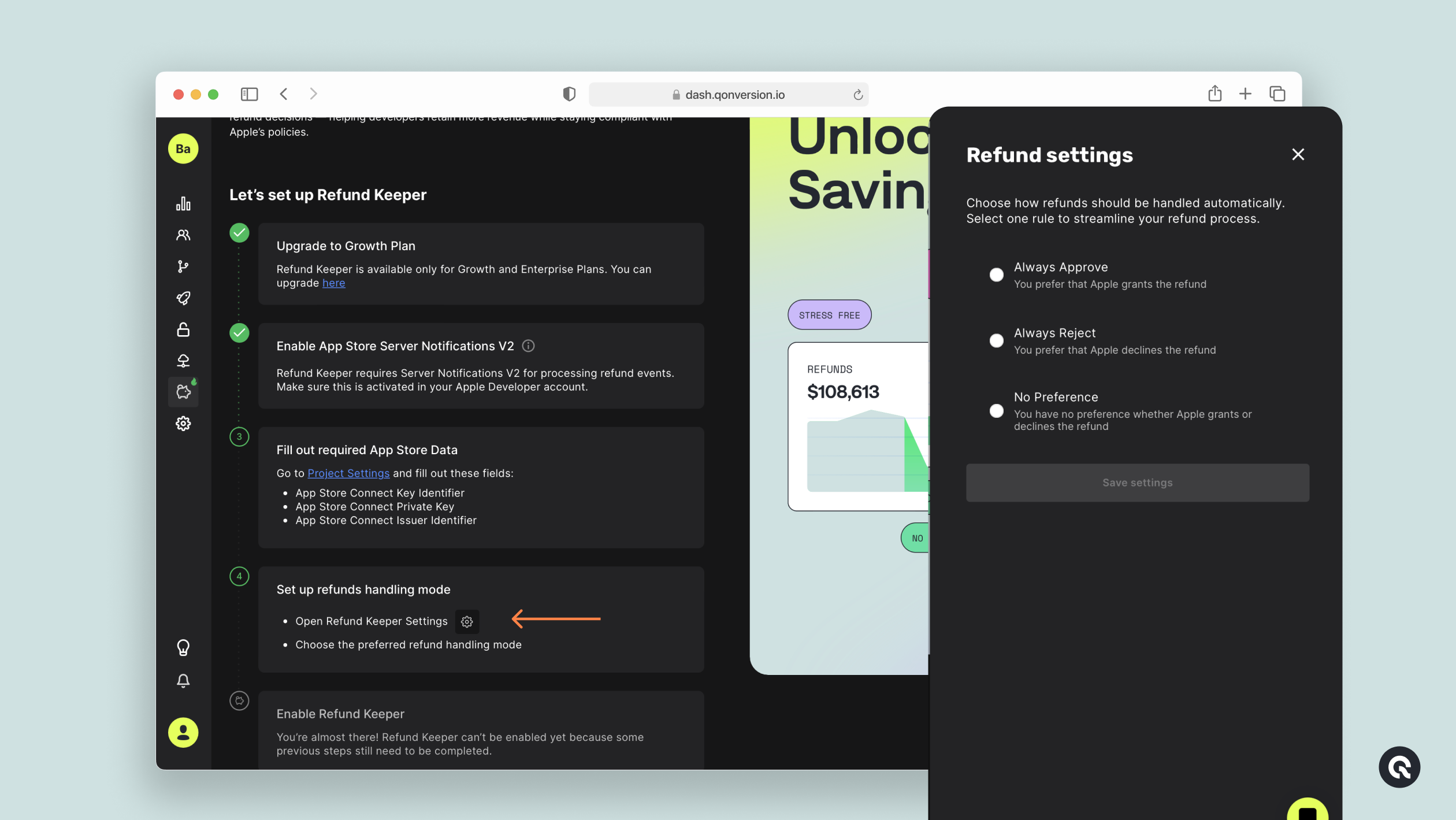
4. **Once you're set, you can choose Refund Handling Mode**
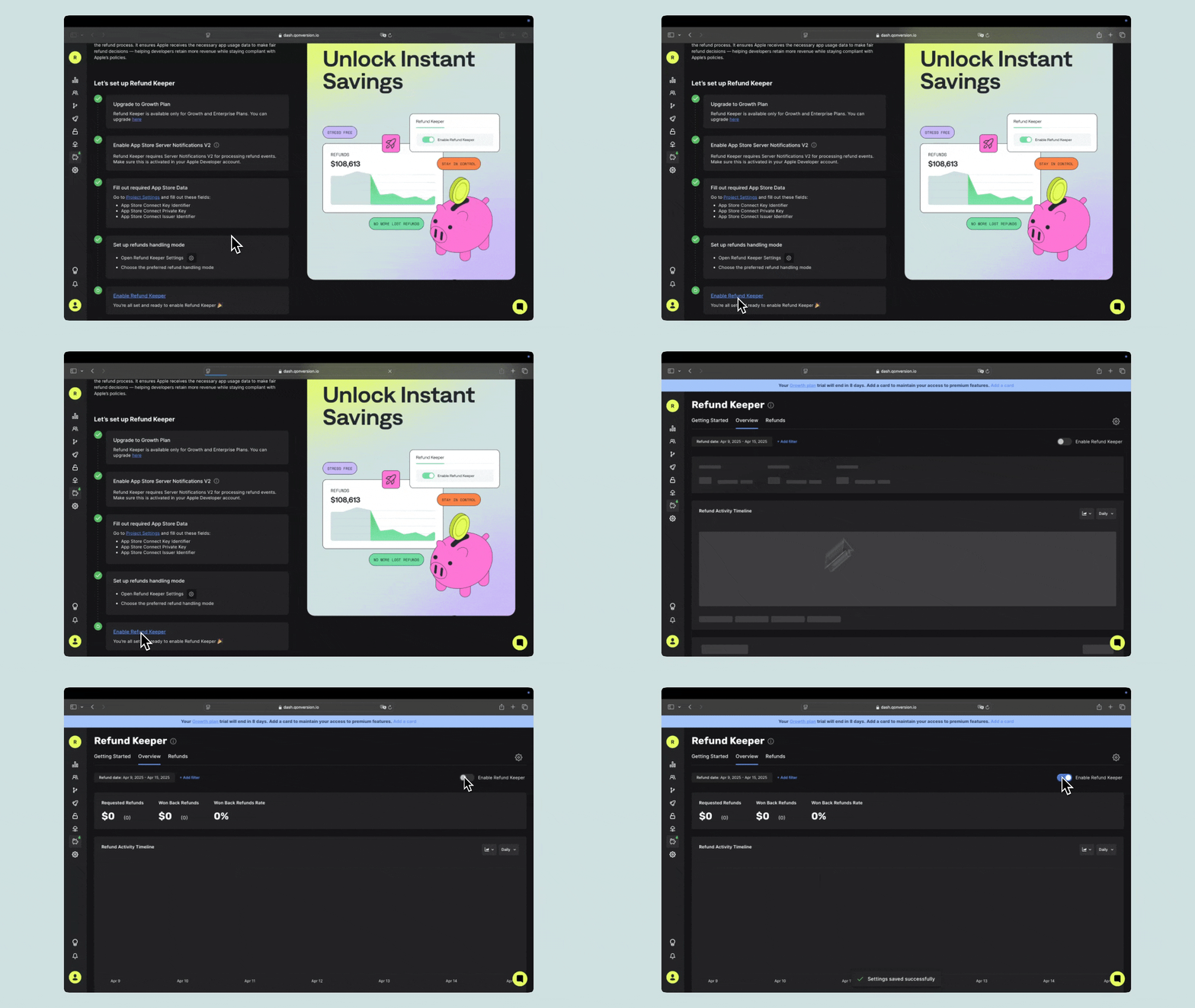
5. Click **Enable Refund Keeper** to activate the feature.
## Refund Preferences
*Apple allows developers to set a refund preference for each request, influencing the decision while Apple retains the final authority.*
| Option | Description |
| ------------------ | ---------------------------------------------------------------------- |
| **Always Decline** | Maximizes revenue protection by contesting most refunds. |
| **Always Refund** | Automatically approves all refund requests. |
| **No Preference** | A balanced approach that lets Apple decide based on the provided data. |
To adjust this setting, navigate to **Refund Preferences** in the Qonversion Dashboard and select your preferred option.
***
[Refund Keeper](refund-keeper)
[Analytics Overview](analytics-overview)
 5. Click **Enable Refund Keeper** to activate the feature.
 ## Refund Preferences
*Apple allows developers to set a refund preference for each request, influencing the decision while Apple retains the final authority.*
| Option | Description |
| ------------------ | ---------------------------------------------------------------------- |
| **Always Decline** | Maximizes revenue protection by contesting most refunds. |
| **Always Refund** | Automatically approves all refund requests. |
| **No Preference** | A balanced approach that lets Apple decide based on the provided data. |
To adjust this setting, navigate to **Refund Preferences** in the Qonversion Dashboard and select your preferred option.
***
[Refund Keeper](refund-keeper)
[Analytics Overview](analytics-overview)
## Refund Preferences
*Apple allows developers to set a refund preference for each request, influencing the decision while Apple retains the final authority.*
| Option | Description |
| ------------------ | ---------------------------------------------------------------------- |
| **Always Decline** | Maximizes revenue protection by contesting most refunds. |
| **Always Refund** | Automatically approves all refund requests. |
| **No Preference** | A balanced approach that lets Apple decide based on the provided data. |
To adjust this setting, navigate to **Refund Preferences** in the Qonversion Dashboard and select your preferred option.
***
[Refund Keeper](refund-keeper)
[Analytics Overview](analytics-overview)