> ## Documentation Index
> Fetch the complete documentation index at: https://documentation.qonversion.io/llms.txt
> Use this file to discover all available pages before exploring further.
# Braze
> Send in-app subscription and purchases to Braze
With Qonversion, you can automatically send in-app subscription and purchases events to Braze.
## 1. Set up the SDKs
1. Make sure you have Braze SDK installed. If you do not have Braze integration yet, please use this documentation for [iOS](https://www.braze.com/docs/developer_guide/platform_integration_guides/ios/initial_sdk_setup/) and [Android](https://www.braze.com/docs/developer_guide/platform_integration_guides/android/initial_sdk_setup/android_sdk_integration/).
2. Set Qonversion SDKs following [installing the SDKs](install-sdk) guides.
3. Attribute events sent from Qonversion and events received from the Braze SDK to the same user by setting the same user id to Braze that you set to Qonversion SDK in [User Identifiers guide](user-identifiers#2-user-id-for-third-party-integrations).
```swift Swift theme={null}
Braze.shared.changeUser(userId: "yourSideUserID")
```
```objectivec Objective-C theme={null}
[braze changeUser:@"yourSideUserID"];
```
```java Java theme={null}
Braze.getInstance(this).changeUser("yourSideUserID");
```
```kotlin Kotlin theme={null}
Braze.getInstance(this).changeUser("yourSideUserID")
```
These snippets use the modern `Braze` class. If your app is still on the legacy `Appboy` SDK, the equivalent call is `Appboy.sharedInstance()?.changeUser("yourSideUserID")` - update to `Braze` when you bump the SDK.
## 2. Configure the Braze Integration
## Provide Integration Details
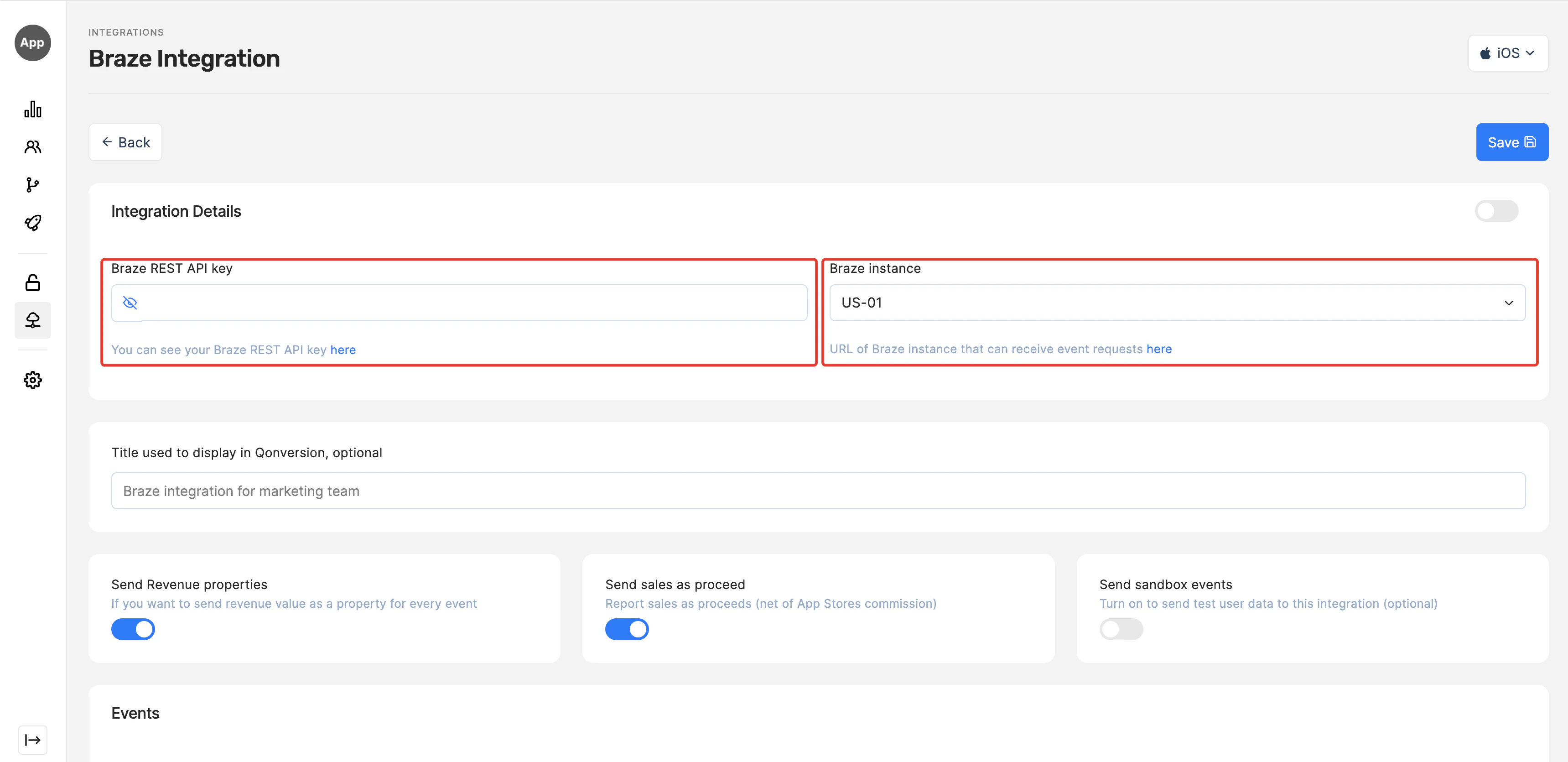
1. Get your **Braze API key** and your **Braze instance** from [Braze](https://dashboard-01.braze.com/).
2. Navigate to the Integrations section in your Qonversion project, select [Braze](https://dash.qonversion.io/app/integration/braze), and provide the **Braze API key** and your **Braze instance**, and Save.
 ### Done
Now Qonversion will start sending in-app purchases and subscriptions data to your Braze account.
## Event Payload
In case you need details about data sent to Braze, follow the example below:
```json theme={null}
{
"events":[
{
"external_id":"638e041drd467600318edd46",
"name":"subscription_renewed",
"properties":{
"revenue":99,
"storefront":"USA"
},
"time":"2023-06-14T12:20:36+00:00"
}
]
}
```
***
[Branch](branch)
[CleverTap](clevertap)
### Done
Now Qonversion will start sending in-app purchases and subscriptions data to your Braze account.
## Event Payload
In case you need details about data sent to Braze, follow the example below:
```json theme={null}
{
"events":[
{
"external_id":"638e041drd467600318edd46",
"name":"subscription_renewed",
"properties":{
"revenue":99,
"storefront":"USA"
},
"time":"2023-06-14T12:20:36+00:00"
}
]
}
```
***
[Branch](branch)
[CleverTap](clevertap)