> ## Documentation Index
> Fetch the complete documentation index at: https://documentation.qonversion.io/llms.txt
> Use this file to discover all available pages before exploring further.
# Branch
> Send iOS and Android in-app subscription events to Branch with Qonversion.
Qonversion can automatically send every valuable mobile subscription event to your Branch account to help you measure the marketing performance. Measure what drives your revenue by tracking trial-to-paying-user conversion, subscription renewals, refunds, and other useful subscription events.
## 1. Set up the SDKs
1. Make sure you have Branch SDK installed. If you do not have Branch integration yet, please use this documentation for [iOS](https://help.branch.io/developers-hub/docs/ios-sdk-overview) and [Android](https://help.branch.io/developers-hub/docs/android-sdk-overview).
2. Set Qonversion SDKs following [installing the SDKs](install-sdk) guides.
## 2. Identify user
**If your application includes user authentication**, it's important to link events sent from Qonversion with events received from the Branch SDK. This can be achieved by assigning the same user identifier to both Branch and Qonversion SDKs, as detailed in the [User Identifiers guide](user-identifiers#2-user-id-for-third-party-integrations). Below are the code snippets for various platforms to initialize the Branch SDK with the user ID:
```swift Swift theme={null}
// Initialize Branch SDK with the user ID
Branch.getInstance().setIdentity("yourSideUserID")
// Logout
Branch.getInstance().logout()
```
```objectivec Objective-C theme={null}
[[Branch getInstance] setIdentity:@"yourSideUserID"];
// Logout
[[Branch getInstance] logout];
```
```java Java theme={null}
Branch.getInstance().setIdentity("yourSideUserID");
// Logout
Branch.getInstance().logout();
```
```kotlin Kotlin theme={null}
Branch.getInstance().setIdentity("yourSideUserID")
// Logout
Branch.getInstance().logout()
```
### Do not track any purchase events on the client side
Qonversion tracks all revenue events so if you track revenue events with Branch SDK, you may double count the revenue in your Branch account.
## 3. Configure the Branch Integration
## Provide Integration Details
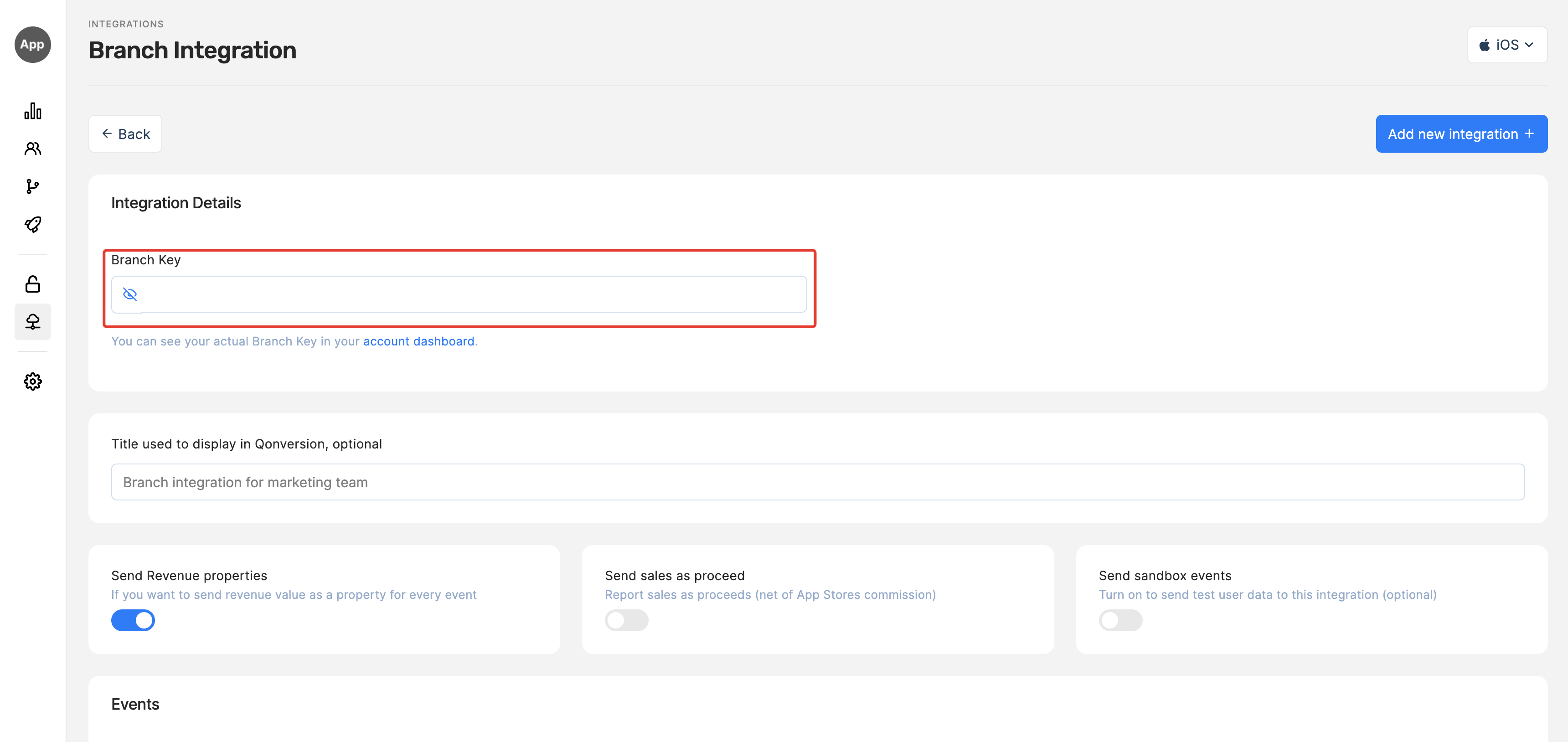
1. Get your **Branch Key** from [Branch Settings Dashboard](https://dashboard.branch.io/account-settings/app)
2. Navigate to the Integrations section in your Qonversion project, select [Branch](https://dash.qonversion.io/app/integration/branch), and provide the **Branch Key** and Save.
 ### Done
Now Qonversion will start sending in-app purchases and subscriptions data to your Branch account.
## 4. Check the integration
Qonversion sends all events as "Purchase" with a custom event alias to Branch. The event names that you set in Qonversion dashboards are the aliases. To see the events from Qonversion in Branch:
* navigate to the Summary dashboard in Branch
* filter PURCHASE events with the "show" filter
* use the additional filter below the chart: "custom\_event\_alias" equals to the event name you set in Qonversion (e.g. trial\_started)
## 5. Countries events attribution
Branch attributes all server events to the country where the server sending these events is located. The only way to change this and attribute events to users' countries is to contact Branch support. You should contact branch support with the request to whitelist your app (include your app's Branch ID in the communication) to record users' IP address instead of the server IP address.
## Event Payload
In case you need details about data sent to Branch, follow the example below:
```json theme={null}
{
"branch_key":"key_live_KEY",
"name":"PURCHASE",
"customer_event_alias":"trial_converted",
"user_data":{
"os":"",
"developer_identity":"",
"idfa":""
},
"event_data":{
"transaction_id":"",
"currency":"EUR",
"revenue":2.39
}
}
```
**→[Read more about tracked events here](integrations-overview#tracked-events)**
***
[Asapty](asapty)
[Braze](braze)
### Done
Now Qonversion will start sending in-app purchases and subscriptions data to your Branch account.
## 4. Check the integration
Qonversion sends all events as "Purchase" with a custom event alias to Branch. The event names that you set in Qonversion dashboards are the aliases. To see the events from Qonversion in Branch:
* navigate to the Summary dashboard in Branch
* filter PURCHASE events with the "show" filter
* use the additional filter below the chart: "custom\_event\_alias" equals to the event name you set in Qonversion (e.g. trial\_started)
## 5. Countries events attribution
Branch attributes all server events to the country where the server sending these events is located. The only way to change this and attribute events to users' countries is to contact Branch support. You should contact branch support with the request to whitelist your app (include your app's Branch ID in the communication) to record users' IP address instead of the server IP address.
## Event Payload
In case you need details about data sent to Branch, follow the example below:
```json theme={null}
{
"branch_key":"key_live_KEY",
"name":"PURCHASE",
"customer_event_alias":"trial_converted",
"user_data":{
"os":"",
"developer_identity":"",
"idfa":""
},
"event_data":{
"transaction_id":"",
"currency":"EUR",
"revenue":2.39
}
}
```
**→[Read more about tracked events here](integrations-overview#tracked-events)**
***
[Asapty](asapty)
[Braze](braze)