> ## Documentation Index
> Fetch the complete documentation index at: https://documentation.qonversion.io/llms.txt
> Use this file to discover all available pages before exploring further.
# AppsFlyer
> Send in-app subscription data to AppsFlyer
Accurately measure what drives your subscription revenue on an ad campaign level by tracking events like trial-to-paying-user conversions, renewals, refunds, and upgrades. Qonversion tracks revenue even if a user does not open your app. This allows you to measure the performance of each subscription plan with 100% accuracy.
## 1. In your app: set up the SDKs
1. You need to have the AppsFlyer SDK integrated into your app before starting with this integration. If you do not have AppsFlyer integration yet, please use [this documentation](https://support.appsflyer.com/hc/en-us/articles/207032066-iOS-SDK-integration-for-developers).
2. Set Qonversion SDKs following [Installing the SDKs](install-sdk) guides.
3. Send AppsFlyer user ID to Qonversion via [User Properties](user-properties). In the **onConversionDataSuccess** callback use the`setProperty()` method with the AppsFlyer user ID value.
```swift Swift theme={null}
// AppsFlyer 6
import AppsFlyerLib
extension AppDelegate: AppsFlyerLibDelegate {
func onConversionDataSuccess(_ conversionInfo: [AnyHashable : Any]!) {
Qonversion.shared().setUserProperty(.appsFlyerUserID, value: AppsFlyerLib.shared().getAppsFlyerUID())
}
func onConversionDataFail(_ error: Error!) {
}
}
// Appsflyer 5
import AppsFlyerLib
extension AppDelegate: AppsFlyerTrackerDelegate {
func onConversionDataSuccess(_ conversionInfo: [AnyHashable : Any]!) {
Qonversion.shared().setUserProperty(.appsFlyerUserID, value: AppsFlyerTracker.shared()?.getAppsFlyerUID())
}
func onConversionDataFail(_ error: Error!) {
}
}
```
```objectivec Objective-C theme={null}
/// AppsFlyer 6
#import
@interface AppDelegate: UIResponder
- (void)onConversionDataSuccess:(NSDictionary *)conversionInfo {
[[Qonversion sharedInstance] setUserProperty:QONUserPropertyKeyAppsFlyerUserID value:[[AppsFlyerLib shared] getAppsFlyerUID]];
}
- (void)onConversionDataFail:(NSError *)error {
}
@end
/// AppsFlyer 5
#import
@interface AppDelegate: UIResponder
- (void)onConversionDataSuccess:(NSDictionary *)conversionInfo {
[[Qonversion sharedInstance] setUserProperty:QONUserPropertyKeyAppsFlyerUserID value:[[AppsFlyerTracker sharedTracker] getAppsFlyerUID]];
}
- (void)onConversionDataFail:(NSError *)error {
}
@end
```
```java Java theme={null}
AppsFlyerConversionListener conversionListener = new AppsFlyerConversionListener() {
@Override
public void onConversionDataSuccess(final Map conversionData) {
Qonversion.getSharedInstance().setUserProperty(QUserPropertyKey.AppsFlyerUserId, AppsFlyerLib.getInstance().getAppsFlyerUID(App.this));
}
@Override
public void onConversionDataFail(String errorMessage) {
}
@Override
public void onAppOpenAttribution(Map conversionData) {
}
@Override
public void onAttributionFailure(String errorMessage) {
}
};
AppsFlyerLib.getInstance().init("afDevKey", conversionListener, this);
```
```kotlin Kotlin theme={null}
val conversionListener: AppsFlyerConversionListener = object : AppsFlyerConversionListener {
override fun onConversionDataSuccess(conversionData: Map) {
Qonversion.shared.setUserProperty(
QUserPropertyKey.AppsFlyerUserId,
AppsFlyerLib.getInstance().getAppsFlyerUID(this@App)
)
}
override fun onConversionDataFail(errorMessage: String) {}
override fun onAppOpenAttribution(conversionData: Map) {}
override fun onAttributionFailure(errorMessage: String) {}
}
AppsFlyerLib.getInstance().init("afDevKey", conversionListener, this)
```
```dart Flutter theme={null}
_appsflyerSdk.onInstallConversionData((res) {
print("res: " + res.toString());
setState(() {
_gcd = res;
});
Qonversion.getSharedInstance().setUserProperty(QUserPropertyKey.appsFlyerUserId, 'your appsflyer user id');
});
```
```typescript React Native theme={null}
this.onInstallConversionDataCanceller = appsFlyer.onInstallConversionData(
(res) => {
appsFlyer.getAppsFlyerUID((err, appsFlyerUID) => {
if (err) {
console.error(err);
} else {
Qonversion.getSharedInstance().setUserProperty(UserPropertyKey.APPS_FLYER_USER_ID, appsFlyerUID);
}
});
}
);
```
```csharp Unity theme={null}
using AppsFlyerSDK;
using QonversionUnity;
public class AppsFlyerObjectScript : MonoBehaviour , IAppsFlyerConversionData
{
void Start()
{
/* AppsFlyer.setDebugLog(true); */
AppsFlyer.initSDK("devkey", "appID", this);
AppsFlyer.startSDK();
}
public void onConversionDataSuccess(string conversionData)
{
Qonversion.GetSharedInstance().SetUserProperty(UserPropertyKey.AppsFlyerUserId, AppsFlyer.getAppsFlyerId());
}
}
```
### Do not track any purchase events on the client side
Qonversion tracks all revenue events so if you track revenue events with AppsFlyer SDK, you may double count the revenue in your AppsFlyer account.
## 2. In stores
1. Get your App ID. You can find the App ID in the App Store URL:
1. **For iOS**
```
https://apps.apple.com/us/app/apple-developer/640199958
```
2. **For Android**
```
https://play.google.com/store/apps/details?id=com.android.chrome
```
## 3. In AppsFlyer
1. Get the AppsFlyer Dev Key in your AppsFlyer account,
1. Go to **Configuration → App Settings → Dev Key** and get it
2. Set up receiving events with S2S in the AppsFlyer
1. If your selected mode is SKAN 4 or Custom:
1. No settings changes are required.
2. If your selected mode is revenue, conversion, or engagement:
1. In AppsFlyer, go to Settings > SKAN Conversion Studio.
2. Click options (⋮).
3. Turn on Record in-app events sent by server-to-server API.
4. Send events by S2S.
Read more: [https://support.appsflyer.com/hc/en-us/articles/4403727223185-SKAN-Conversion-Studio#report-events-by-servertoserver-api](https://support.appsflyer.com/hc/en-us/articles/4403727223185-SKAN-Conversion-Studio#report-events-by-servertoserver-api)
## 4. Configure the AppsFlyer integration on Qonversion's side
### Provide Integration Details
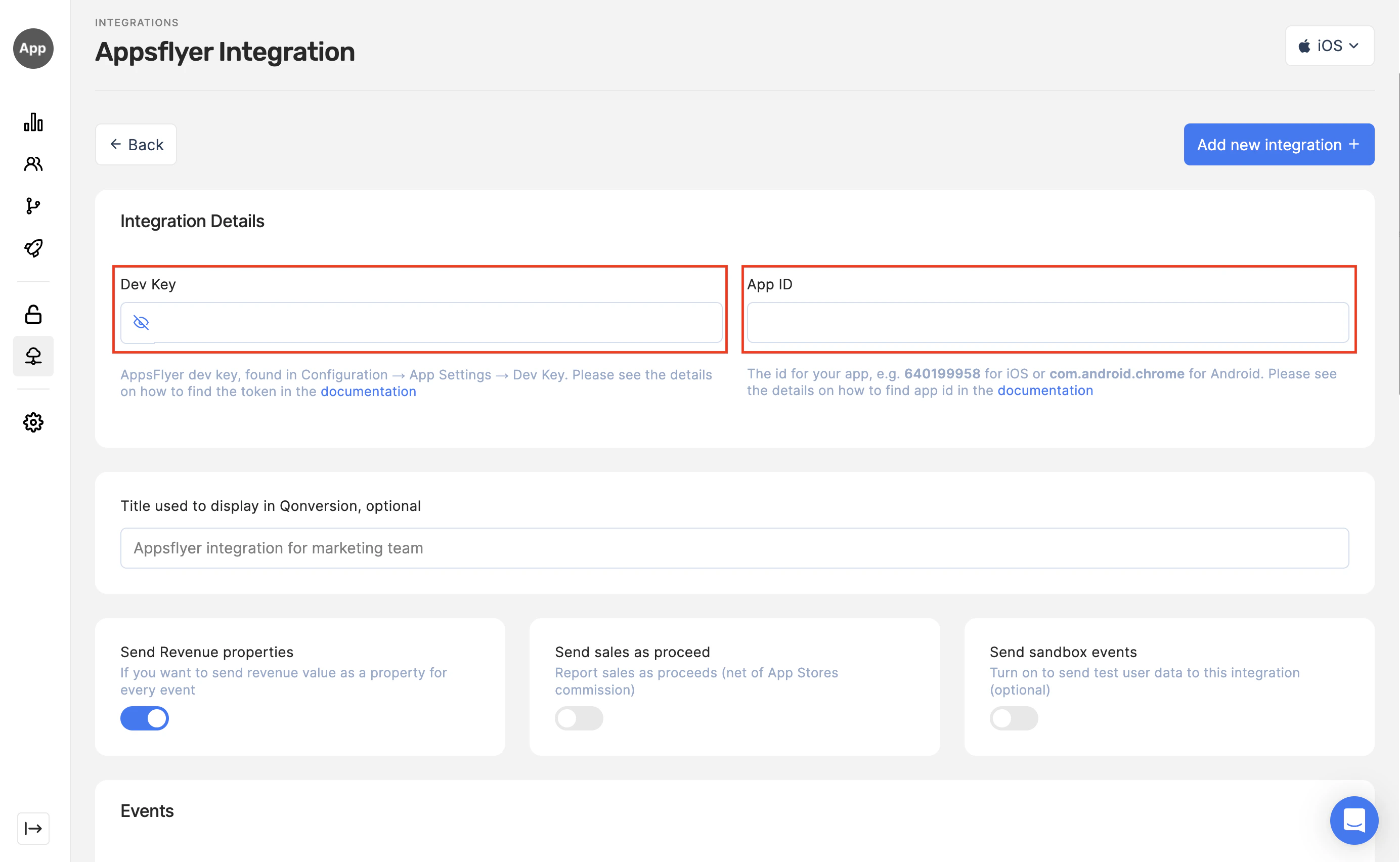
1. Navigate to the Integrations section in your Qonversion project, select [AppsFlyer](https://dash.qonversion.io/app/integration/appsflyer), and provide the Dev Key and App ID, and Save
1. Put in the Dev Key from the AppsFlyer
2. Put in App ID
 ### Configure the event names
We recommend using the default event names provided by Qonversion. However, you can change the event names to suit your preferences. Note that the event names will not affect revenue recognition. All purchase events containing a value (subscription started, trial converted, subscription renewed, subscription refunded, in-app purchase) will be sent to AppsFlyer with the af\_revenue property, and the revenue will be recognized correctly in AppsFlyer.
**→[Read more about tracked events here](integrations-overview#tracked-events)**
### Enable the integration
### Done!
Now Qonversion will start sending in-app purchases and subscriptions data to your AppsFlyer account.
## Details
### About our event payload
In case you need details about data sent to AppsFlyer, follow the example below:
```json theme={null}
{
"appsflyer_id": "",
"os": "14.6",
"app_version_name": "1.0.0",
"customer_user_id": "outside_uid",
"idfa": "",
"idfv": "",
"eventCurrency": "EUR",
"ip": "",
"bundleIdentifier": "com.app.name",
"eventName": "trial_converted",
"storefront": "USA",
"eventTime": "Y-m-d H:i:s.u",
"eventValue": {
"af_content_type": "product",
"af_content_id": "product_id",
"q_uid": "QON_...",
"af_revenue": "1.99",
"af_currency": "EUR"
}
}
```
Notes:
* `appsflyer_id` is generated by AppsFlyer.
* `customer_user_id` is the unique user identifier set by the app owner.
* `bundleIdentifier` is the app bundle ID from App Store Connect.
* `eventTime` is UTC. AppsFlyer needs to receive each event by 02:00 UTC of the following day; otherwise AppsFlyer falls back to the time it received the event.
### Check out the sample Xcode Project
[Here](https://github.com/qonversion/qonversion-ios-sdk/tree/develop/Sample) you can find the sample Xcode project that demonstrates the Qonversion and AppsFlyer integration
## How to compare your app revenue in AppsFlyer to Qonversion
Navigate to your **AppsFlyer → Activity** dashboard. The date range relates to the event date and isn't LTV-based. The revenue you see in this dashboard is the revenue generated for the selected period. Revenue consists of in-app purchases (if reported) and ad revenue.
To compare the total revenue from this dashboard to the revenue tracked by Qonversion:
1. Navigate to the Qonversion [Customers](http://dash.qonversion.io/customers/index) dashboard.
2. Select the same date range.
3. See the "Sales" figure at the top right.
This sales figure should be equal to your revenue in AppsFlyer. Please note:
1. The sales data in Qonversion is before deducting app stores commissions. If you are sending the revenue to AppsFlyer net of App Store commission (step 1 (4) of this guide above), the sales number will be 15-30% higher in Qonversion than in AppsFlyer.
2. Qonversion does not track ad revenue
3. Qonversion Customers dashboard data does not contain one-off in-app purchases.
There also might be a minor difference due to:
1. Time zones, Qonversion uses UTC time;
2. FX rates.
***
What’s Next
Other Attribution Platforms
* [User Identifiers](user-identifiers)
* [Amplitude](amplitude)
* [Webhooks](webhooks)
### Configure the event names
We recommend using the default event names provided by Qonversion. However, you can change the event names to suit your preferences. Note that the event names will not affect revenue recognition. All purchase events containing a value (subscription started, trial converted, subscription renewed, subscription refunded, in-app purchase) will be sent to AppsFlyer with the af\_revenue property, and the revenue will be recognized correctly in AppsFlyer.
**→[Read more about tracked events here](integrations-overview#tracked-events)**
### Enable the integration
### Done!
Now Qonversion will start sending in-app purchases and subscriptions data to your AppsFlyer account.
## Details
### About our event payload
In case you need details about data sent to AppsFlyer, follow the example below:
```json theme={null}
{
"appsflyer_id": "",
"os": "14.6",
"app_version_name": "1.0.0",
"customer_user_id": "outside_uid",
"idfa": "",
"idfv": "",
"eventCurrency": "EUR",
"ip": "",
"bundleIdentifier": "com.app.name",
"eventName": "trial_converted",
"storefront": "USA",
"eventTime": "Y-m-d H:i:s.u",
"eventValue": {
"af_content_type": "product",
"af_content_id": "product_id",
"q_uid": "QON_...",
"af_revenue": "1.99",
"af_currency": "EUR"
}
}
```
Notes:
* `appsflyer_id` is generated by AppsFlyer.
* `customer_user_id` is the unique user identifier set by the app owner.
* `bundleIdentifier` is the app bundle ID from App Store Connect.
* `eventTime` is UTC. AppsFlyer needs to receive each event by 02:00 UTC of the following day; otherwise AppsFlyer falls back to the time it received the event.
### Check out the sample Xcode Project
[Here](https://github.com/qonversion/qonversion-ios-sdk/tree/develop/Sample) you can find the sample Xcode project that demonstrates the Qonversion and AppsFlyer integration
## How to compare your app revenue in AppsFlyer to Qonversion
Navigate to your **AppsFlyer → Activity** dashboard. The date range relates to the event date and isn't LTV-based. The revenue you see in this dashboard is the revenue generated for the selected period. Revenue consists of in-app purchases (if reported) and ad revenue.
To compare the total revenue from this dashboard to the revenue tracked by Qonversion:
1. Navigate to the Qonversion [Customers](http://dash.qonversion.io/customers/index) dashboard.
2. Select the same date range.
3. See the "Sales" figure at the top right.
This sales figure should be equal to your revenue in AppsFlyer. Please note:
1. The sales data in Qonversion is before deducting app stores commissions. If you are sending the revenue to AppsFlyer net of App Store commission (step 1 (4) of this guide above), the sales number will be 15-30% higher in Qonversion than in AppsFlyer.
2. Qonversion does not track ad revenue
3. Qonversion Customers dashboard data does not contain one-off in-app purchases.
There also might be a minor difference due to:
1. Time zones, Qonversion uses UTC time;
2. FX rates.
***
What’s Next
Other Attribution Platforms
* [User Identifiers](user-identifiers)
* [Amplitude](amplitude)
* [Webhooks](webhooks)