> ## Documentation Index
> Fetch the complete documentation index at: https://documentation.qonversion.io/llms.txt
> Use this file to discover all available pages before exploring further.
# Amplitude
> Send in-app subscription and purchases events to Amplitude
Qonversion sends all revenue events, including purchases in your app, subscriptions after free trials, renewals, and even refunds, to your Amplitude account. This allows you to match your user behavior with their payment history in Amplitude and inform your product decisions.
## 1. Setup the SDKs
1. Make sure you have Amplitude SDK installed. More about the Amplitude SDKs read [here](https://help.amplitude.com/hc/en-us/articles/205406607-SDKs).
2. Set Qonversion SDKs following [installing the SDKs](install-sdk) guides.
3. Attribute events sent from Qonversion and events received from the Amplitude SDK to the same user by setting the same user ID to Amplitude that you set to Qonversion SDK using the [setProperty](user-properties) method.
```swift Swift theme={null}
Amplitude.instance()?.setUserId("yourSideUserID")
```
```objectivec Objective-C theme={null}
[[Amplitude] instance] setUserId:@"yourSideUserID"];
```
```java Java theme={null}
Amplitude.getInstance().setUserId("yourSideUserID");
```
```kotlin Kotlin theme={null}
Amplitude.getInstance().userId = "yourSideUserID"
```
```csharp Unity theme={null}
Amplitude.Instance.init("AMPLITUDE_API_KEY", "yourSideUserID");
```
If your events from Qonversion do not attribute to users in Amplitude, please check that you are setting user IDs correctly with the SDK. User IDs must be strings with a length of 5 characters or more.
**→[Read more about user identifiers here](user-identifiers)**
## 2. Configure the Amplitude Integration
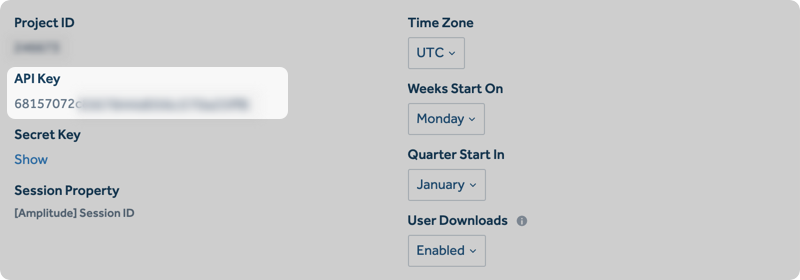
1. Navigate to your Amplitude's Manage Data Section, choose your app, and copy your API Key:
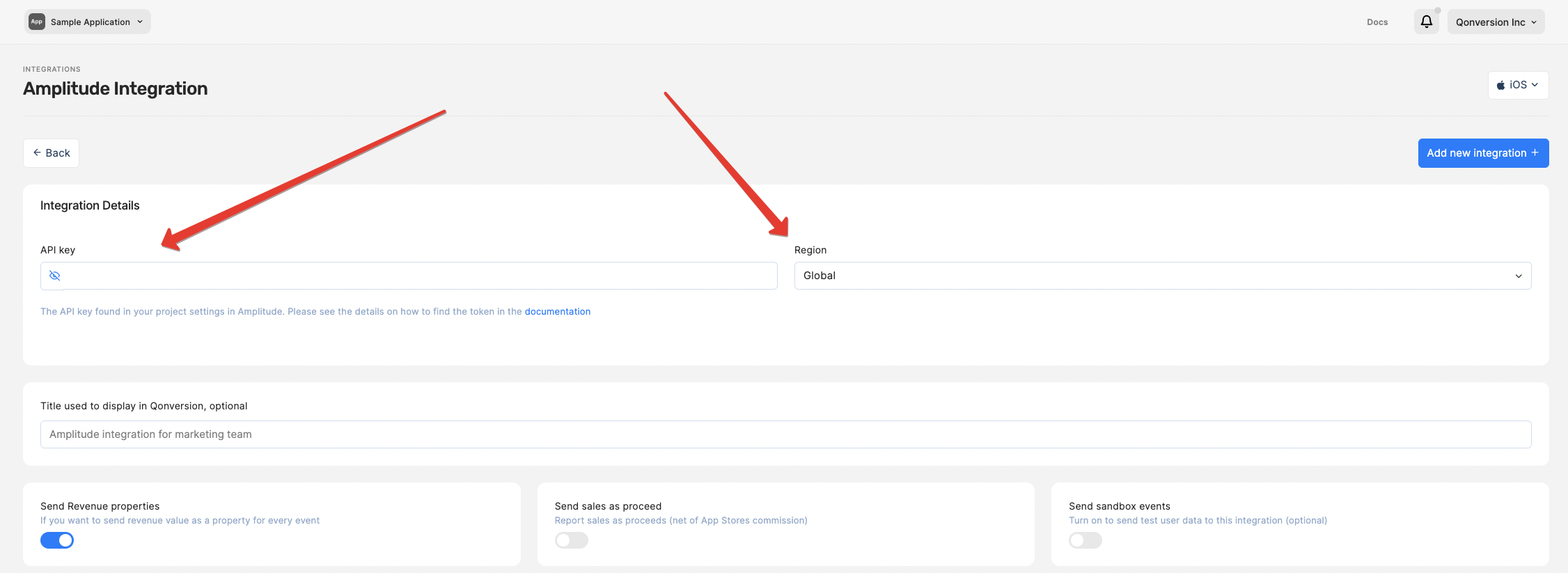
 2. Navigate to the Integrations section in your Qonversion project, select [Amplitude](https://dash.qonversion.io/app/integration/amplitude), and provide the API Key.
3. If your Amplitude account is hosted on EU servers, switch your region settings to Europe in the Qonversion Amplitude integration settings.
4. You can use the default event names provided by Qonversion or change them as you need.
2. Navigate to the Integrations section in your Qonversion project, select [Amplitude](https://dash.qonversion.io/app/integration/amplitude), and provide the API Key.
3. If your Amplitude account is hosted on EU servers, switch your region settings to Europe in the Qonversion Amplitude integration settings.
4. You can use the default event names provided by Qonversion or change them as you need.
 **→[Read more about tracked events here](integrations-overview#tracked-events)**
### Done!
Now Qonversion will start sending in-app purchases and subscriptions data to your Amplitude account.
## Event Payload
In case you need details about data sent to Amplitude, follow the example below:
Qonversion posts to Amplitude's `/2/httpapi` endpoint, which expects `{api_key, events: [...]}`. Each event includes the keys below. The advertising-id key is platform-dependent: iOS events include `idfa`, Android events include `adid`, and Stripe events omit both.
```json theme={null}
{
"api_key": "",
"events": [
{
"user_id": "yourSideUserID",
"time": 1590735145100,
"productId": "native.subs.full.v3.month.14.99.trial.7d",
"event_type": "trial_converted",
"insert_id": "5942",
"platform": "iOS",
"revenueType": "trial_converted",
"quantity": 1,
"storefront": "USA",
"app_version": "11.11",
"os_name": "iOS",
"os_version": "16.0",
"device_model": "iPhone15",
"country": "UK",
"device_id": "A77BE955-4CFC-A4F5-69D081217E9D3B",
"idfa": "00000000-0000-0000-0000-000000000000",
"revenue": 2.39
}
]
}
```
Amplitude only stores revenue in USD - non-USD currencies are converted server-side.
***
[Amazon S3](amazon-s3)
[AppMetrica](appmetrica)
**→[Read more about tracked events here](integrations-overview#tracked-events)**
### Done!
Now Qonversion will start sending in-app purchases and subscriptions data to your Amplitude account.
## Event Payload
In case you need details about data sent to Amplitude, follow the example below:
Qonversion posts to Amplitude's `/2/httpapi` endpoint, which expects `{api_key, events: [...]}`. Each event includes the keys below. The advertising-id key is platform-dependent: iOS events include `idfa`, Android events include `adid`, and Stripe events omit both.
```json theme={null}
{
"api_key": "",
"events": [
{
"user_id": "yourSideUserID",
"time": 1590735145100,
"productId": "native.subs.full.v3.month.14.99.trial.7d",
"event_type": "trial_converted",
"insert_id": "5942",
"platform": "iOS",
"revenueType": "trial_converted",
"quantity": 1,
"storefront": "USA",
"app_version": "11.11",
"os_name": "iOS",
"os_version": "16.0",
"device_model": "iPhone15",
"country": "UK",
"device_id": "A77BE955-4CFC-A4F5-69D081217E9D3B",
"idfa": "00000000-0000-0000-0000-000000000000",
"revenue": 2.39
}
]
}
```
Amplitude only stores revenue in USD - non-USD currencies are converted server-side.
***
[Amazon S3](amazon-s3)
[AppMetrica](appmetrica)