> ## Documentation Index
> Fetch the complete documentation index at: https://documentation.qonversion.io/llms.txt
> Use this file to discover all available pages before exploring further.
# Migrating from Adapty to Qonversion
> We have prepared this guide to help you move your infrastructure seamlessly from Adapty to Qonversion. Although this guide is comprehensive and should enable you to transfer the entire infrastructure smoothly, feel free to reach out to support if you have any questions.
1. [Configure dashboard](#configure-dashboard)
2. [Install SDKs](#install-sdks)
3. [User-base migration](#user-base-migration)
## Configure dashboard
First and foremost, [register](https://go.qonversion.io/8C4r) at Qonversion. Registration will take you through an onboarding process, where you'll have to fill out information about your project and insert links — all to help you add your project to Qonversion. We highly recommend following this flow and not skipping any settings during registration. We'll also cover the scenario if you don't fill these out.
### Store Settings
First, let's set up your Stores in the Qonversion dashboard. To do this, gather the necessary data from Adapty.
#### Apple App Store settings
To configure the Apple App Store in Qonversion, you will need the following fields:
1. **App-Specific Shared Secret**: Copy this value from the App Store Connect shared secret field in the App Settings -> iOS SDK section in the Adapty dashboard. [Here's](ios-app-store-info-fields#2-generate-the-app-specific-shared-secret) a more detailed guide on how to obtain this.
2. **App Store ID**: You'll find your App Store ID in the URL of your App Store Connect account. For example, if your URL is something like `https://apps.apple.com/us/app/example-app/id123456789`, then 123456789 is your app’s Apple ID.
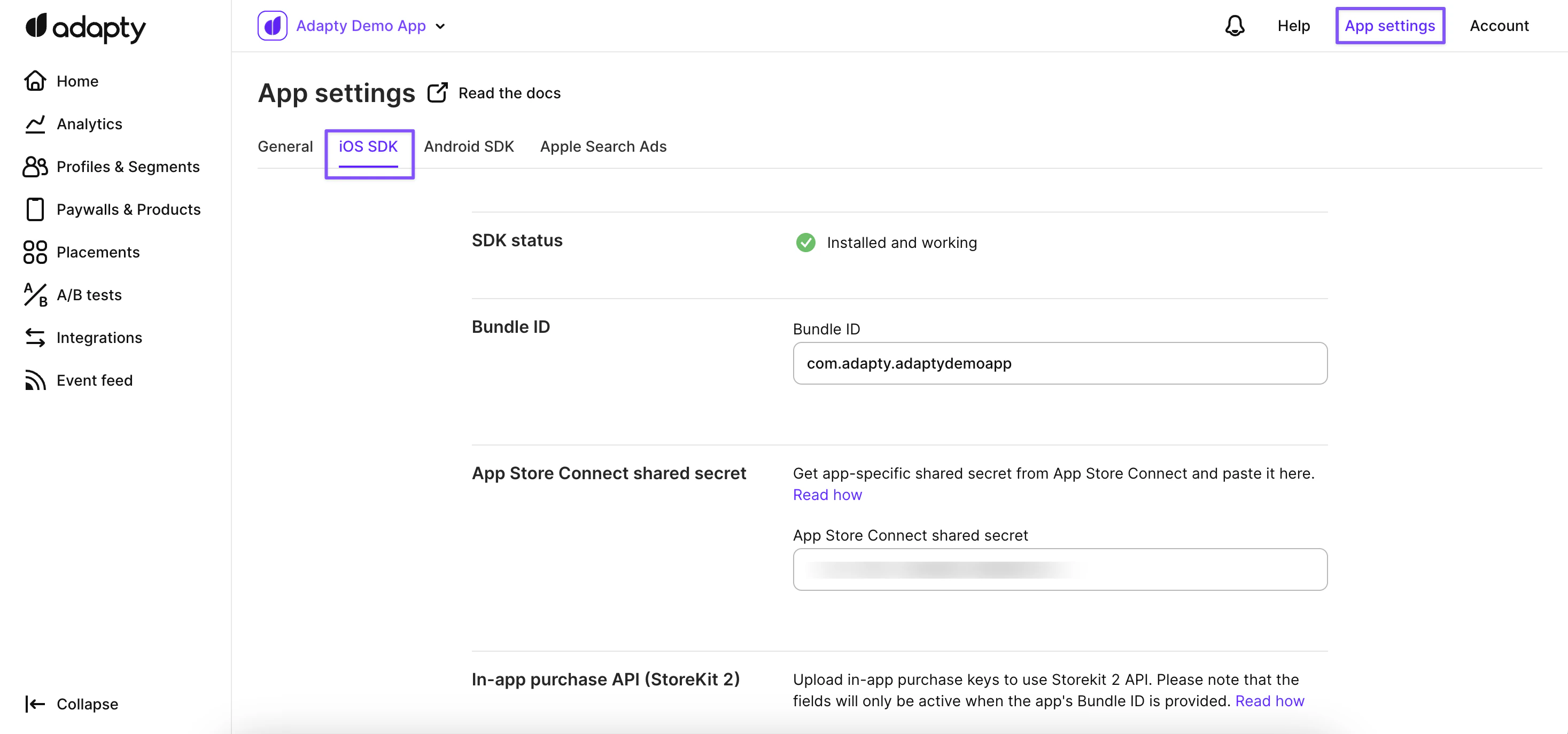 #### Google Play Console Settings
Here's what you have at Adapty:
#### Google Play Console Settings
Here's what you have at Adapty:
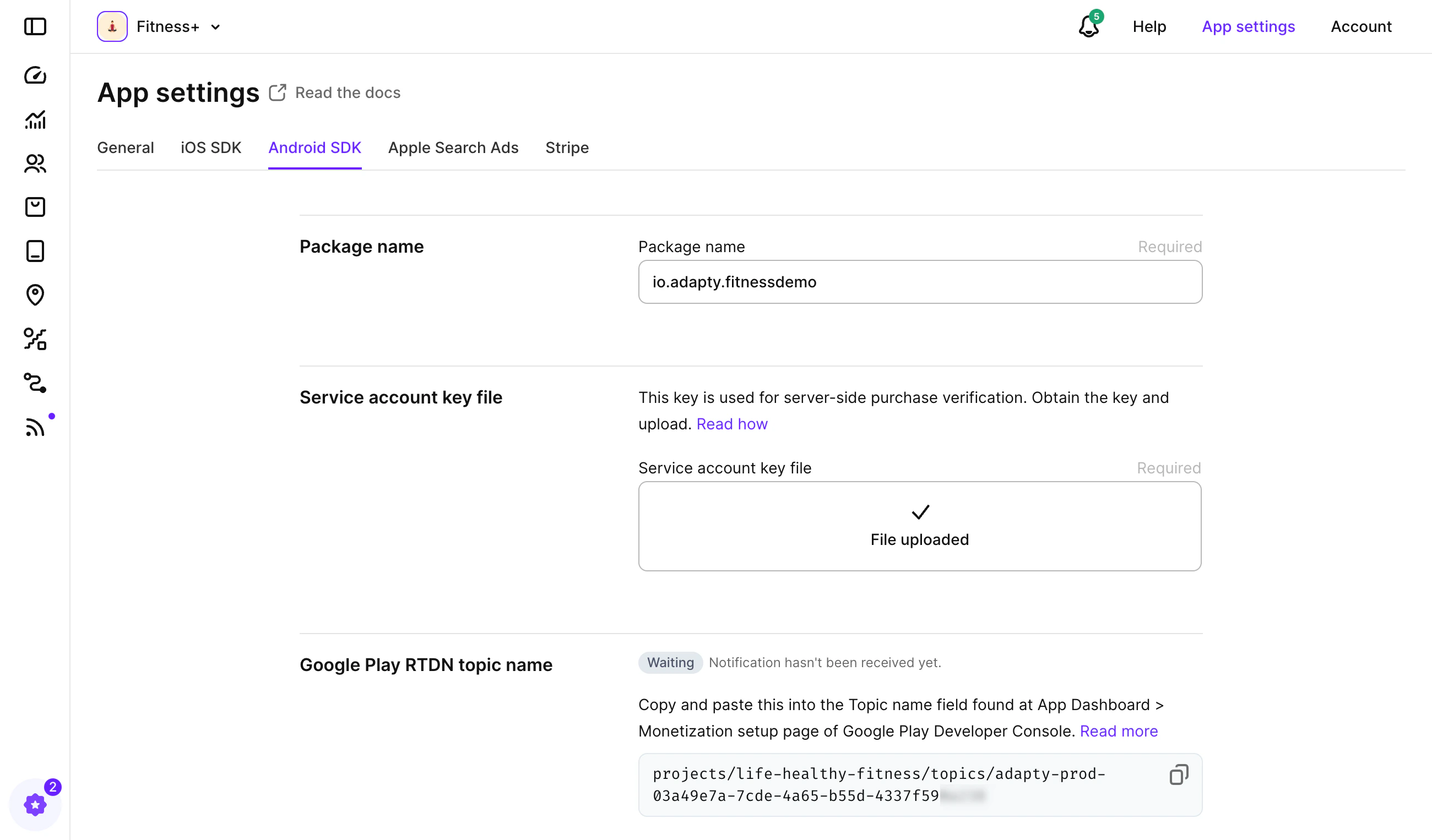 To set up your Google Play account in Qonversion, you will need the following:
1. **Android Package Name**: This is the applicationID found in your app-level build.gradle file. You can either copy it from there or use the **Package Name** from your Adapty settings.
2. **Service Account Credentials JSON**: Copy the value from the **Service account key file** shown in the screenshot above, or attach the same file you used with Adapty. [Here's more](android-store-setup) on how you can get Google Play Service Account Key.
### Configure Stores in Qonversion
Once you have all the necessary data from Adapty, follow the steps to fill in the required Stores in Qonversion
[Stores Settings](https://demo.arcade.software/Eq6Y1v6okCVCUhOcYfUF?embed\&embed_mobile=inline\&embed_desktop=inline\&show_copy_link=true)
### Products, Entitlements and Remote Configs
After you've filled the store data, it's time to set up Remote Configs, Products, and Entitlements. Here's another way to describe these elements:
| Adapty | Qonversion |
| ------------- | ------------ |
| Access levels | Entitlements |
| Products | Products |
| Paywalls | Offerings |
#### Entitlements (Access levels)
Let's start with Entitlements. Similar to how you set up Access levels in Adapty, you need to set up Entitlements in Qonversion.
Here’s how it was done in Adapty:
To set up your Google Play account in Qonversion, you will need the following:
1. **Android Package Name**: This is the applicationID found in your app-level build.gradle file. You can either copy it from there or use the **Package Name** from your Adapty settings.
2. **Service Account Credentials JSON**: Copy the value from the **Service account key file** shown in the screenshot above, or attach the same file you used with Adapty. [Here's more](android-store-setup) on how you can get Google Play Service Account Key.
### Configure Stores in Qonversion
Once you have all the necessary data from Adapty, follow the steps to fill in the required Stores in Qonversion
[Stores Settings](https://demo.arcade.software/Eq6Y1v6okCVCUhOcYfUF?embed\&embed_mobile=inline\&embed_desktop=inline\&show_copy_link=true)
### Products, Entitlements and Remote Configs
After you've filled the store data, it's time to set up Remote Configs, Products, and Entitlements. Here's another way to describe these elements:
| Adapty | Qonversion |
| ------------- | ------------ |
| Access levels | Entitlements |
| Products | Products |
| Paywalls | Offerings |
#### Entitlements (Access levels)
Let's start with Entitlements. Similar to how you set up Access levels in Adapty, you need to set up Entitlements in Qonversion.
Here’s how it was done in Adapty:
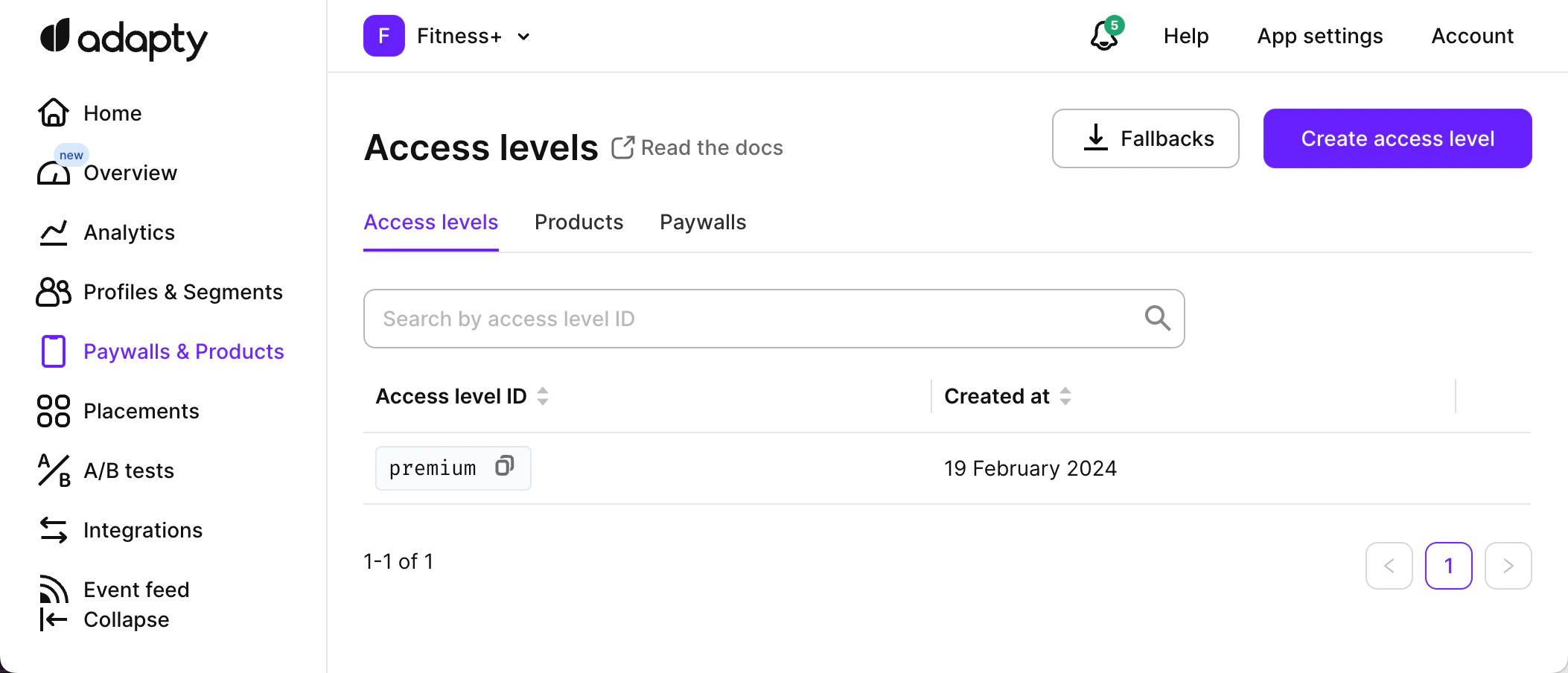 Here’s how to do it in Qonversion:
Navigate to the Entitlements and click the **Create Entitlement** button.
[Create entitlements](https://demo.arcade.software/dYOIEanZRhOmQ9zidazH?embed\&embed_mobile=inline\&embed_desktop=inline\&show_copy_link=true)
#### Products
Next, you need to create Products similar to how you created in Adapty:
Here’s how to do it in Qonversion:
Navigate to the Entitlements and click the **Create Entitlement** button.
[Create entitlements](https://demo.arcade.software/dYOIEanZRhOmQ9zidazH?embed\&embed_mobile=inline\&embed_desktop=inline\&show_copy_link=true)
#### Products
Next, you need to create Products similar to how you created in Adapty:
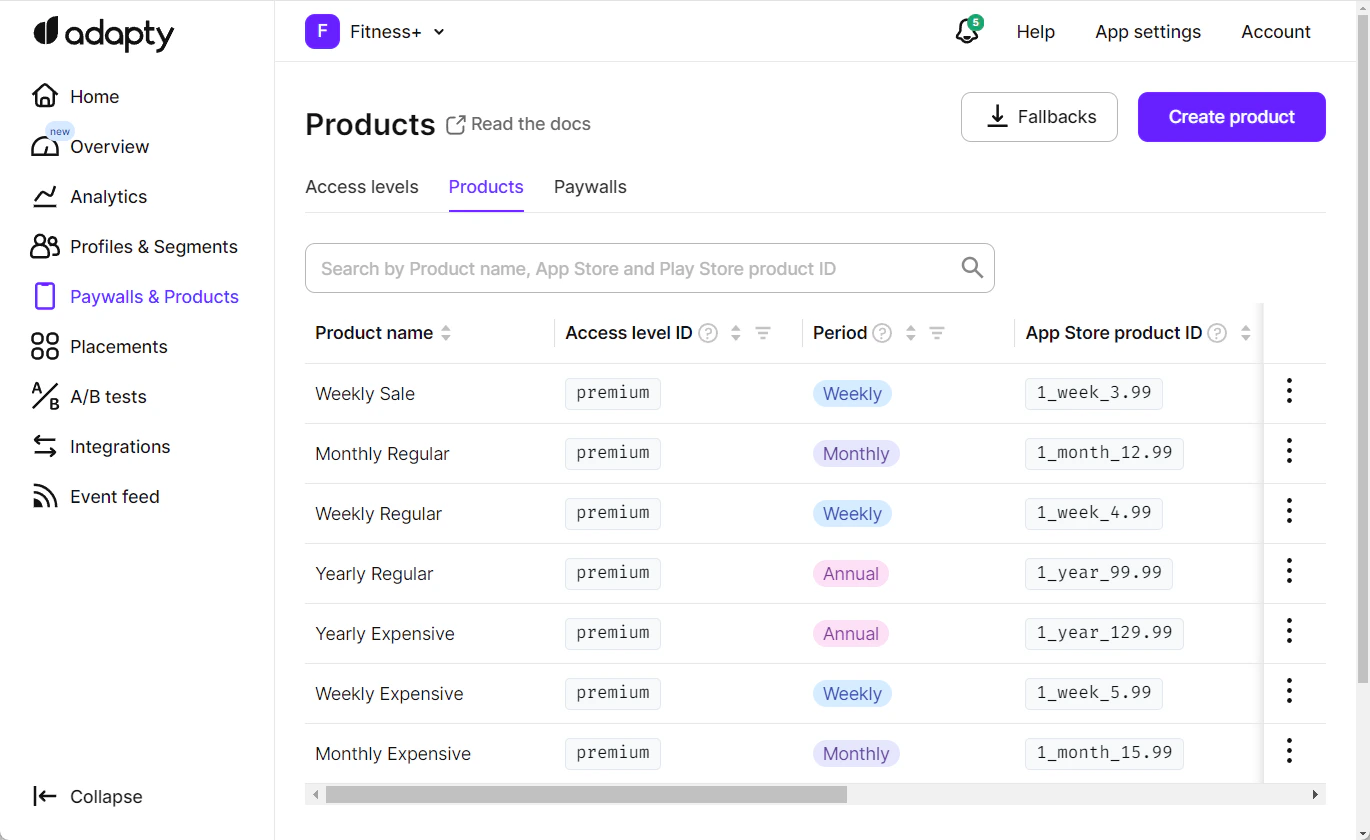 To create Products in Qonversion, go to **Entitlements → Products** and click **Create Product**.
[Entitlements – Products](https://demo.arcade.software/Evi7fa9nT4xmjzuavh4j?embed\&embed_mobile=inline\&embed_desktop=inline\&show_copy_link=true)
* **Qonversion Product ID** is your unique product identifier in Qonversion that corresponds to a unique product on the Apple App Store and Google Play Store. Qonversion SDK will use it to make purchases.
* **AppStore Product ID** – product identifier on Apple App Store. Learn more on how to create [subscriptions on iOS](https://qonversion.io/blog/configure-iap-app-store-connect/).
* **Google Play Product ID** – product identifier on Google Play Console. Learn more on how to set up [Android in-app products ](android-in-app-products).
* **Google Play Base Plan ID** - identifier of the base plan for Google Play Product. This is used for subscription products. If you're creating an in-app, leave this field empty for in-apps. In Qonversion, you will set up different products for the different base plans of the same product.
* **Associated Entitlements** - choose the entitlements that should be granted once this product is purchased.
#### Offerings
Offerings are designed as a remote configuration to present particular products on specific paywalls. Moreover, you can change the products without additional app releases.
For example, you can offer one set of products on a paywall immediately after an onboarding flow is completed and another with discounts if a user has not converted later..
[Create Offerings](https://demo.arcade.software/4OeIiqTaXHUzarxCOITJ?embed\&embed_mobile=inline\&embed_desktop=inline\&show_copy_link=true)
### Server-to-server notifications
To seamlessly implement server-to-server notifications, use Adapty S2S URLs as a temporary proxy in our system. This allows Qonversion to process new requests while still sending notifications to your existing users.
#### Configure Apple App Store
1. Navigate to your Qonversion [project settings](https://dash.qonversion.io/project-settings/stores?tab=ios). Copy the server-to-server notification URL for Apple App Store.
2. Sign in to [App Store Connect](https://appstoreconnect.apple.com/apps) and select your app.
3. Navigate to the App Information section.
To create Products in Qonversion, go to **Entitlements → Products** and click **Create Product**.
[Entitlements – Products](https://demo.arcade.software/Evi7fa9nT4xmjzuavh4j?embed\&embed_mobile=inline\&embed_desktop=inline\&show_copy_link=true)
* **Qonversion Product ID** is your unique product identifier in Qonversion that corresponds to a unique product on the Apple App Store and Google Play Store. Qonversion SDK will use it to make purchases.
* **AppStore Product ID** – product identifier on Apple App Store. Learn more on how to create [subscriptions on iOS](https://qonversion.io/blog/configure-iap-app-store-connect/).
* **Google Play Product ID** – product identifier on Google Play Console. Learn more on how to set up [Android in-app products ](android-in-app-products).
* **Google Play Base Plan ID** - identifier of the base plan for Google Play Product. This is used for subscription products. If you're creating an in-app, leave this field empty for in-apps. In Qonversion, you will set up different products for the different base plans of the same product.
* **Associated Entitlements** - choose the entitlements that should be granted once this product is purchased.
#### Offerings
Offerings are designed as a remote configuration to present particular products on specific paywalls. Moreover, you can change the products without additional app releases.
For example, you can offer one set of products on a paywall immediately after an onboarding flow is completed and another with discounts if a user has not converted later..
[Create Offerings](https://demo.arcade.software/4OeIiqTaXHUzarxCOITJ?embed\&embed_mobile=inline\&embed_desktop=inline\&show_copy_link=true)
### Server-to-server notifications
To seamlessly implement server-to-server notifications, use Adapty S2S URLs as a temporary proxy in our system. This allows Qonversion to process new requests while still sending notifications to your existing users.
#### Configure Apple App Store
1. Navigate to your Qonversion [project settings](https://dash.qonversion.io/project-settings/stores?tab=ios). Copy the server-to-server notification URL for Apple App Store.
2. Sign in to [App Store Connect](https://appstoreconnect.apple.com/apps) and select your app.
3. Navigate to the App Information section.
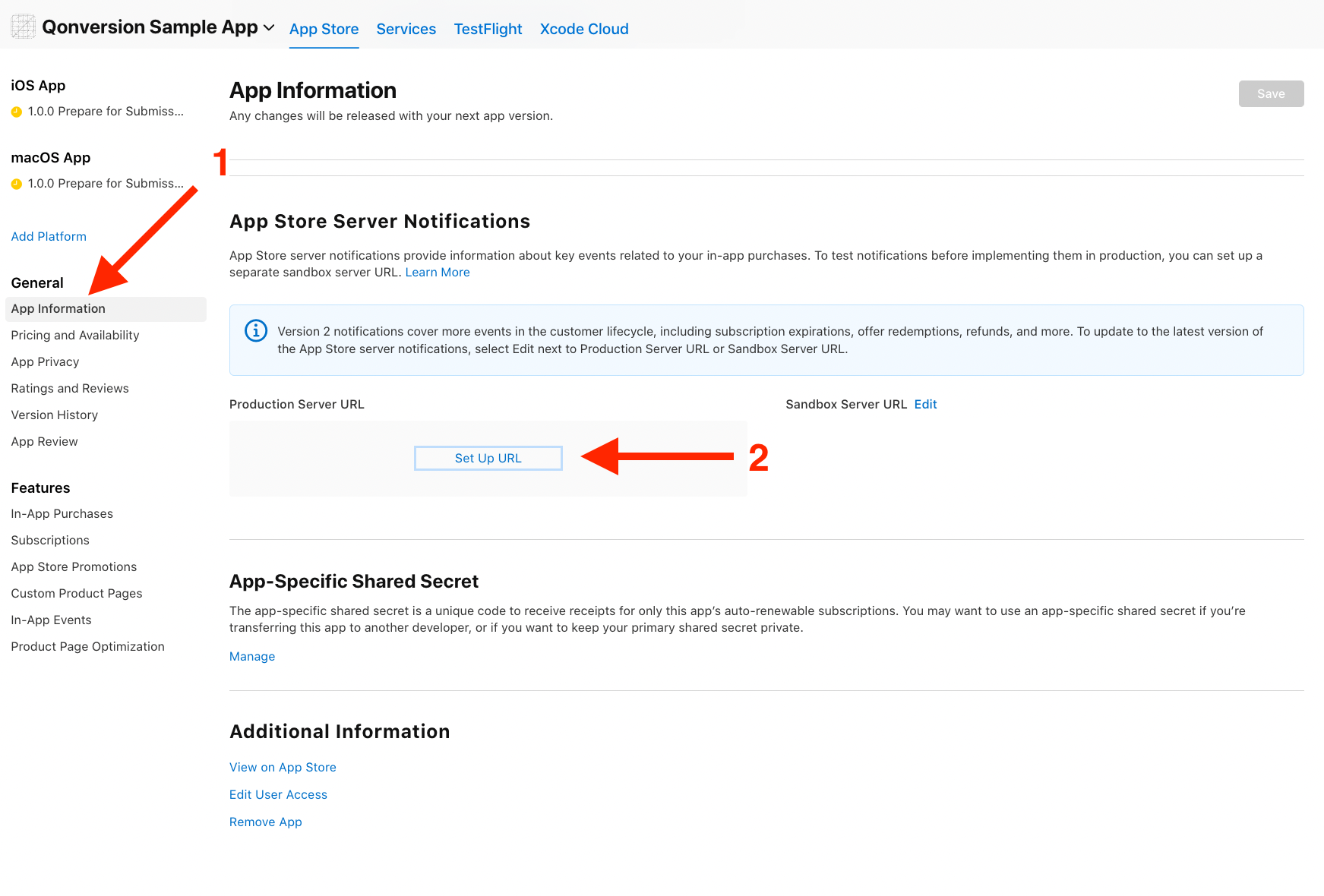 4. Copy the Adapty URL you used for server-to-server notifications and replace it with the URL from step 1.
5. Set up the Adapty URL as a Proxy URL in Qonversion in [project settings](https://dash.qonversion.io/project-settings/stores?tab=ios).
See more information [here](ios-s2s-notifications).
#### Google Developer Notifications
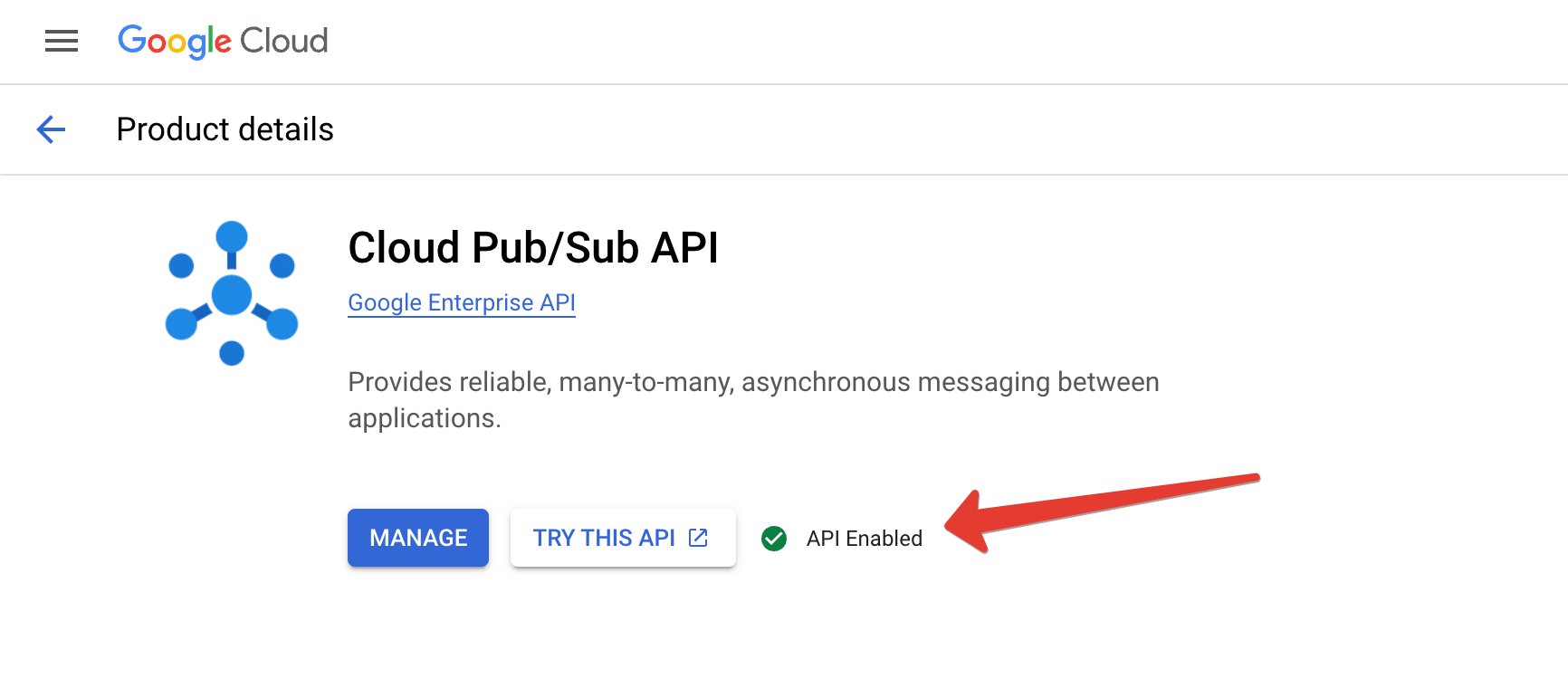
1. [Enable access to API here](https://console.cloud.google.com/flows/enableapi?apiid=pubsub).
4. Copy the Adapty URL you used for server-to-server notifications and replace it with the URL from step 1.
5. Set up the Adapty URL as a Proxy URL in Qonversion in [project settings](https://dash.qonversion.io/project-settings/stores?tab=ios).
See more information [here](ios-s2s-notifications).
#### Google Developer Notifications
1. [Enable access to API here](https://console.cloud.google.com/flows/enableapi?apiid=pubsub).
 2. Navigate to [project settings](https://dash.qonversion.io/project-settings/stores?tab=android), then click the "Connect to Google" button.
3. You need to copy generated **Google Developer Notifications Topic ID**.
4. Open the **Google Play Console** for your application, then navigate to **Monetization setup**.
5. In the **Real-time developer notifications** tab, insert your topic ID, click on **Save changes**, and then the **Send Test Notification** button.
It takes up to 24 hours for your [Google service credentials](android-store-setup) to work correctly. Make sure to wait for at least 24 hours after you have created the credentials before connecting to Google Real-Time Developer Notifications.
See more information [here](google-developer-notifications).
## Install SDKs
Check out the links below for the SDK you need and follow the steps provided:
→ [iOS SDK](ios-sdk-setup) → [Android SDK](android-sdk) → [Flutter SDK](flutter-sdk) → [React Native SDK](react-native-sdk) → [Unity SDK](unity-sdk) → [Cordova Plugin](cordova) → [Capacitor Plugin](capacitor) → [Web](web-sdk) → [Kids Mode Qonversion SDKs](kids-mode-sdk)
Read more about [Installing the SDKs](install-sdk).
When you're done with the setup, it's time to get into the code!
### Launch SDK
Firstly, you need to initialize the SDK. Here's how you did it in Adapty:
```swift Swift theme={null}
func application(_ application: UIApplication, didFinishLaunchingWithOptions launchOptions: [UIApplication.LaunchOptionsKey: Any]?) -> Bool {
let configurationBuilder =
Adapty.Configuration
.Builder(withAPIKey: "PUBLIC_SDK_KEY")
.with(observerMode: false)
Adapty.activate(with: configurationBuilder) { error in
// handle the error
}
}
```
```java Java theme={null}
public class App extends Application {
@Override
public void onCreate() {
super.onCreate()
Adapty.activate(
applicationContext,
new AdaptyConfig.Builder("PUBLIC_SDK_KEY")
.withObserverMode(false)
.build()
);
}
}
```
```kotlin Kotlin theme={null}
class App : Application() {
override fun onCreate() {
super.onCreate()
Adapty.activate(
applicationContext,
AdaptyConfig.Builder("PUBLIC_SDK_KEY")
.withObserverMode(false)
.build()
}
}
```
```dart Flutter theme={null}
// Few different steps with iOS Info.plist and AndroidManifest.xml files.
// That can be removed while migrating to Qonversion.
// And then call:
try {
Adapty().activate();
} on AdaptyError catch (adaptyError) {}
} catch (e) {}
```
```typescript React Native theme={null}
adapty.activate('PUBLIC_SDK_KEY', {
observerMode: false
});
```
```csharp Unity theme={null}
// Few different steps with iOS Info.plist and AndroidManifest.xml files.
// Create a script which will be responsible for listening of Adapty events.
// Few other steps
```
Here's how you'll do it for Qonversion.
```swift Swift theme={null}
import Qonversion
func application(_ application: UIApplication, didFinishLaunchingWithOptions launchOptions: [UIApplication.LaunchOptionsKey: Any]?) -> Bool {
let config = Qonversion.Configuration(projectKey: "projectKey", launchMode: .subscriptionManagement)
Qonversion.initWithConfig(config)
return true
}
```
```objectivec Objective-C theme={null}
#import "Qonversion.h"
- (BOOL)application:(UIApplication *)application didFinishLaunchingWithOptions:(NSDictionary *)launchOptions {
QONConfiguration *configuration = [[QONConfiguration alloc] initWithProjectKey:@"projectKey" launchMode:QONLaunchModeSubscriptionManagement];
[Qonversion initWithConfig:configuration];
return YES;
}
```
```java Java theme={null}
import com.qonversion.android.sdk.Qonversion;
import com.qonversion.android.sdk.QonversionConfig;
import com.qonversion.android.sdk.dto.QLaunchMode;
public class App extends Application {
@Override
public void onCreate() {
super.onCreate();
final QonversionConfig qonversionConfig = new QonversionConfig.Builder(
this,
"projectKey",
QLaunchMode.SubscriptionManagement
).build();
Qonversion.initialize(qonversionConfig);
}
}
```
```kotlin Kotlin theme={null}
import com.qonversion.android.sdk.Qonversion
import com.qonversion.android.sdk.QonversionConfig
import com.qonversion.android.sdk.dto.QLaunchMode
class App : Application() {
override fun onCreate() {
super.onCreate()
val qonversionConfig = QonversionConfig.Builder(
this,
"projectKey",
QLaunchMode.SubscriptionManagement
).build()
Qonversion.initialize(qonversionConfig)
}
}
```
```dart Flutter theme={null}
import 'package:qonversion_flutter/qonversion_flutter.dart';
final config = new QonversionConfigBuilder(
'projectKey',
QLaunchMode.subscriptionManagement
).build();
Qonversion.initialize(config);
```
```typescript React Native theme={null}
import Qonversion, {
QonversionConfigBuilder,
LaunchMode,
} from '@qonversion/react-native-sdk';
const config = new QonversionConfigBuilder(
'projectKey',
LaunchMode.SUBSCRIPTION_MANAGEMENT
).build();
Qonversion.initialize(config);
```
```csharp Unity theme={null}
using QonversionUnity;
private void Start()
{
QonversionConfig config = new QonversionConfigBuilder(
"projectKey",
LaunchMode.SubscriptionManagement
).Build();
Qonversion.Initialize(config);
}
```
```typescript Cordova theme={null}
const config = new Qonversion.ConfigBuilder(
'projectKey',
Qonversion.LaunchMode.SUBSCRIPTION_MANAGEMENT,
).build();
Qonversion.initialize(config);
```
```typescript Capacitor theme={null}
import Qonversion, {
QonversionConfigBuilder,
LaunchMode,
} from '@qonversion/capacitor-plugin';
const config = new QonversionConfigBuilder(
'projectKey',
LaunchMode.SUBSCRIPTION_MANAGEMENT
).build();
Qonversion.initialize(config);
```
### Displaying products
In Adapty you did it using paywalls.
```swift Swift theme={null}
Adapty.getPaywallProducts(paywall: paywall) { result in
switch result {
case let .success(products):
// the requested products array
case let .failure(error):
// handle the error
}
}
```
```kotlin Kotlin theme={null}
Adapty.getPaywallProducts(paywall) { result ->
when (result) {
is AdaptyResult.Success -> {
val products = result.value
// the requested products
}
is AdaptyResult.Error -> {
val error = result.error
// handle the error
}
}
}
```
```java Java theme={null}
Adapty.getPaywallProducts(paywall, result -> {
if (result instanceof AdaptyResult.Success) {
List products = ((AdaptyResult.Success>) result).getValue();
// the requested products
} else if (result instanceof AdaptyResult.Error) {
AdaptyError error = ((AdaptyResult.Error) result).getError();
// handle the error
}
});
```
```dart Flutter theme={null}
try {
final products = await Adapty().getPaywallProducts(paywall: paywall);
// the requested products array
} on AdaptyError catch (adaptyError) {
// handle the error
} catch (e) {
}
```
```csharp Unity theme={null}
Adapty.GetPaywallProducts(paywall, (products, error) => {
if(error != null) {
// handle the error
return;
}
// products - the requested products array
});
```
```typescript React Native (TS) theme={null}
try {
// ...paywall
const products = await adapty.getPaywallProducts(paywall);
// the requested products list
} catch (error) {
// handle the error
}
```
In Qonversion you can simply fetch products and display them using offerings:
```swift Swift theme={null}
Qonversion.shared().offerings { (offerings, error) in
if let products = offerings?.main?.products {
// Display products for sale
}
}
```
```objectivec Objective-C theme={null}
[[Qonversion sharedInstance] offerings:^(QONOfferings * _Nullable offerings, NSError * _Nullable error) {
if (offerings.main.products.count > 0) {
// Display products for sale
}
}];
```
```java Java theme={null}
Qonversion.getSharedInstance().offerings(new QonversionOfferingsCallback() {
@Override
public void onSuccess(@NotNull QOfferings offerings) {
if (offerings.getMain() != null && !offerings.getMain().getProducts().isEmpty()) {
// Display products for sale
}
}
@Override
public void onError(@NotNull QonversionError error) {
// handle error here
}
});
```
```kotlin Kotlin theme={null}
Qonversion.shared.offerings(object: QonversionOfferingsCallback {
override fun onSuccess(offerings: QOfferings) {
val mainOffering = offerings.main
if (mainOffering != null && mainOffering.products.isNotEmpty()) {
// Display products for sale
}
}
override fun onError(error: QonversionError) {
// handle error here
}
})
```
```dart Flutter theme={null}
try {
final QOfferings offerings = await Qonversion.getSharedInstance().offerings();
final List products = offerings.main.products;
if (products.isNotEmpty) {
// Display your products
}
} catch (e) {
print(e);
}
```
```typescript React Native theme={null}
try {
const offerings = await Qonversion.getSharedInstance().offerings();
if (offerings.main != null && offerings.main.products.length > 0) {
// Display products for sale
}
} catch (e) {
// handle error here
}
```
```csharp Unity theme={null}
Qonversion.GetSharedInstance().Offerings((offerings, error) =>
{
if (error == null)
{
Offering mainOffering = offerings.Main;
if(mainOffering != null)
{
List products = mainOffering.Products;
if (products.Any())
{
// Display your products
}
}
}
else
{
// Handle the error
Debug.Log("Error" + error.ToString());
}
});
```
```typescript Cordova theme={null}
try {
const offerings = await Qonversion.getSharedInstance().offerings();
if (offerings.main != null && offerings.main.products.length > 0) {
// Display products for sale
}
} catch (e) {
// handle error here
}
```
```typescript Capacitor theme={null}
try {
const offerings = await Qonversion.getSharedInstance().offerings();
if (offerings.main != null && offerings.main.products.length > 0) {
// Display products for sale
}
} catch (e) {
// handle error here
}
```
[See more about Offerings](offerings)
### Making purchases
Adapty:
```swift Swift theme={null}
Adapty.makePurchase(product: product) { result in
switch result {
case let .success(info):
if info.profile.accessLevels["YOUR_ACCESS_LEVEL"]?.isActive ?? false {
// successful purchase
}
case let .failure(error):
// handle the error
}
}
```
```kotlin Kotlin theme={null}
Adapty.makePurchase(activity, product) { result ->
when (result) {
is AdaptyResult.Success -> {
val info = result.value
//NOTE: info is null in case of cross-grade with DEFERRED proration mode
val profile = info?.profile
if (profile?.accessLevels?.get("YOUR_ACCESS_LEVEL")?.isActive == true) {
// grant access to premium features
}
}
is AdaptyResult.Error -> {
val error = result.error
// handle the error
}
}
}
```
```java Java theme={null}
Adapty.makePurchase(activity, product, result -> {
if (result instanceof AdaptyResult.Success) {
AdaptyPurchasedInfo info = ((AdaptyResult.Success) result).getValue();
//NOTE: info is null in case of cross-grade with DEFERRED proration mode
AdaptyProfile profile = info != null ? info.getProfile() : null;
if (profile != null) {
AdaptyProfile.AccessLevel premium = profile.getAccessLevels().get("YOUR_ACCESS_LEVEL");
if (premium != null && premium.isActive()) {
// successful purchase
}
}
} else if (result instanceof AdaptyResult.Error) {
AdaptyError error = ((AdaptyResult.Error) result).getError();
// handle the error
}
});
```
```dart Flutter theme={null}
try {
final profile = await Adapty().makePurchase(product: product);
if (profile?.accessLevels['YOUR_ACCESS_LEVEL']?.isActive ?? false) {
// successful purchase
}
} on AdaptyError catch (adaptyError) {
// handle the error
} catch (e) {
}
```
```csharp Unity theme={null}
Adapty.MakePurchase(product, (profile, error) => {
if(error != null) {
// handle error
return;
}
var accessLevel = profile.AccessLevels["YOUR_ACCESS_LEVEL"];
if (accessLevel != null && accessLevel.IsActive) {
// grant access to features
}
});
```
```typescript React Native (TS) theme={null}
try {
const profile = await adapty.makePurchase(product);
const isSubscribed = profile?.accessLevels['YOUR_ACCESS_LEVEL']?.isActive;
if (isSubscribed) {
// grant access to features in accordance with access level
}
} catch (error) {
// handle the error
}
```
Qonversion:
```swift Swift theme={null}
Qonversion.shared().purchase(product) { (result) in
if result.isSuccessful {
if let premium: Qonversion.Entitlement = result.entitlements["premium"], premium.isActive {
// Grant user access to premium features
}
} else if result.isCanceledByUser {
// Handle canceled purchase
} else if result.isPending {
// Handle pending purchase
} else {
// Handle errors
}
}
```
```objectivec Objective-C theme={null}
[[Qonversion sharedInstance] purchaseWithResult:product completion:^(QONPurchaseResult * _Nonnull result) {
if (result.isSuccessful) {
QONEntitlement *premiumEntitlement = result.entitlements[@"premium"];
if (premiumEntitlement && premiumEntitlement.isActive) {
// Grant user access to premium features
}
} else if (result.isCanceledByUser) {
// Handle canceled purchase
} else if (result.isPending) {
// Handle pending purchase
} else {
// Handle errors
}
}];
```
```java Java theme={null}
Qonversion.getSharedInstance().purchase(this, product, new QonversionPurchaseCallback() {
@Override
public void onResult(@NonNull QPurchaseResult result) {
if (result.isSuccessful()) {
QEntitlement premium = result.getEntitlements().get("premium");
if (premium != null && premium.isActive()) {
// Grant user access to premium features
}
} else if (result.isCanceledByUser()) {
// Handle canceled purchase
} else if (result.isPending()) {
// Handle pending purchase
} else {
// Handle errors
}
}
});
```
```kotlin Kotlin theme={null}
Qonversion.shared.purchase(this, product, object : QonversionPurchaseCallback {
override fun onResult(result: QPurchaseResult) {
when {
result.isSuccessful -> {
val premium = result.entitlements["premium"]
if (premium != null && premium.isActive) {
// Grant user access to premium features
}
}
result.isCanceledByUser -> {
// Handle canceled purchase
}
result.isPending -> {
// Handle pending purchase
}
else -> {
// Handle errors
}
}
}
})
```
```dart Flutter theme={null}
final result = await Qonversion.getSharedInstance().purchaseWithResult(product);
if (result.isSuccess) {
final premium = result.entitlements?['premium'];
if (premium != null && premium.isActive) {
// Grant user access to premium features
}
} else if (result.isCanceled) {
// Handle canceled purchase
} else if (result.isPending) {
// Handle pending purchase
} else {
// Handle errors
}
```
```typescript React Native theme={null}
const result: PurchaseResult = await Qonversion.getSharedInstance().purchaseWithResult(product);
if (result.isSuccess) {
const premium = result.entitlements?.get('premium');
if (premium && premium.isActive) {
// Grant user access to premium features
}
} else if (result.isCanceled) {
// Handle canceled purchase
} else if (result.isPending) {
// Handle pending purchase
} else {
// Handle errors
}
```
```csharp Unity theme={null}
Qonversion.GetSharedInstance().Purchase(product, (result) =>
{
if (result.IsSuccess)
{
if (result.Entitlements != null &&
result.Entitlements.TryGetValue("premium", out var premium) &&
premium.IsActive)
{
// Grant user access to premium features
}
}
else if (result.IsCanceled)
{
// Handle canceled purchase
}
else if (result.IsPending)
{
// Handle pending purchase
}
else
{
// Handle errors
}
});
```
```typescript Cordova theme={null}
const result = await Qonversion.getSharedInstance().purchase(product);
if (result.isSuccess) {
const premium = result.entitlements?.get('premium');
if (premium && premium.isActive) {
// Grant user access to premium features
}
} else if (result.isCanceled) {
// Handle canceled purchase
} else if (result.isPending) {
// Handle pending purchase
} else {
// Handle errors
}
```
```typescript Capacitor theme={null}
const result = await Qonversion.getSharedInstance().purchase(product);
if (result.isSuccess) {
const premium = result.entitlements?.get('premium');
if (premium && premium.isActive) {
// Grant user access to premium features
}
} else if (result.isCanceled) {
// Handle canceled purchase
} else if (result.isPending) {
// Handle pending purchase
} else {
// Handle errors
}
```
### Restore purchases
If your app has a restore purchases feature on paywalls, just use the Qonversion `restore()` function when users want to restore their purchases.
```swift Swift theme={null}
Qonversion.shared().restore { [weak self] (entitlements, error) in
if let error = error {
// Handle error
}
if let entitlement: Qonversion.Entitlement = entitlements["plus"], entitlement.isActive {
// Restored and entitlement is active
}
```
```objectivec Objective-C theme={null}
[[Qonversion sharedInstance] restore:^(NSDictionary * _Nonnull result, NSError * _Nullable error) {
if (error) {
// Handle error
}
QONEntitlement *entitlement = result[@"active"];
if (entitlement && entitlement.isActive) {
// Restored and entitlement is active
}
}];
```
```java Java theme={null}
Qonversion.getSharedInstance().restore(new QonversionEntitlementsCallback() {
@Override
public void onSuccess(@NotNull Map entitlements) {
QEntitlement premiumEntitlement = entitlements.get("premium");
if (premiumEntitlement != null && premiumEntitlement.isActive()) {
// handle active entitlement here
}
}
@Override
public void onError(@NotNull QonversionError error) {
// handle error here
}
});
```
```kotlin Kotlin theme={null}
Qonversion.shared.restore(object : QonversionEntitlementsCallback {
override fun onSuccess(entitlements: Map) {
val premiumEntitlement = entitlements["premium"]
if (premiumEntitlement != null && premiumEntitlement.isActive) {
// handle active entitlement here
}
}
override fun onError(error: QonversionError) {
// handle error here
}
})
```
```dart Flutter theme={null}
try {
final Map entitlements = await Qonversion.getSharedInstance().restore();
} catch (e) {
print(e);
}
```
```typescript React Native theme={null}
try {
const entitlements: Map = await Qonversion.getSharedInstance().restore();
} catch (e) {
console.log(e);
}
```
```csharp Unity theme={null}
Qonversion.GetSharedInstance().Restore((entitlements, error) =>
{
if (error == null)
{
// Handle entitlements here
}
else
{
// Handle the error
Debug.Log("Error" + error.ToString());
}
});
```
```typescript Cordova theme={null}
try {
const entitlements = await Qonversion.getSharedInstance().restore();
} catch (e) {
console.log(e);
}
```
```typescript Capacitor theme={null}
try {
const entitlements: Map = await Qonversion.getSharedInstance().restore();
} catch (e) {
console.log(e);
}
```
### User status
To check the customer status in Qonversion, you need to use Entitlements. In Adapty, you used profile and access levels.
Adapty:
```swift Swift theme={null}
Adapty.getProfile { result in
if let profile = try? result.get() {
// check the access
profile.accessLevels["YOUR_ACCESS_LEVEL"]?.isActive ?? false {
// grant access to premium features
}
}
}
```
```kotlin Kotlin theme={null}
Adapty.getProfile { result ->
when (result) {
is AdaptyResult.Success -> {
val profile = result.value
// check the access
}
is AdaptyResult.Error -> {
val error = result.error
// handle the error
}
}
}
```
```java Java theme={null}
Adapty.getProfile(result -> {
if (result instanceof AdaptyResult.Success) {
AdaptyProfile profile = ((AdaptyResult.Success) result).getValue();
// check the access
} else if (result instanceof AdaptyResult.Error) {
AdaptyError error = ((AdaptyResult.Error) result).getError();
// handle the error
}
});
```
```dart Flutter theme={null}
try {
final profile = await Adapty().getProfile();
// check the access
} on AdaptyError catch (adaptyError) {
// handle the error
} catch (e) {
}
```
```csharp Unity theme={null}
Adapty.GetProfile((profile, error) => {
if (error != null) {
// handle the error
return;
}
// check the access
});
```
```typescript React Native (TS) theme={null}
try {
const profile = await adapty.getProfile();
} catch (error) {
// handle the error
}
```
Qonversion:
```swift Swift theme={null}
Qonversion.shared().checkEntitlements { (entitlements, error) in
if let error = error {
// handle error
return
}
if let premium: Qonversion.Entitlement = entitlements["premium"], premium.isActive {
// unlock feature
}
}
```
```objectivec Objective-C theme={null}
[[Qonversion sharedInstance] checkEntitlements:^(NSDictionary * _Nonnull entitlements,
NSError * _Nullable error) {
QONEntitlement *premiumEntitlement = entitlements[@"premium"];
if (premiumEntitlement && premiumEntitlement.isActive) {
// unlock feature
}
}];
```
```java Java theme={null}
Qonversion.getSharedInstance().checkEntitlements(new QonversionEntitlementsCallback() {
@Override
public void onSuccess(@NotNull Map entitlements) {
final QEntitlement premiumEntitlement = entitlements.get("premium");
if (premiumEntitlement != null && premiumEntitlement.isActive()) {
// unlock feature
}
}
@Override
public void onError(@NotNull QonversionError error) {
// handle error here
}
});
```
```kotlin Kotlin theme={null}
Qonversion.shared.checkEntitlements(object: QonversionEntitlementsCallback {
override fun onSuccess(entitlements: Map) {
val premiumEntitlement = entitlements["premium"]
if (premiumEntitlement != null && premiumEntitlement.isActive) {
// unlock feature
}
}
override fun onError(error: QonversionError) {
// handle error here
}
})
```
```dart Flutter theme={null}
try {
final Map entitlements = await Qonversion.getSharedInstance().checkEntitlements();
final premium = entitlements['premium'];
if (premium != null && premium.isActive) {
// unlock feature
}
} catch (e) {
print(e);
}
```
```typescript React Native theme={null}
try {
const entitlements = await Qonversion.getSharedInstance().checkEntitlements();
const premiumEntitlement = entitlements.get('premium');
if (premiumEntitlement != null) {
// unlock feature
}
} catch (e) {
// handle error here
}
```
```csharp Unity theme={null}
Qonversion.GetSharedInstance().CheckEntitlements((entitlements, error) =>
{
if (error == null)
{
if (entitlements.TryGetValue("premium", out Entitlement premium) && premium.IsActive)
{
// unlock feature
}
}
else
{
// Handle the error
Debug.Log("Error" + error.ToString());
}
});
```
```typescript Cordova theme={null}
try {
const entitlements = await Qonversion.getSharedInstance().checkEntitlements();
const premiumEntitlement = entitlements.get('premium');
if (premiumEntitlement != null) {
// unlock feature
}
} catch (e) {
// handle error here
}
```
```typescript Capacitor theme={null}
try {
const entitlements = await Qonversion.getSharedInstance().checkEntitlements();
const premiumEntitlement = entitlements.get('premium');
if (premiumEntitlement != null) {
// unlock feature
}
} catch (e) {
// handle error here
}
```
### Authorization system
### Cross-device and cross-platform access
Set up this section only if you need cross-device and cross-platform access and your project includes an authorization system.
Qonversion lets you identify your signed-in users and unlock premium access across multiple devices. Use the `identify()` method to link a user to your signed-in subscriber. Call this method every time you want to use User Identity. For example, when a user logs in. User Identity provides a convenient way of managing premium access of your existing subscribers, including the following cases:
* A user reinstalls your app for any reason. Using the same User ID allows you to provide premium access linked to previously purchased products.
* A user logs in on several devices. You can provide premium access based on a subscription purchased on one of his devices.
* A user logs in on iOS and Android versions of your app. You can provide premium access based on a subscription purchased on one of the platforms.
#### Logging in
When a user logs into his account, call `identify()`.
```swift Swift theme={null}
Qonversion.shared().identify("your_custom_user_id")
// or the following option, if you want to get notified about the result.
Qonversion.shared().identify("your_custom_user_id") { user, error in
// use user if necessary
}
```
```objectivec Objective-C theme={null}
[[Qonversion sharedInstance] identify:@"your_custom_user_id"];
// or the following option, if you want to get notified about the result.
[[Qonversion sharedInstance] identify:@"your_custom_user_id" completion:^(QONUser * _Nullable user, NSError * _Nullable error) {
// use user if necessary
}];
```
```java Java theme={null}
Qonversion.getSharedInstance().identify("your_custom_user_id");
// or the following option, if you want to get notified about the result.
Qonversion.getSharedInstance().identify("your_custom_user_id", new QonversionUserCallback() {
@Override
public void onSuccess(@NonNull QUser user) {
// use user if necessary
}
@Override
public void onError(@NonNull QonversionError error) {
// handle error here
}
});
```
```kotlin Kotlin theme={null}
Qonversion.shared.identify("your_custom_user_id")
// or the following option, if you want to get notified about the result.
Qonversion.shared.identify("your_custom_user_id", object : QonversionUserCallback {
override fun onSuccess(user: QUser) {
// use user if necessary
}
override fun onError(error: QonversionError) {
// handle error here
}
})
```
```dart Flutter theme={null}
try {
final userInfo = await Qonversion.getSharedInstance().identify("your_custom_user_id");
// use userInfo if necessary
} catch (e) {
// handle error here
}
```
```typescript React Native theme={null}
try {
const userInfo = await Qonversion.getSharedInstance().identify('your_custom_user_id');
// use userInfo if necessary
} catch (e) {
// handle error here
}
```
```csharp Unity theme={null}
Qonversion.GetSharedInstance().Identify("your_custom_user_id")
// or the following option, if you want to get notified about the result.
Qonversion.GetSharedInstance().Identify("your_custom_user_id", (userInfo, error) =>
{
if (error == null)
{
// use userInfo if necessary
}
else
{
// Handle the error
Debug.Log("Error" + error.ToString());
}
});
```
```typescript Cordova theme={null}
try {
const userInfo = await Qonversion.getSharedInstance().identify('your_custom_user_id');
// use userInfo if necessary
} catch (e) {
// handle error here
}
```
```typescript Capacitor theme={null}
try {
const userInfo = await Qonversion.getSharedInstance().identify('your_custom_user_id');
// use userInfo if necessary
} catch (e) {
// handle error here
}
```
```bash curl theme={null}
curl --location --request POST 'https://api.qonversion.io/v3/identities/new_identities_user' \
--header 'Authorization: Bearer ' \
--header 'Content-Type: application/json' \
--data-raw '{
"user_id": "QON_38a2d811afd54a433587620f8696266e"
}'
{
"id": "new_identities_user",
"user_id": "QON_38a2d811afd54a433587620f8696266e"
}
```
### Use the unique user ID stored in your database
Always use unique user ID values. Otherwise, a user can get matched to another user's entitlements status.
To check entitlements for identified users, you can call the `checkEntitlements` function, which we discussed above.
#### Logging out
You need to call the `logout()` method to handle entitlements for an unauthorized user. Call this method when a user logs out within your app:
```swift Swift theme={null}
Qonversion.shared().logout()
```
```objectivec Objective-C theme={null}
[[Qonversion sharedInstance] logout];
```
```java Java theme={null}
Qonversion.getSharedInstance().logout();
```
```kotlin Kotlin theme={null}
Qonversion.shared.logout()
```
```dart Flutter theme={null}
Qonversion.getSharedInstance().logout();
```
```typescript React Native theme={null}
Qonversion.getSharedInstance().logout();
```
```csharp Unity theme={null}
Qonversion.GetSharedInstance().Logout();
```
```typescript Cordova theme={null}
Qonversion.getSharedInstance().logout();
```
```typescript Capacitor theme={null}
Qonversion.getSharedInstance().logout();
```
When a user logs back into his account, don't forget to use `identify()` method again.
## User-base migration
Those steps have to be done to keep the system working smoothly for your current user base. The necessity of steps depends on the complexity of your system. The simplest system is represented by a single platform infrastructure (Apple, Google, or Stripe). The complex one includes a few platforms with authorization system, your backend infrastructure, and WebHooks handler.
### Qonversion Android SDK 9.+ limitation
For Qonversion Android SDK 9.+, the method `syncHistoricalData()` has been removed because of a limitation in Google Play Billing Library 8, which prevents the retrieval of historical purchases
### Client-side migration
Follow these steps to sync user status and retrieve the latest data from Google and Apple on your current device. Call the `syncHistoricalData()` method right after Qonversion SDK initialization to synchronize all the device-related data and ensure that none of the entitlements has been missed.
### User-database migration
Once you have the app version with Qonversion SDK up and running, it's time to proceed to the server-side migration.
1. Prepare files with [AppStore with Base64 encoded receipt data](migrating-subscriptions#app-store-data-migration-file) or [Google Play with purchase tokens](migrating-subscriptions#google-play-data-migration-file). If you do not have receipt data or purchase tokens on your side but are already running your subscription management with a third-party vendor, you should ask the vendor’s support team for the required data file.
2. Then simply **share the files with us** using our support chat and provide CSV files.
## Release
After finishing all the steps, you're ready to release your app. For complex systems with cross-platform access and authorization setups, make sure your Qonversion team has verified the user database migration.
### You're good to go
Check out the detailed Adapty and Qonversion [feature comparison](https://qonversion.io/adapty-alternative) and don't hesitate to contact us if you have questions.
***
[Migrating from RevenueCat](migrating-from-revenuecat-to-qonversion)
[Users and Access](users-and-access)
2. Navigate to [project settings](https://dash.qonversion.io/project-settings/stores?tab=android), then click the "Connect to Google" button.
3. You need to copy generated **Google Developer Notifications Topic ID**.
4. Open the **Google Play Console** for your application, then navigate to **Monetization setup**.
5. In the **Real-time developer notifications** tab, insert your topic ID, click on **Save changes**, and then the **Send Test Notification** button.
It takes up to 24 hours for your [Google service credentials](android-store-setup) to work correctly. Make sure to wait for at least 24 hours after you have created the credentials before connecting to Google Real-Time Developer Notifications.
See more information [here](google-developer-notifications).
## Install SDKs
Check out the links below for the SDK you need and follow the steps provided:
→ [iOS SDK](ios-sdk-setup) → [Android SDK](android-sdk) → [Flutter SDK](flutter-sdk) → [React Native SDK](react-native-sdk) → [Unity SDK](unity-sdk) → [Cordova Plugin](cordova) → [Capacitor Plugin](capacitor) → [Web](web-sdk) → [Kids Mode Qonversion SDKs](kids-mode-sdk)
Read more about [Installing the SDKs](install-sdk).
When you're done with the setup, it's time to get into the code!
### Launch SDK
Firstly, you need to initialize the SDK. Here's how you did it in Adapty:
```swift Swift theme={null}
func application(_ application: UIApplication, didFinishLaunchingWithOptions launchOptions: [UIApplication.LaunchOptionsKey: Any]?) -> Bool {
let configurationBuilder =
Adapty.Configuration
.Builder(withAPIKey: "PUBLIC_SDK_KEY")
.with(observerMode: false)
Adapty.activate(with: configurationBuilder) { error in
// handle the error
}
}
```
```java Java theme={null}
public class App extends Application {
@Override
public void onCreate() {
super.onCreate()
Adapty.activate(
applicationContext,
new AdaptyConfig.Builder("PUBLIC_SDK_KEY")
.withObserverMode(false)
.build()
);
}
}
```
```kotlin Kotlin theme={null}
class App : Application() {
override fun onCreate() {
super.onCreate()
Adapty.activate(
applicationContext,
AdaptyConfig.Builder("PUBLIC_SDK_KEY")
.withObserverMode(false)
.build()
}
}
```
```dart Flutter theme={null}
// Few different steps with iOS Info.plist and AndroidManifest.xml files.
// That can be removed while migrating to Qonversion.
// And then call:
try {
Adapty().activate();
} on AdaptyError catch (adaptyError) {}
} catch (e) {}
```
```typescript React Native theme={null}
adapty.activate('PUBLIC_SDK_KEY', {
observerMode: false
});
```
```csharp Unity theme={null}
// Few different steps with iOS Info.plist and AndroidManifest.xml files.
// Create a script which will be responsible for listening of Adapty events.
// Few other steps
```
Here's how you'll do it for Qonversion.
```swift Swift theme={null}
import Qonversion
func application(_ application: UIApplication, didFinishLaunchingWithOptions launchOptions: [UIApplication.LaunchOptionsKey: Any]?) -> Bool {
let config = Qonversion.Configuration(projectKey: "projectKey", launchMode: .subscriptionManagement)
Qonversion.initWithConfig(config)
return true
}
```
```objectivec Objective-C theme={null}
#import "Qonversion.h"
- (BOOL)application:(UIApplication *)application didFinishLaunchingWithOptions:(NSDictionary *)launchOptions {
QONConfiguration *configuration = [[QONConfiguration alloc] initWithProjectKey:@"projectKey" launchMode:QONLaunchModeSubscriptionManagement];
[Qonversion initWithConfig:configuration];
return YES;
}
```
```java Java theme={null}
import com.qonversion.android.sdk.Qonversion;
import com.qonversion.android.sdk.QonversionConfig;
import com.qonversion.android.sdk.dto.QLaunchMode;
public class App extends Application {
@Override
public void onCreate() {
super.onCreate();
final QonversionConfig qonversionConfig = new QonversionConfig.Builder(
this,
"projectKey",
QLaunchMode.SubscriptionManagement
).build();
Qonversion.initialize(qonversionConfig);
}
}
```
```kotlin Kotlin theme={null}
import com.qonversion.android.sdk.Qonversion
import com.qonversion.android.sdk.QonversionConfig
import com.qonversion.android.sdk.dto.QLaunchMode
class App : Application() {
override fun onCreate() {
super.onCreate()
val qonversionConfig = QonversionConfig.Builder(
this,
"projectKey",
QLaunchMode.SubscriptionManagement
).build()
Qonversion.initialize(qonversionConfig)
}
}
```
```dart Flutter theme={null}
import 'package:qonversion_flutter/qonversion_flutter.dart';
final config = new QonversionConfigBuilder(
'projectKey',
QLaunchMode.subscriptionManagement
).build();
Qonversion.initialize(config);
```
```typescript React Native theme={null}
import Qonversion, {
QonversionConfigBuilder,
LaunchMode,
} from '@qonversion/react-native-sdk';
const config = new QonversionConfigBuilder(
'projectKey',
LaunchMode.SUBSCRIPTION_MANAGEMENT
).build();
Qonversion.initialize(config);
```
```csharp Unity theme={null}
using QonversionUnity;
private void Start()
{
QonversionConfig config = new QonversionConfigBuilder(
"projectKey",
LaunchMode.SubscriptionManagement
).Build();
Qonversion.Initialize(config);
}
```
```typescript Cordova theme={null}
const config = new Qonversion.ConfigBuilder(
'projectKey',
Qonversion.LaunchMode.SUBSCRIPTION_MANAGEMENT,
).build();
Qonversion.initialize(config);
```
```typescript Capacitor theme={null}
import Qonversion, {
QonversionConfigBuilder,
LaunchMode,
} from '@qonversion/capacitor-plugin';
const config = new QonversionConfigBuilder(
'projectKey',
LaunchMode.SUBSCRIPTION_MANAGEMENT
).build();
Qonversion.initialize(config);
```
### Displaying products
In Adapty you did it using paywalls.
```swift Swift theme={null}
Adapty.getPaywallProducts(paywall: paywall) { result in
switch result {
case let .success(products):
// the requested products array
case let .failure(error):
// handle the error
}
}
```
```kotlin Kotlin theme={null}
Adapty.getPaywallProducts(paywall) { result ->
when (result) {
is AdaptyResult.Success -> {
val products = result.value
// the requested products
}
is AdaptyResult.Error -> {
val error = result.error
// handle the error
}
}
}
```
```java Java theme={null}
Adapty.getPaywallProducts(paywall, result -> {
if (result instanceof AdaptyResult.Success) {
List products = ((AdaptyResult.Success>) result).getValue();
// the requested products
} else if (result instanceof AdaptyResult.Error) {
AdaptyError error = ((AdaptyResult.Error) result).getError();
// handle the error
}
});
```
```dart Flutter theme={null}
try {
final products = await Adapty().getPaywallProducts(paywall: paywall);
// the requested products array
} on AdaptyError catch (adaptyError) {
// handle the error
} catch (e) {
}
```
```csharp Unity theme={null}
Adapty.GetPaywallProducts(paywall, (products, error) => {
if(error != null) {
// handle the error
return;
}
// products - the requested products array
});
```
```typescript React Native (TS) theme={null}
try {
// ...paywall
const products = await adapty.getPaywallProducts(paywall);
// the requested products list
} catch (error) {
// handle the error
}
```
In Qonversion you can simply fetch products and display them using offerings:
```swift Swift theme={null}
Qonversion.shared().offerings { (offerings, error) in
if let products = offerings?.main?.products {
// Display products for sale
}
}
```
```objectivec Objective-C theme={null}
[[Qonversion sharedInstance] offerings:^(QONOfferings * _Nullable offerings, NSError * _Nullable error) {
if (offerings.main.products.count > 0) {
// Display products for sale
}
}];
```
```java Java theme={null}
Qonversion.getSharedInstance().offerings(new QonversionOfferingsCallback() {
@Override
public void onSuccess(@NotNull QOfferings offerings) {
if (offerings.getMain() != null && !offerings.getMain().getProducts().isEmpty()) {
// Display products for sale
}
}
@Override
public void onError(@NotNull QonversionError error) {
// handle error here
}
});
```
```kotlin Kotlin theme={null}
Qonversion.shared.offerings(object: QonversionOfferingsCallback {
override fun onSuccess(offerings: QOfferings) {
val mainOffering = offerings.main
if (mainOffering != null && mainOffering.products.isNotEmpty()) {
// Display products for sale
}
}
override fun onError(error: QonversionError) {
// handle error here
}
})
```
```dart Flutter theme={null}
try {
final QOfferings offerings = await Qonversion.getSharedInstance().offerings();
final List products = offerings.main.products;
if (products.isNotEmpty) {
// Display your products
}
} catch (e) {
print(e);
}
```
```typescript React Native theme={null}
try {
const offerings = await Qonversion.getSharedInstance().offerings();
if (offerings.main != null && offerings.main.products.length > 0) {
// Display products for sale
}
} catch (e) {
// handle error here
}
```
```csharp Unity theme={null}
Qonversion.GetSharedInstance().Offerings((offerings, error) =>
{
if (error == null)
{
Offering mainOffering = offerings.Main;
if(mainOffering != null)
{
List products = mainOffering.Products;
if (products.Any())
{
// Display your products
}
}
}
else
{
// Handle the error
Debug.Log("Error" + error.ToString());
}
});
```
```typescript Cordova theme={null}
try {
const offerings = await Qonversion.getSharedInstance().offerings();
if (offerings.main != null && offerings.main.products.length > 0) {
// Display products for sale
}
} catch (e) {
// handle error here
}
```
```typescript Capacitor theme={null}
try {
const offerings = await Qonversion.getSharedInstance().offerings();
if (offerings.main != null && offerings.main.products.length > 0) {
// Display products for sale
}
} catch (e) {
// handle error here
}
```
[See more about Offerings](offerings)
### Making purchases
Adapty:
```swift Swift theme={null}
Adapty.makePurchase(product: product) { result in
switch result {
case let .success(info):
if info.profile.accessLevels["YOUR_ACCESS_LEVEL"]?.isActive ?? false {
// successful purchase
}
case let .failure(error):
// handle the error
}
}
```
```kotlin Kotlin theme={null}
Adapty.makePurchase(activity, product) { result ->
when (result) {
is AdaptyResult.Success -> {
val info = result.value
//NOTE: info is null in case of cross-grade with DEFERRED proration mode
val profile = info?.profile
if (profile?.accessLevels?.get("YOUR_ACCESS_LEVEL")?.isActive == true) {
// grant access to premium features
}
}
is AdaptyResult.Error -> {
val error = result.error
// handle the error
}
}
}
```
```java Java theme={null}
Adapty.makePurchase(activity, product, result -> {
if (result instanceof AdaptyResult.Success) {
AdaptyPurchasedInfo info = ((AdaptyResult.Success) result).getValue();
//NOTE: info is null in case of cross-grade with DEFERRED proration mode
AdaptyProfile profile = info != null ? info.getProfile() : null;
if (profile != null) {
AdaptyProfile.AccessLevel premium = profile.getAccessLevels().get("YOUR_ACCESS_LEVEL");
if (premium != null && premium.isActive()) {
// successful purchase
}
}
} else if (result instanceof AdaptyResult.Error) {
AdaptyError error = ((AdaptyResult.Error) result).getError();
// handle the error
}
});
```
```dart Flutter theme={null}
try {
final profile = await Adapty().makePurchase(product: product);
if (profile?.accessLevels['YOUR_ACCESS_LEVEL']?.isActive ?? false) {
// successful purchase
}
} on AdaptyError catch (adaptyError) {
// handle the error
} catch (e) {
}
```
```csharp Unity theme={null}
Adapty.MakePurchase(product, (profile, error) => {
if(error != null) {
// handle error
return;
}
var accessLevel = profile.AccessLevels["YOUR_ACCESS_LEVEL"];
if (accessLevel != null && accessLevel.IsActive) {
// grant access to features
}
});
```
```typescript React Native (TS) theme={null}
try {
const profile = await adapty.makePurchase(product);
const isSubscribed = profile?.accessLevels['YOUR_ACCESS_LEVEL']?.isActive;
if (isSubscribed) {
// grant access to features in accordance with access level
}
} catch (error) {
// handle the error
}
```
Qonversion:
```swift Swift theme={null}
Qonversion.shared().purchase(product) { (result) in
if result.isSuccessful {
if let premium: Qonversion.Entitlement = result.entitlements["premium"], premium.isActive {
// Grant user access to premium features
}
} else if result.isCanceledByUser {
// Handle canceled purchase
} else if result.isPending {
// Handle pending purchase
} else {
// Handle errors
}
}
```
```objectivec Objective-C theme={null}
[[Qonversion sharedInstance] purchaseWithResult:product completion:^(QONPurchaseResult * _Nonnull result) {
if (result.isSuccessful) {
QONEntitlement *premiumEntitlement = result.entitlements[@"premium"];
if (premiumEntitlement && premiumEntitlement.isActive) {
// Grant user access to premium features
}
} else if (result.isCanceledByUser) {
// Handle canceled purchase
} else if (result.isPending) {
// Handle pending purchase
} else {
// Handle errors
}
}];
```
```java Java theme={null}
Qonversion.getSharedInstance().purchase(this, product, new QonversionPurchaseCallback() {
@Override
public void onResult(@NonNull QPurchaseResult result) {
if (result.isSuccessful()) {
QEntitlement premium = result.getEntitlements().get("premium");
if (premium != null && premium.isActive()) {
// Grant user access to premium features
}
} else if (result.isCanceledByUser()) {
// Handle canceled purchase
} else if (result.isPending()) {
// Handle pending purchase
} else {
// Handle errors
}
}
});
```
```kotlin Kotlin theme={null}
Qonversion.shared.purchase(this, product, object : QonversionPurchaseCallback {
override fun onResult(result: QPurchaseResult) {
when {
result.isSuccessful -> {
val premium = result.entitlements["premium"]
if (premium != null && premium.isActive) {
// Grant user access to premium features
}
}
result.isCanceledByUser -> {
// Handle canceled purchase
}
result.isPending -> {
// Handle pending purchase
}
else -> {
// Handle errors
}
}
}
})
```
```dart Flutter theme={null}
final result = await Qonversion.getSharedInstance().purchaseWithResult(product);
if (result.isSuccess) {
final premium = result.entitlements?['premium'];
if (premium != null && premium.isActive) {
// Grant user access to premium features
}
} else if (result.isCanceled) {
// Handle canceled purchase
} else if (result.isPending) {
// Handle pending purchase
} else {
// Handle errors
}
```
```typescript React Native theme={null}
const result: PurchaseResult = await Qonversion.getSharedInstance().purchaseWithResult(product);
if (result.isSuccess) {
const premium = result.entitlements?.get('premium');
if (premium && premium.isActive) {
// Grant user access to premium features
}
} else if (result.isCanceled) {
// Handle canceled purchase
} else if (result.isPending) {
// Handle pending purchase
} else {
// Handle errors
}
```
```csharp Unity theme={null}
Qonversion.GetSharedInstance().Purchase(product, (result) =>
{
if (result.IsSuccess)
{
if (result.Entitlements != null &&
result.Entitlements.TryGetValue("premium", out var premium) &&
premium.IsActive)
{
// Grant user access to premium features
}
}
else if (result.IsCanceled)
{
// Handle canceled purchase
}
else if (result.IsPending)
{
// Handle pending purchase
}
else
{
// Handle errors
}
});
```
```typescript Cordova theme={null}
const result = await Qonversion.getSharedInstance().purchase(product);
if (result.isSuccess) {
const premium = result.entitlements?.get('premium');
if (premium && premium.isActive) {
// Grant user access to premium features
}
} else if (result.isCanceled) {
// Handle canceled purchase
} else if (result.isPending) {
// Handle pending purchase
} else {
// Handle errors
}
```
```typescript Capacitor theme={null}
const result = await Qonversion.getSharedInstance().purchase(product);
if (result.isSuccess) {
const premium = result.entitlements?.get('premium');
if (premium && premium.isActive) {
// Grant user access to premium features
}
} else if (result.isCanceled) {
// Handle canceled purchase
} else if (result.isPending) {
// Handle pending purchase
} else {
// Handle errors
}
```
### Restore purchases
If your app has a restore purchases feature on paywalls, just use the Qonversion `restore()` function when users want to restore their purchases.
```swift Swift theme={null}
Qonversion.shared().restore { [weak self] (entitlements, error) in
if let error = error {
// Handle error
}
if let entitlement: Qonversion.Entitlement = entitlements["plus"], entitlement.isActive {
// Restored and entitlement is active
}
```
```objectivec Objective-C theme={null}
[[Qonversion sharedInstance] restore:^(NSDictionary * _Nonnull result, NSError * _Nullable error) {
if (error) {
// Handle error
}
QONEntitlement *entitlement = result[@"active"];
if (entitlement && entitlement.isActive) {
// Restored and entitlement is active
}
}];
```
```java Java theme={null}
Qonversion.getSharedInstance().restore(new QonversionEntitlementsCallback() {
@Override
public void onSuccess(@NotNull Map entitlements) {
QEntitlement premiumEntitlement = entitlements.get("premium");
if (premiumEntitlement != null && premiumEntitlement.isActive()) {
// handle active entitlement here
}
}
@Override
public void onError(@NotNull QonversionError error) {
// handle error here
}
});
```
```kotlin Kotlin theme={null}
Qonversion.shared.restore(object : QonversionEntitlementsCallback {
override fun onSuccess(entitlements: Map) {
val premiumEntitlement = entitlements["premium"]
if (premiumEntitlement != null && premiumEntitlement.isActive) {
// handle active entitlement here
}
}
override fun onError(error: QonversionError) {
// handle error here
}
})
```
```dart Flutter theme={null}
try {
final Map entitlements = await Qonversion.getSharedInstance().restore();
} catch (e) {
print(e);
}
```
```typescript React Native theme={null}
try {
const entitlements: Map = await Qonversion.getSharedInstance().restore();
} catch (e) {
console.log(e);
}
```
```csharp Unity theme={null}
Qonversion.GetSharedInstance().Restore((entitlements, error) =>
{
if (error == null)
{
// Handle entitlements here
}
else
{
// Handle the error
Debug.Log("Error" + error.ToString());
}
});
```
```typescript Cordova theme={null}
try {
const entitlements = await Qonversion.getSharedInstance().restore();
} catch (e) {
console.log(e);
}
```
```typescript Capacitor theme={null}
try {
const entitlements: Map = await Qonversion.getSharedInstance().restore();
} catch (e) {
console.log(e);
}
```
### User status
To check the customer status in Qonversion, you need to use Entitlements. In Adapty, you used profile and access levels.
Adapty:
```swift Swift theme={null}
Adapty.getProfile { result in
if let profile = try? result.get() {
// check the access
profile.accessLevels["YOUR_ACCESS_LEVEL"]?.isActive ?? false {
// grant access to premium features
}
}
}
```
```kotlin Kotlin theme={null}
Adapty.getProfile { result ->
when (result) {
is AdaptyResult.Success -> {
val profile = result.value
// check the access
}
is AdaptyResult.Error -> {
val error = result.error
// handle the error
}
}
}
```
```java Java theme={null}
Adapty.getProfile(result -> {
if (result instanceof AdaptyResult.Success) {
AdaptyProfile profile = ((AdaptyResult.Success) result).getValue();
// check the access
} else if (result instanceof AdaptyResult.Error) {
AdaptyError error = ((AdaptyResult.Error) result).getError();
// handle the error
}
});
```
```dart Flutter theme={null}
try {
final profile = await Adapty().getProfile();
// check the access
} on AdaptyError catch (adaptyError) {
// handle the error
} catch (e) {
}
```
```csharp Unity theme={null}
Adapty.GetProfile((profile, error) => {
if (error != null) {
// handle the error
return;
}
// check the access
});
```
```typescript React Native (TS) theme={null}
try {
const profile = await adapty.getProfile();
} catch (error) {
// handle the error
}
```
Qonversion:
```swift Swift theme={null}
Qonversion.shared().checkEntitlements { (entitlements, error) in
if let error = error {
// handle error
return
}
if let premium: Qonversion.Entitlement = entitlements["premium"], premium.isActive {
// unlock feature
}
}
```
```objectivec Objective-C theme={null}
[[Qonversion sharedInstance] checkEntitlements:^(NSDictionary * _Nonnull entitlements,
NSError * _Nullable error) {
QONEntitlement *premiumEntitlement = entitlements[@"premium"];
if (premiumEntitlement && premiumEntitlement.isActive) {
// unlock feature
}
}];
```
```java Java theme={null}
Qonversion.getSharedInstance().checkEntitlements(new QonversionEntitlementsCallback() {
@Override
public void onSuccess(@NotNull Map entitlements) {
final QEntitlement premiumEntitlement = entitlements.get("premium");
if (premiumEntitlement != null && premiumEntitlement.isActive()) {
// unlock feature
}
}
@Override
public void onError(@NotNull QonversionError error) {
// handle error here
}
});
```
```kotlin Kotlin theme={null}
Qonversion.shared.checkEntitlements(object: QonversionEntitlementsCallback {
override fun onSuccess(entitlements: Map) {
val premiumEntitlement = entitlements["premium"]
if (premiumEntitlement != null && premiumEntitlement.isActive) {
// unlock feature
}
}
override fun onError(error: QonversionError) {
// handle error here
}
})
```
```dart Flutter theme={null}
try {
final Map entitlements = await Qonversion.getSharedInstance().checkEntitlements();
final premium = entitlements['premium'];
if (premium != null && premium.isActive) {
// unlock feature
}
} catch (e) {
print(e);
}
```
```typescript React Native theme={null}
try {
const entitlements = await Qonversion.getSharedInstance().checkEntitlements();
const premiumEntitlement = entitlements.get('premium');
if (premiumEntitlement != null) {
// unlock feature
}
} catch (e) {
// handle error here
}
```
```csharp Unity theme={null}
Qonversion.GetSharedInstance().CheckEntitlements((entitlements, error) =>
{
if (error == null)
{
if (entitlements.TryGetValue("premium", out Entitlement premium) && premium.IsActive)
{
// unlock feature
}
}
else
{
// Handle the error
Debug.Log("Error" + error.ToString());
}
});
```
```typescript Cordova theme={null}
try {
const entitlements = await Qonversion.getSharedInstance().checkEntitlements();
const premiumEntitlement = entitlements.get('premium');
if (premiumEntitlement != null) {
// unlock feature
}
} catch (e) {
// handle error here
}
```
```typescript Capacitor theme={null}
try {
const entitlements = await Qonversion.getSharedInstance().checkEntitlements();
const premiumEntitlement = entitlements.get('premium');
if (premiumEntitlement != null) {
// unlock feature
}
} catch (e) {
// handle error here
}
```
### Authorization system
### Cross-device and cross-platform access
Set up this section only if you need cross-device and cross-platform access and your project includes an authorization system.
Qonversion lets you identify your signed-in users and unlock premium access across multiple devices. Use the `identify()` method to link a user to your signed-in subscriber. Call this method every time you want to use User Identity. For example, when a user logs in. User Identity provides a convenient way of managing premium access of your existing subscribers, including the following cases:
* A user reinstalls your app for any reason. Using the same User ID allows you to provide premium access linked to previously purchased products.
* A user logs in on several devices. You can provide premium access based on a subscription purchased on one of his devices.
* A user logs in on iOS and Android versions of your app. You can provide premium access based on a subscription purchased on one of the platforms.
#### Logging in
When a user logs into his account, call `identify()`.
```swift Swift theme={null}
Qonversion.shared().identify("your_custom_user_id")
// or the following option, if you want to get notified about the result.
Qonversion.shared().identify("your_custom_user_id") { user, error in
// use user if necessary
}
```
```objectivec Objective-C theme={null}
[[Qonversion sharedInstance] identify:@"your_custom_user_id"];
// or the following option, if you want to get notified about the result.
[[Qonversion sharedInstance] identify:@"your_custom_user_id" completion:^(QONUser * _Nullable user, NSError * _Nullable error) {
// use user if necessary
}];
```
```java Java theme={null}
Qonversion.getSharedInstance().identify("your_custom_user_id");
// or the following option, if you want to get notified about the result.
Qonversion.getSharedInstance().identify("your_custom_user_id", new QonversionUserCallback() {
@Override
public void onSuccess(@NonNull QUser user) {
// use user if necessary
}
@Override
public void onError(@NonNull QonversionError error) {
// handle error here
}
});
```
```kotlin Kotlin theme={null}
Qonversion.shared.identify("your_custom_user_id")
// or the following option, if you want to get notified about the result.
Qonversion.shared.identify("your_custom_user_id", object : QonversionUserCallback {
override fun onSuccess(user: QUser) {
// use user if necessary
}
override fun onError(error: QonversionError) {
// handle error here
}
})
```
```dart Flutter theme={null}
try {
final userInfo = await Qonversion.getSharedInstance().identify("your_custom_user_id");
// use userInfo if necessary
} catch (e) {
// handle error here
}
```
```typescript React Native theme={null}
try {
const userInfo = await Qonversion.getSharedInstance().identify('your_custom_user_id');
// use userInfo if necessary
} catch (e) {
// handle error here
}
```
```csharp Unity theme={null}
Qonversion.GetSharedInstance().Identify("your_custom_user_id")
// or the following option, if you want to get notified about the result.
Qonversion.GetSharedInstance().Identify("your_custom_user_id", (userInfo, error) =>
{
if (error == null)
{
// use userInfo if necessary
}
else
{
// Handle the error
Debug.Log("Error" + error.ToString());
}
});
```
```typescript Cordova theme={null}
try {
const userInfo = await Qonversion.getSharedInstance().identify('your_custom_user_id');
// use userInfo if necessary
} catch (e) {
// handle error here
}
```
```typescript Capacitor theme={null}
try {
const userInfo = await Qonversion.getSharedInstance().identify('your_custom_user_id');
// use userInfo if necessary
} catch (e) {
// handle error here
}
```
```bash curl theme={null}
curl --location --request POST 'https://api.qonversion.io/v3/identities/new_identities_user' \
--header 'Authorization: Bearer ' \
--header 'Content-Type: application/json' \
--data-raw '{
"user_id": "QON_38a2d811afd54a433587620f8696266e"
}'
{
"id": "new_identities_user",
"user_id": "QON_38a2d811afd54a433587620f8696266e"
}
```
### Use the unique user ID stored in your database
Always use unique user ID values. Otherwise, a user can get matched to another user's entitlements status.
To check entitlements for identified users, you can call the `checkEntitlements` function, which we discussed above.
#### Logging out
You need to call the `logout()` method to handle entitlements for an unauthorized user. Call this method when a user logs out within your app:
```swift Swift theme={null}
Qonversion.shared().logout()
```
```objectivec Objective-C theme={null}
[[Qonversion sharedInstance] logout];
```
```java Java theme={null}
Qonversion.getSharedInstance().logout();
```
```kotlin Kotlin theme={null}
Qonversion.shared.logout()
```
```dart Flutter theme={null}
Qonversion.getSharedInstance().logout();
```
```typescript React Native theme={null}
Qonversion.getSharedInstance().logout();
```
```csharp Unity theme={null}
Qonversion.GetSharedInstance().Logout();
```
```typescript Cordova theme={null}
Qonversion.getSharedInstance().logout();
```
```typescript Capacitor theme={null}
Qonversion.getSharedInstance().logout();
```
When a user logs back into his account, don't forget to use `identify()` method again.
## User-base migration
Those steps have to be done to keep the system working smoothly for your current user base. The necessity of steps depends on the complexity of your system. The simplest system is represented by a single platform infrastructure (Apple, Google, or Stripe). The complex one includes a few platforms with authorization system, your backend infrastructure, and WebHooks handler.
### Qonversion Android SDK 9.+ limitation
For Qonversion Android SDK 9.+, the method `syncHistoricalData()` has been removed because of a limitation in Google Play Billing Library 8, which prevents the retrieval of historical purchases
### Client-side migration
Follow these steps to sync user status and retrieve the latest data from Google and Apple on your current device. Call the `syncHistoricalData()` method right after Qonversion SDK initialization to synchronize all the device-related data and ensure that none of the entitlements has been missed.
### User-database migration
Once you have the app version with Qonversion SDK up and running, it's time to proceed to the server-side migration.
1. Prepare files with [AppStore with Base64 encoded receipt data](migrating-subscriptions#app-store-data-migration-file) or [Google Play with purchase tokens](migrating-subscriptions#google-play-data-migration-file). If you do not have receipt data or purchase tokens on your side but are already running your subscription management with a third-party vendor, you should ask the vendor’s support team for the required data file.
2. Then simply **share the files with us** using our support chat and provide CSV files.
## Release
After finishing all the steps, you're ready to release your app. For complex systems with cross-platform access and authorization setups, make sure your Qonversion team has verified the user database migration.
### You're good to go
Check out the detailed Adapty and Qonversion [feature comparison](https://qonversion.io/adapty-alternative) and don't hesitate to contact us if you have questions.
***
[Migrating from RevenueCat](migrating-from-revenuecat-to-qonversion)
[Users and Access](users-and-access)